Key takeaways
- Compare the best USB WiFi adapters for desktops and laptops, from WiFi 6 and 6E models with desktop cradles to a compact WiFi 5 pick for older PCs.
A desktop PC without built-in wireless, or a laptop whose internal card has slowed to a crawl, does not need a full rebuild to get back on a modern network. A USB WiFi adapter plugs into a spare port and handles the whole job from outside the case, making it the fastest upgrade route for any machine you would rather not open up. The current market spans three wireless generations at once, from mature WiFi 5 through mainstream WiFi 6 to tri-band WiFi 6E, so the right pick depends mostly on the router you already own.
This guide compares five USB adapters from TP-Link, NETGEAR, and ASUS covering those generations and the main physical styles: high-gain antenna models on extension cables, compact sticks with flip-up antennas, and one small dual-band dongle for older systems. Every pick connects over USB 3.0 and is a standalone adapter for a single computer, not a router, an extender, or an internal card. Two design points recur below: cradle and cable models can sit on the desk where the signal is cleaner, and models with drivers on a USB thumb drive help when the target PC has no connection yet.
As an Amazon Associate, we earn from qualifying purchases.
How to Choose a USB WiFi Adapter
Start with your router, because an adapter can only use bands and standards the router broadcasts. A WiFi 6E adapter paired with a WiFi 5 router behaves like a WiFi 5 adapter, and the 6 GHz band only appears when both ends support it and the operating system allows it. Windows 11 is required for 6 GHz access on the tri-band pick below; Windows 10 machines stay on 2.4 GHz and 5 GHz even with a 6E adapter installed.
Speed classes such as AX1800 or AXE3000 sum the maximum link rates across bands, and a computer connects on one band at a time. Treat the per-band figures as the useful comparison: 5 GHz rates matter for nearby rooms and fast internet plans, while 2.4 GHz reaches farther through walls at lower speeds. All five adapters here use USB 3.0 or faster host connections; a USB 2.0 port would cap throughput below what the radios can do.
TP-Link Archer TX20U Plus

The Archer TX20U Plus is the mainstream WiFi 6 option in this group, built around dual high-gain antennas and a one-meter USB 3.0 cable that lets it sit on the desk instead of behind a tower. Its AX1800 radio delivers up to 1201 Mbps on 5 GHz and 574 Mbps on 2.4 GHz, covering the full capability of a WiFi 6 router and outrunning the wireless hardware in most older desktops and laptops.
TP-Link adds the WiFi 6 features that keep busy networks responsive, including MU-MIMO, OFDMA, and beamforming, plus WPA3 encryption for networks that enable it. The two 5dBi antennas fold and rotate to angle toward the router, and the cable suits permanent setups where the PC sits under a desk or inside a cabinet. Setup is a standard driver install on Windows 10 or 11.
Specs
- WiFi standard: WiFi 6 (802.11ax), backwards compatible with 802.11a/b/g/n/ac
- Speed class: AX1800, up to 1201 Mbps on 5 GHz, 574 Mbps on 2.4 GHz
- Interface: USB 3.0, 1-meter USB 3.0 cable included
- Antennas: 2 adjustable high-gain dual-band antennas, 5dBi
- Security: WPA3, plus WPA and WPA2 support
- Operating systems: Windows 11 and Windows 10
- Dimensions: 84 x 156.3 x 19.2 mm
Who it’s for / who should skip
Who it’s for: desktop owners with a WiFi 6 router whose PC sits far from it, under a desk, or behind obstructions. Who should skip: anyone who needs the 6 GHz band, and Mac or Linux users, since TP-Link lists Windows support only.
NETGEAR Nighthawk A8000

The Nighthawk A8000 is the WiFi 6E step-up in this lineup, adding the 6 GHz band to the usual pair for owners of 6E routers who want a less crowded lane. Its AXE3000 radio is rated at up to 600 Mbps on 2.4 GHz, 1200 Mbps on 5 GHz, and 1200 Mbps on the new 6 GHz band. The flip-open antenna and included cradle give it more placement flexibility than a bare stick.
NETGEAR ships the driver on a USB thumb drive in the box, useful when the computer being upgraded has no working connection to download one. It works with any WiFi 6 or 6E router or mesh system, and falls back gracefully to older networks. One condition shapes the purchase: the 6 GHz band requires Windows 11, so on Windows 10 the A8000 operates as a dual-band WiFi 6 adapter.
Specs
- WiFi standard: WiFi 6E (802.11ax), backwards compatible with WiFi 6, 5, and older
- Speed class: AXE3000, up to 600 Mbps on 2.4 GHz, 1200 Mbps on 5 GHz, 1200 Mbps on 6 GHz
- Interface: USB 3.0, USB cradle included
- Antenna: flip-open high-gain antenna design
- Security: WPA3
- Operating systems: Windows 11 (required for 6 GHz) and Windows 10
- Dimensions: 3.66 x 1.24 x 0.57 inches; weight 0.99 oz
- Model: A8000-100PAS; driver installation thumb drive included
Who it’s for / who should skip
Who it’s for: Windows 11 users with a WiFi 6E router who want 6 GHz access without installing an internal card. Who should skip: Windows 10 users paying for a 6 GHz band they cannot use yet, and anyone whose router is WiFi 5, where a cheaper dual-band adapter performs the same.
ASUS USB-AX56
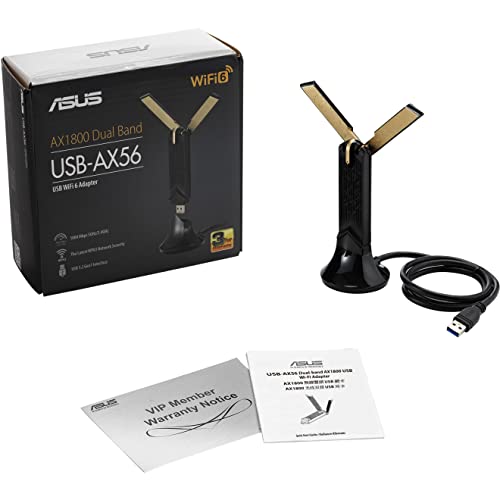
The USB-AX56 is ASUS’s dual-band WiFi 6 entry, pairing an AX1800 radio with two external antennas and a desktop cradle in the box. It reaches up to 1201 Mbps on 5 GHz and 574 Mbps on 2.4 GHz, matching the headline rates of the other WiFi 6 picks here, with OFDMA, MU-MIMO, and BSS Coloring for crowded apartment and office airwaves.
The fold-out antennas and cradle suit a fixed desk, where the adapter can sit above the PC rather than behind it, while the stick itself still plugs straight into a laptop. WPA3 security is supported alongside older WPA and WPA2 modes, and ASUS lists support for Windows 11 and 64-bit Windows 10. Buyers with a 6 GHz network should look at the tri-band pick above instead, since this model tops out at WiFi 6.
Specs
- WiFi standard: WiFi 6 (802.11ax), backwards compatible with 802.11a/b/g/n/ac
- Speed class: AX1800, up to 1201 Mbps on 5 GHz, 574 Mbps on 2.4 GHz
- Interface: USB 3.2 Gen 1
- Antennas: 2 external antennas, fold-out design, desktop cradle included
- Security: WPA3-Personal and WPA2, with legacy WEP and WPA modes
- Operating systems: Windows 11 and Windows 10 64-bit
- Dimensions: 115 x 30 x 17.5 mm; weight 40.3 g
Who it’s for / who should skip
Who it’s for: WiFi 6 households that want an antenna-and-cradle adapter from ASUS for a desk PC, in a stick small enough to move to a laptop. Who should skip: WiFi 6E router owners who want 6 GHz access, and anyone on 32-bit Windows or a non-Windows system.
NETGEAR Nighthawk A7500

The Nighthawk A7500 covers the same WiFi 6 ground as the dual-band picks above in NETGEAR’s more compact stick format, without the cradle-and-cable arrangement. It is an AX1800 adapter rated at up to 1200 Mbps on 5 GHz and 600 Mbps on 2.4 GHz. The flexible flip antenna adjusts at the port to improve reception where the computer sits.
Like its 6E sibling, the A7500 includes its driver on a USB thumb drive, so an offline PC can be set up without borrowing another connection first. It works with any WiFi 6 or WiFi 5 router or mesh system, supports WPA3, and runs on Windows 10 and 11. The trade-off is placement: it lives at the USB port, so a desktop buried in a cabinet may prefer a cradle model.
Specs
- WiFi standard: WiFi 6 (802.11ax), backwards compatible with WiFi 5 and older
- Speed class: AX1800, up to 600 Mbps on 2.4 GHz, 1200 Mbps on 5 GHz
- Interface: USB 3.0
- Antenna: flexible flip-up antenna
- Security: WPA3
- Operating systems: Windows 11 and Windows 10
- Dimensions: 3.66 x 1.24 x 0.57 inches; weight 0.99 oz
- Model: A7500-100PAS; driver thumb drive included
Who it’s for / who should skip
Who it’s for: laptop and desktop users on WiFi 6 or WiFi 5 networks who want a compact NETGEAR adapter with an offline-friendly driver install. Who should skip: buyers who need a cradle to lift the adapter away from a shielded tower case, and anyone shopping for 6 GHz support.
TP-Link Archer T3U Plus

The Archer T3U Plus is the WiFi 5 representative in this group, aimed at older computers and older routers where an AC1300 radio is a sensible match. It delivers up to 867 Mbps on 5 GHz and 400 Mbps on 2.4 GHz over a USB 3.0 connection, with MU-MIMO support for routers that offer it. That is well beyond the wireless built into most machines of its era.
Its standout feature at this level is the adjustable high-gain antenna built into the housing, which rotates to find a better angle than the fixed internal antennas in mini dongles. TP-Link also lists compatibility from Windows XP through Windows 11, plus older Mac OS versions, making it the only pick here for genuinely old systems. It gives up WiFi 6 efficiency features and any 6 GHz path, so it is a compatibility choice rather than a future-proofing one.
Specs
- WiFi standard: WiFi 5 (802.11ac), backwards compatible with 802.11a/b/g/n
- Speed class: AC1300, up to 867 Mbps on 5 GHz, 400 Mbps on 2.4 GHz
- Interface: USB 3.0
- Antenna: adjustable high-gain antenna, built into the housing
- Security: WPA and WPA2 encryption modes; WPA3 not stated
- Operating systems: Windows 11, 10, 8.1, 8, 7, and XP; Mac OS 10.9 to 10.15
- Dimensions: not stated
Who it’s for / who should skip
Who it’s for: owners of older Windows or Mac systems on WiFi 5 networks who want a simple, antenna-equipped upgrade their OS still supports. Who should skip: anyone with a WiFi 6 or 6E router, and buyers planning to keep the adapter through a router upgrade.
Frequently Asked Questions
Will a USB WiFi adapter work with any router brand?
Yes. These adapters follow standard WiFi protocols, so a TP-Link, NETGEAR, or ASUS adapter connects to any brand of router, including mesh systems. The limits come from generations rather than brands: a WiFi 6E adapter needs a 6E router to expose the 6 GHz band, and features such as WPA3 and MU-MIMO activate only when both ends support them.
Does the USB port version really matter?
It does for the faster adapters. USB 2.0 tops out below the link rates of every pick in this guide, so an AX1800 or AXE3000 adapter in a USB 2.0 port cannot reach its rated speeds. All five adapters use USB 3.0 or USB 3.2 Gen 1 connections, and they deliver full performance only in a matching port.
Can a USB adapter replace a broken internal laptop WiFi card?
In most cases, yes. Plug the adapter in, install its driver, and then disable the faulty internal card in the operating system’s device settings so the computer stops trying to use it. An external adapter can also hold a steadier signal than a damaged internal card.
Why does the 6 GHz band need Windows 11?
Microsoft never added WiFi 6E support to Windows 10, so it cannot present the 6 GHz band to any adapter. A tri-band adapter such as the Nighthawk A8000 still works on Windows 10, but only on 2.4 GHz and 5 GHz. Upgrading to Windows 11 unlocks the third band with the same hardware.
Final Verdict
For most people, the TP-Link Archer TX20U Plus is the balanced choice: full WiFi 6 rates, adjustable high-gain antennas, and a cable that frees it from the back of the tower. The NETGEAR Nighthawk A8000 is the pick when a WiFi 6E router and Windows 11 make its 6 GHz band usable, while the ASUS USB-AX56 and NETGEAR Nighthawk A7500 give WiFi 6 buyers a cradle design and a compact stick respectively. The TP-Link Archer T3U Plus closes the list as the compatibility pick for older systems. Match the adapter generation to your router first, and every model here will do its job well.
Product and ASIN Reference
| Product | ASIN |
|---|---|
| TP-Link Archer TX20U Plus | B0B5YPK9L1 |
| NETGEAR Nighthawk A8000 | B0B94R78N7 |
| ASUS USB-AX56 | B09QQWQS1N |
| NETGEAR Nighthawk A7500 | B0CT66KSW7 |
| TP-Link Archer T3U Plus | B08D72GSMS |