Key takeaways
- Compare the best Bluetooth adapters for PC, from nano Bluetooth 5.3 dongles to Linux-friendly picks for keyboards, mice, headsets and game controllers.
Many desktops and older laptops lack built-in Bluetooth, or have an aging internal module that drops connections. A USB Bluetooth adapter fixes that in minutes: plug it into a free port, pair your devices, and the PC works with wireless keyboards, mice, headsets, game controllers, and printers. The best choice depends on Bluetooth version, operating system support, and how many devices must stay connected at once.
This guide covers five USB Bluetooth adapters for PCs only, from modern nano dongles with Bluetooth 5.3 to established Bluetooth 4.0 models valued for Linux support. Every pick is a general-purpose PC adapter, not a car receiver or TV transmitter.
As an Amazon Associate, we earn from qualifying purchases.
How to Choose a USB Bluetooth Adapter for a PC
Start with the Bluetooth version. Bluetooth 5.0 and newer improve range and capacity compared with Bluetooth 4.0, and Bluetooth 5.3 adds refinements for connection stability and low-energy power use. For a mouse and keyboard on a desk, Bluetooth 4.0 can still work well. For several devices, a headset for calls, or a controller used farther from the PC, Bluetooth 5.0 or 5.3 is the safer starting point. All five picks support classic Bluetooth and Bluetooth Low Energy, which matters because many modern mice, keyboards, and sensors use low-energy connections.
Operating system support rules out more purchases than any other factor. Most current nano dongles are Windows only. The TP-Link and UGREEN picks do not list macOS support, and the UGREEN model also drops Windows 7. The ASUS, Plugable, and Kinivo adapters list Linux support, making them relevant for Linux desktops and single-board projects. Disable an existing internal Bluetooth adapter before relying on a USB dongle, because Windows normally works with one Bluetooth radio at a time.
Placement affects range. Nano adapters sit almost flush, but a metal case or rear port can block the signal; a front port or short extension cable often helps. Finally, count devices: listings state different limits, such as up to seven for the TP-Link UB500 and up to five for the UGREEN adapter.
TP-Link USB Bluetooth Adapter for PC (UB500)

The TP-Link UB500 is the most straightforward modern upgrade for a Windows PC with no Bluetooth. It uses a nano design that can stay in a USB port, and current Amazon listings describe it with Bluetooth 5.3 and, for the newest revision, Bluetooth 5.4, with EDR and Bluetooth Low Energy support. TP-Link states it can support up to seven Bluetooth devices at once, covering a keyboard, mouse, headset, controller, and printer.
Setup on Windows 8.1, 10, and 11 is described as plug and play, while Windows 7 requires a driver download. TP-Link notes the UB500 is for Windows PCs and does not support macOS, Linux, or TVs. The listing gives a data rate of 2 Megabits per second, suiting peripherals and audio rather than large file transfers.
Specs
- Model: UB500
- Bluetooth version: Bluetooth 5.3, with the current Amazon.com listing describing the newest revision as Bluetooth 5.4; EDR and BLE
- Interface: USB, nano design
- Data transfer rate: 2 Megabits per second, as listed
- Simultaneous devices: up to 7, as listed
- Operating system support: Windows 11, 10, 8.1, and 7 with driver download
- Dimensions: 0.74 by 0.58 by 0.27 inches
- Weight: 0.071 ounces, as listed
- Not supported: macOS, Linux, and TV use, as noted on the listing
Who it’s for / who should skip
Who it’s for: Windows users who want a small, current adapter for peripherals, a headset, and a controller, and who prefer to leave the dongle installed.
Who should skip: Linux and macOS users, and buyers who need an external-antenna long-range adapter for a large room.
UGREEN USB Bluetooth 5.3 Adapter for PC (35995)

The UGREEN USB Bluetooth 5.3 Adapter is a compact option focused on recent Windows systems. Its listing describes plug-and-play use for Windows 11, 10, and 8.1, and model documentation identifies it as model 35995, also referenced as CM591. It supports EDR and Bluetooth Low Energy for keyboards, mice, headphones, speakers, and printers.
UGREEN lists the adapter as connecting up to five devices simultaneously, enough for a keyboard, mouse, headset, and controller. The listed data rate is 2 Megabits per second, and the size is 1.2 by 0.63 by 0.27 inches, still small enough to leave in a laptop port. The trade-off is reach: support is limited to Windows 11, 10, and 8.1, with no Windows 7 support stated.
Specs
- Model: 35995, also referenced as CM591
- Bluetooth version: Bluetooth 5.3 with EDR and BLE
- Interface: USB
- Data transfer rate: 2 Megabits per second, as listed
- Simultaneous devices: up to 5, as listed
- Operating system support: Windows 11, 10, and 8.1
- Dimensions: 1.2 by 0.63 by 0.27 inches, as listed
- Weight: 0.634 ounces, as listed
- Windows 7 support: not stated for this model
Who it’s for / who should skip
Who it’s for: Windows 11 and 10 users who want a Bluetooth 5.3 dongle for several peripherals and do not need older operating system support.
Who should skip: Windows 7 and Linux users, and buyers who need more than five simultaneous devices.
ASUS USB-BT500 Bluetooth 5.0 USB Adapter
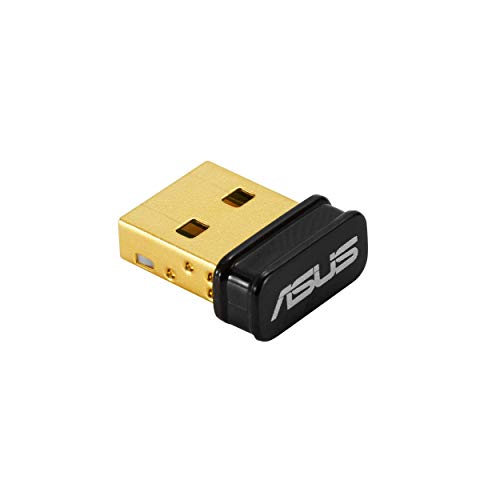
The ASUS USB-BT500 is a Bluetooth 5.0 adapter with unusually clear official specifications. ASUS lists data rates of up to 3 Megabits per second for classic Bluetooth and 2 Megabits per second for Bluetooth Low Energy, with distance of up to 10 meters for classic connections and up to 40 meters for low-energy connections in open space. Those open-space figures help explain why low-energy mice and keyboards can stay connected farther away than an older headset.
ASUS lists USB 2.0 Type A and operating system support for Windows 8.1, Windows 10, and Linux. The adapter is backward compatible with Bluetooth 2.1, 3.x, and 4.x devices. At 1.9 grams, it is one of the smallest picks here. Its ASUS specification table does not list Windows 11 or Windows 7, so buyers on those systems should confirm support on the current ASUS page before ordering.
Specs
- Model: USB-BT500
- Bluetooth version: Bluetooth 5.0 plus EDR and Bluetooth Smart (Low Energy)
- Interface: USB 2.0 Type A
- Data rate: up to 3 Megabits per second classic; 2 Megabits per second BLE, as listed by ASUS
- Distance: up to 10 meters classic; up to 40 meters BLE in open space, as listed by ASUS
- Operating system support: Windows 8.1 and 10, and Linux, as listed by ASUS
- Backward compatibility: Bluetooth 2.1, 3.x, and 4.x
- Dimensions: 7.1 by 14.9 by 17.4 millimeters, as listed by ASUS
- Weight: 1.9 grams, as listed by ASUS
Who it’s for / who should skip
Who it’s for: Windows 10 and Linux users who want a very small Bluetooth 5.0 adapter with published classic and low-energy specifications.
Who should skip: Buyers who specifically want Bluetooth 5.3, or whose system version is not confirmed on the ASUS support list.
Plugable USB Bluetooth 4.0 Low Energy Micro Adapter (USB-BT4LE)

The Plugable USB-BT4LE uses Bluetooth 4.0, and its value is compatibility and support rather than the newest standard. Plugable describes it as a dual-mode adapter for Bluetooth Classic and Low Energy, working with Windows 7, 8.x, 10, and 11. It uses the Broadcom BCM20702 chipset, a detail that matters for Linux and Raspberry Pi users who check chipset support before buying.
As a certified Bluetooth Class 2 device, it is listed for connections up to 32 feet, or 10 meters, which fits a desk or small room. The listing gives a size of 0.75 by 0.25 by 0.5 inches and weight of 0.1 ounces. Plugable notes that recent Mac computers will not work with this adapter, since they are designed for their built-in Bluetooth.
Specs
- Model: USB-BT4LE
- Bluetooth version: Bluetooth 4.0, dual-mode Classic and Low Energy
- Chipset: Broadcom BCM20702, as shown in support material
- Device class: Bluetooth Class 2
- Range: up to 32 feet, or 10 meters, as listed
- Interface: USB 2.0 Type A
- Data transfer rate: 3 Megabits per second, as listed
- Operating system support: Windows 11, 10, 8.x, and 7, as listed; Linux and Raspberry Pi covered in support material
- Dimensions: 0.75 by 0.25 by 0.5 inches
- Weight: 0.1 ounces
Who it’s for / who should skip
Who it’s for: Windows and Linux users, including Raspberry Pi projects, who want a known-chipset Bluetooth 4.0 adapter at desk range.
Who should skip: Buyers who want Bluetooth 5 range improvements, and Mac users.
Kinivo USB Bluetooth Adapter for PC (BTD400)
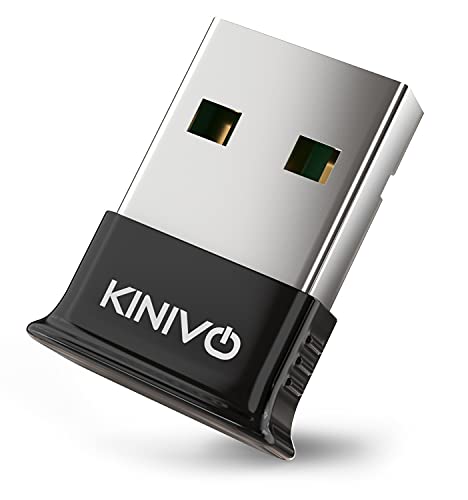
The Kinivo BTD400, also written BTD-400, is a Bluetooth 4.0 adapter with broad legacy support. Its Amazon listing states that it supports common peripherals such as keyboards, mice, headsets, and stereo headphones, and is backward compatible with Bluetooth 2.1, 2.0, and 3.0 devices, making it useful for older hardware in a home office.
Kinivo material lists compatibility with Windows 11, 10, 8.1, 8, 7, Vista, and XP, with driver notes by version, and the Amazon title also lists Linux and Raspberry Pi. The listing states it is not compatible with Mac OS. Its exact range figure is not stated in the listing data checked, so buyers needing a stated long range should choose a Bluetooth 5 pick.
Specs
- Model: BTD400, also written as BTD-400
- Bluetooth version: Bluetooth 4.0 with Low Energy
- Device class: Class 2, as listed
- Interface: USB
- Backward compatibility: Bluetooth 2.1, 2.0, and 3.0, as listed
- Operating system support: Windows 11, 10, 8.1, 8, 7, Vista, and XP, with driver notes; Linux and Raspberry Pi listed in the Amazon title
- Range: not stated in the Amazon listing data checked
- Mac support: not compatible with Mac OS, as listed
- Included items: adapter, installation disc for older Windows versions, and user manual, as listed
Who it’s for / who should skip
Who it’s for: Users with older Windows systems or mixed Windows and Linux setups who need Bluetooth 4.0 for standard peripherals.
Who should skip: Buyers who want Bluetooth 5 or 5.3, a stated long-range figure, or macOS support.
Frequently Asked Questions
Will a USB Bluetooth adapter work if a PC already has Bluetooth built in?
It can, but the existing radio normally needs to be disabled first. Windows works with one Bluetooth adapter at a time, and TP-Link and Plugable both describe disabling other adapters to avoid conflicts. After disabling the internal device, install the USB adapter and pair devices again.
Is Bluetooth 5.3 worth choosing over Bluetooth 4.0 for a desktop?
For a single mouse or keyboard next to the PC, Bluetooth 4.0 is usually enough. Bluetooth 5.3 is more valuable when several devices stay connected or a low-energy device is used farther away. The Bluetooth 4.0 picks still suit Linux and older Windows priorities.
Can these adapters connect a game controller and a headset at the same time?
Yes, within the simultaneous device limits stated for each adapter. A controller and headset are a common pairing for the TP-Link, UGREEN, and ASUS picks. These are general-purpose adapters, not dedicated gaming audio transmitters, so players who need a specific low-latency audio product should look at that separate category.
Why does a nano adapter lose connection on a desktop PC?
Placement is the most common reason. A dongle in a rear port can be shielded by a metal case or desk. Moving it to a front port or using a short USB extension cable to place it in clear space is a standard fix, and Plugable discusses USB port choice in its support material.
Final Verdict
For most current Windows PCs, the TP-Link UB500 is the simplest recommendation: it is small, supports up to seven devices, and covers Windows 7 through 11 with a driver note for Windows 7. The UGREEN Bluetooth 5.3 adapter is a close alternative for Windows 8.1 and newer, with a clear five-device limit. Choose the ASUS USB-BT500 for a well-documented Bluetooth 5.0 option with Linux support.
The Bluetooth 4.0 picks serve a different purpose. The Plugable USB-BT4LE suits users who care about a known Broadcom chipset, while the Kinivo BTD400 covers the widest range of older Windows versions here. Match the adapter to the operating system first, then to device count and distance.
Product and ASIN Reference
| Product | ASIN |
|---|---|
| TP-Link USB Bluetooth Adapter for PC (UB500) | B09DMP6T22 |
| UGREEN USB Bluetooth 5.3 Adapter for PC (35995) | B0CZD94YFR |
| ASUS USB-BT500 Bluetooth 5.0 USB Adapter | B08DFBNG7F |
| Plugable USB Bluetooth 4.0 Low Energy Micro Adapter (USB-BT4LE) | B009ZIILLI |
| Kinivo USB Bluetooth Adapter for PC (BTD400) | B007Q45EF4 |