Key takeaways
- Compare the best USB and USB-C Ethernet adapters for laptops and tablets, from simple Gigabit dongles to faster 2.5G models for modern networks.
Thin laptops keep dropping the Ethernet port, and plenty of desktops, tablets, and handhelds never had one. A USB or USB-C Ethernet adapter fixes that in seconds: plug it into a spare port, connect a network cable, and you get a wired connection that holds steady through video calls, large downloads, and online games where Wi-Fi tends to stutter or drop.
This guide compares five adapters that cover the main buying angles. Two are straightforward Gigabit models for everyday wired access, two step up to 2.5 Gigabit speeds for faster local networks and NAS transfers, and one adds a dual connector so a single adapter works on both USB-C and older USB-A machines. Every pick is a simple single-port adapter, not a dock or a hub, so its only job is networking.
As an Amazon Associate, we earn from qualifying purchases.
How to choose an Ethernet adapter
Start with the connector. Most current laptops use USB-C, while older machines and many desktops still offer USB-A ports. Adapters are sold in both forms, and a few include an attached USB-A converter so one unit covers both. Whichever form you pick, the host port needs to run at USB 3.0 speeds or better for anything above basic Fast Ethernet throughput; a USB 2.0 port will bottleneck a Gigabit or 2.5 Gigabit adapter.
Next, match the link speed to your network. A Gigabit adapter negotiates at 10, 100, or 1000 Mbps and is the right match for most home routers and internet plans. A 2.5 Gigabit adapter adds a 2500 Mbps link rate and makes sense if your router, switch, or NAS already has multi-gig ports and you move large files locally. On a plain Gigabit network, a 2.5G adapter simply runs at Gigabit speed, so it is a safe future-proofing choice rather than wasted money.
Chipset and driver support matter more than the brand on the shell. Realtek RTL8153 and RTL8156 family chips dominate this category and are supported by built-in drivers in current Windows, macOS, Chrome OS, and Linux builds, which is what makes these adapters plug and play. Older operating systems sometimes need a driver download from the manufacturer, so check the listing notes if your machine runs an older OS. Finally, look at the small things: an aluminum shell sheds heat during long transfers, a braided or foldable cable survives a laptop bag better, and link LEDs confirm the connection is live at a glance.
Anker PowerExpand USB-C to Gigabit Ethernet Adapter (A8313)
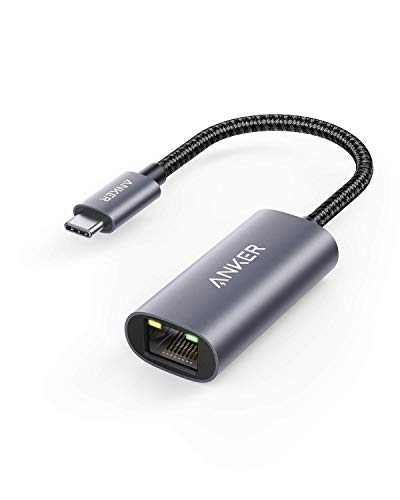
Anker’s PowerExpand adapter is the simple, well-finished option for anyone who just needs a reliable Gigabit port on a USB-C laptop. The unibody aluminum shell feels a step above the plastic dongles bundled with some laptops, and the short braided nylon cable resists the fraying that usually kills adapters carried loose in a bag.
The adapter links at 10, 100, and 1000 Mbps and is built around plug-and-play use on Windows, macOS, and Chrome OS, with a wide published compatibility list covering MacBook Pro and Air models, the Dell XPS line, Surface devices, iPad Pro, and many Chromebooks. Anker notes that an ASIX driver may be needed for a stable connection on some systems, and the listing is explicit that this model is not compatible with the Nintendo Switch, which is worth knowing before buying it for a console dock.
Specs
- Host connector: USB-C
- Ethernet speeds: 10/100/1000 Mbps (Gigabit)
- Body material: Aluminum
- Cable: Braided nylon, 0.5 ft
- Dimensions: 2.05 x 0.94 x 0.55 in
- Chipset: ASIX-based (driver download noted for some systems)
- Operating systems: Windows, macOS, Chrome OS
- Warranty: 18-month warranty
Who it’s for / who should skip
– For: USB-C laptop and tablet owners who want a compact, durable Gigabit adapter from an established brand for calls, streaming, and everyday downloads.
– Skip: Switch owners, anyone with a 2.5 Gigabit network who wants the extra link speed, and shoppers who need a USB-A connector.
TP-Link UE300C USB-C to Gigabit Ethernet Adapter

The UE300C is TP-Link’s foldable take on the USB-C Gigabit adapter, and its party trick is the retractable, folding cable design. The connector tucks into the body, so there is no loose cable to snag or fray in a pocket or laptop sleeve, and the whole unit weighs about as much as a couple of coins.
Inside, TP-Link lists the Realtek RTL8153 chipset on its specification page, paired with a single 10/100/1000 Mbps RJ45 port. Plug and play is supported on Windows 10, macOS 10.9 and later, Chrome OS, and Linux, while Windows 7 and very old Mac OS X versions need a driver from TP-Link’s site. A status LED confirms the link is live.
Specs
- Host connector: USB-C (USB 3.0)
- Ethernet speeds: 10/100/1000 Mbps (Gigabit)
- Chipset: Realtek RTL8153
- Dimensions: 2.8 x 1.0 x 0.6 in (71 x 26 x 16.2 mm)
- Weight: 20 g (0.71 oz)
- Design: Foldable with retractable cable, status LED
- Operating systems: Windows, macOS, Chrome OS, Linux (driver needed for Windows 7)
- In the box: Adapter, quick installation guide
Who it’s for / who should skip
– For: Frequent travelers and commuters who want the smallest, lightest Gigabit adapter and like the fold-flat cable for bag storage.
– Skip: Buyers who want multi-gig speeds, a metal shell, or a longer fixed cable for a permanent desk setup.
UGREEN USB-C to Ethernet Adapter 2.5G (25052)

UGREEN’s 2.5G adapter is the step up for homes and offices that have already moved past Gigabit on the local network. It negotiates at 2500, 1000, 100, and 10 Mbps, so it runs at full speed on a 2.5 Gigabit router or switch port and drops back gracefully on older Gigabit gear.
The adapter uses the Realtek RTL8156BG controller behind a USB 3.0 Type-C connection and works through Thunderbolt 3 and Thunderbolt 4 ports as well. UGREEN lists compatibility across Windows, macOS, Linux, and iOS devices, which makes it a practical pick for a MacBook, an iPad, or a phone with a USB-C port when a hotel or office offers only a wired drop. Its aluminum shell helps shed heat during sustained transfers to a NAS, where a 2.5G link stays busy far longer than during a quick download.
Specs
- Host connector: USB-C (USB 3.0), Thunderbolt 3/4 compatible
- Ethernet speeds: 10/100/1000/2500 Mbps (2.5 Gigabit)
- Chipset: Realtek RTL8156BG
- Model number: 25052
- Body material: Aluminum
- Operating systems: Windows, macOS, Linux, iOS
- Cable length: not stated
- Weight: not stated
Who it’s for / who should skip
– For: Owners of 2.5 Gigabit routers, switches, or NAS units who want faster local transfers, plus USB-C tablet and phone users who occasionally need a wired link.
– Skip: Anyone on a plain Gigabit network who will never use the headroom, and USB-A-only households without a free USB-C port.
Plugable 2.5G USB-C and USB to Ethernet Adapter (USBC-E2500)

Plugable solves the mixed-household problem with a dual-connector design: the adapter ends in USB-C, and an attached USB-C to USB-A converter stays captive on the cable, so the same unit moves between a modern laptop and an older desktop without a separate dongle to lose. It is a thoughtful design for IT kits and shared desks.
Performance matches the other 2.5G picks, with link rates of 100, 1000, and 2500 Mbps over the Realtek RTL8156 chipset. Plugable also publishes the finer networking details that many brands skip, including 9K jumbo frame support, Auto MDI-X crossover detection, and IEEE 802.1Q VLAN support depending on the operating system. Power and activity LEDs sit on the body, most modern operating systems work plug and play, and Plugable notes a driver download may be needed on older systems or kernels. Full 2.5G speed does require a USB 3.0 host port and a 2.5G-capable router or switch at the other end.
Specs
- Host connector: USB-C with attached USB-A adapter (USB 3.0 required for full speed)
- Ethernet speeds: 100/1000/2500 Mbps (2.5 Gigabit)
- Chipset: Realtek RTL8156
- Extras: 9K jumbo frames, Auto MDI-X, IEEE 802.1Q VLAN support (OS dependent)
- Indicators: Power and activity LEDs
- Operating systems: Windows, macOS, Chrome OS, Linux (driver may be needed on older versions)
- In the box: Adapter with attached USB-A converter, quick install guide
- Dimensions: not stated
Who it’s for / who should skip
– For: People who switch between USB-C and USB-A computers, home lab users who care about jumbo frames and VLAN support, and anyone equipping a shared or IT drawer.
– Skip: Buyers who want charging pass-through in the same adapter, or minimalists who prefer the smallest possible single-connector dongle.
Anker PowerExpand USB-C to 2.5 Gbps Ethernet Adapter (A8316)

Anker’s second adapter in this guide is the faster sibling of the A8313, built for buyers who like the PowerExpand formula but want multi-gig headroom. It links at 10, 100, 1000, and 2500 Mbps, so it drops straight into a Gigabit network today and keeps up if the router or switch gets upgraded later.
The portable aluminum body follows the same design language as the Gigabit model, and Anker’s manual lists broad system support spanning Windows 10 down to XP, Mac OS X 10.2 and above, and Linux, which makes it a flexible spare for older machines as well as current ones. As with the other 2.5G adapters here, real throughput depends on the whole chain: the host needs a USB 3.0-class port, and the network side needs a 2.5G port and suitable cabling.
Specs
- Host connector: USB-C
- Ethernet speeds: 10/100/1000/2500 Mbps (2.5 Gigabit)
- Model number: A8316
- Body material: Aluminum
- Operating systems: Windows 10/8/7/Vista/XP, Mac OS X 10.2 and above, Linux
- Warranty: 18-month limited warranty
- Chipset: not stated
- Cable length: not stated
Who it’s for / who should skip
– For: Anker loyalists planning a move to a 2.5 Gigabit network, and anyone who wants one adapter that also covers older Windows and Mac machines.
– Skip: USB-A-only setups, and buyers who want published extras such as jumbo frame or VLAN support spelled out in the specs.
Frequently asked questions
Will a USB Ethernet adapter work on a laptop with only USB-C ports?
Yes. Any USB-C adapter in this guide plugs straight in, and Thunderbolt 3, 4, and 5 ports accept them as well because the adapters run over standard USB data. Just confirm the port supports USB data transfer, since a rare charging-only port cannot run an adapter.
Do I need a 2.5 Gigabit adapter, or is Gigabit enough?
Gigabit is enough for internet plans at or below gigabit speed and for typical home networks. Choose 2.5 Gigabit if your router, switch, or NAS already offers multi-gig ports and you move large files locally, or if you want the adapter to survive your next network upgrade.
Are drivers required to use these adapters?
On current versions of Windows, macOS, Chrome OS, and Linux, the Realtek and ASIX chipsets used here are handled by built-in drivers, so the adapters work as soon as they are plugged in. Older operating systems may need a driver from the manufacturer’s support page, which the listings flag where it applies.
Can I use one of these adapters with a tablet or phone?
In many cases, yes. USB-C iPads and many Android devices recognize standard USB Ethernet adapters, and the UGREEN model in this guide lists iOS support explicitly. Support varies by device maker, so check your device’s documentation, and note that Anker states its Gigabit A8313 is not compatible with the Nintendo Switch.
Final verdict
For most people, the decision is about speed class first and connector second. If your network is Gigabit and likely to stay that way, the Anker PowerExpand A8313 and the foldable TP-Link UE300C are both dependable, genuinely portable picks, with the Anker ahead on finish and the TP-Link ahead on pocket-friendly design. If your router, switch, or NAS already runs at 2.5 Gigabit, step up to the UGREEN 25052 for a clean single-connector design, the Plugable USBC-E2500 if one adapter must serve both USB-C and USB-A machines, or the Anker A8316 for the same speed with wider legacy OS support. Any of the five gives a portless device a steadier connection than Wi-Fi, and all install the same way: plug in, connect the cable, and get back to work.
Product and ASIN Reference
| Product | ASIN |
|---|---|
| Anker PowerExpand USB-C to Gigabit Ethernet Adapter (A8313) | B08CK9X9Z8 |
| TP-Link UE300C USB-C to Gigabit Ethernet Adapter | B08HQBC678 |
| UGREEN USB-C to Ethernet Adapter 2.5G (25052) | B0CD1FDKT1 |
| Plugable 2.5G USB-C and USB to Ethernet Adapter (USBC-E2500) | B084L4JL9K |
| Anker PowerExpand USB-C to 2.5 Gbps Ethernet Adapter (A8316) | B097N5WJY9 |