Key takeaways
- Compare wireless mice for office work, from the MX Master 3S to the M240 Silent, covering quiet clicks, battery life, comfort and multi-device pairing.
A wireless mouse is one of the simplest upgrades for a desk, yet the range is wide. Models differ in shape, connection type, scroll wheel design, battery approach and noise level, and those details decide whether a mouse feels right through a full working day. This guide focuses on everyday wireless mice built for work and office use, not gaming models.
The five picks below cover the main office needs: a premium productivity mouse, a full-size comfort model, a multi-device mouse, a quiet contoured mouse for shared spaces, and a compact Bluetooth model that needs no receiver. Each entry lists verified specifications and who the mouse suits.
As an Amazon Associate, we earn from qualifying purchases.
How to Choose a Wireless Mouse for Work
Start with the connection. Bluetooth mice pair directly with most modern laptops and tablets and leave every USB port free. Mice with a USB receiver, such as a Logi Bolt or Unifying receiver, connect in seconds and work with older machines that lack Bluetooth. Several office mice offer both options.
Shape matters more than sensor numbers. A sculpted right-handed shell supports the palm during long sessions, while a low, symmetrical body is easier to pack and works for either hand. Larger mice such as the M650 L and MX Master 3S fill bigger hands, while compact models such as the M240 suit smaller hands and travel bags. Many comfort mice are right-handed only, so left-handed users should check the shape carefully.
Next, consider the scroll wheel and buttons. A dual-mode wheel that switches between precise line scrolling and a free-spinning mode makes long documents far easier to move through, and side buttons save time in browsers. Battery approach also matters: AA-powered mice can last well over a year between changes, while rechargeable models need a cable session every month or two. In shared or quiet spaces, look for quiet click switches, which keep the familiar click feel with far less noise.
Logitech MX Master 3S Standard Edition

The MX Master 3S is the flagship productivity pick in this roundup. Its sculpted right-handed body is the largest here, with a pronounced thumb rest, a main MagSpeed scroll wheel and a separate thumb wheel for horizontal movement. The Darkfield sensor is rated at 8,000 DPI and tracks on most surfaces, including glass of a minimum thickness stated by the maker.
Connectivity covers both office setups: Bluetooth Low Energy for direct pairing and a Logi Bolt USB receiver in the box. The mouse pairs with up to three devices, with support listed for Windows, macOS, Linux, Chrome OS, iPadOS and Android. Power comes from a rechargeable battery charged over USB-C, rated at up to 70 days per charge.
Seven buttons, including back and forward controls, a gesture button and a wheel mode-shift button, can be customised in the maker software. Quiet click switches keep noise low in shared rooms. This is the most capable mouse here for heavy document and spreadsheet work, provided the larger shape fits the hand.
Specs
- Sensor: Darkfield high precision, up to 8,000 DPI
- Connectivity: Bluetooth Low Energy and Logi Bolt USB receiver
- Buttons: 7, plus thumb wheel and gesture button
- Battery: Rechargeable Li-Po, up to 70 days per charge, USB-C charging
- Dimensions: 124.9 x 84.3 x 51 mm
- Weight: 141 g
- Hand orientation: Right-handed
- Model number: 910-006557
Who it’s for / who should skip
- Who it’s for: Office workers who scroll long documents daily, use several computers, or work on glass surfaces.
- Who should skip: Small-handed or left-handed users, and buyers who prefer replaceable batteries.
Logitech Signature M650 L
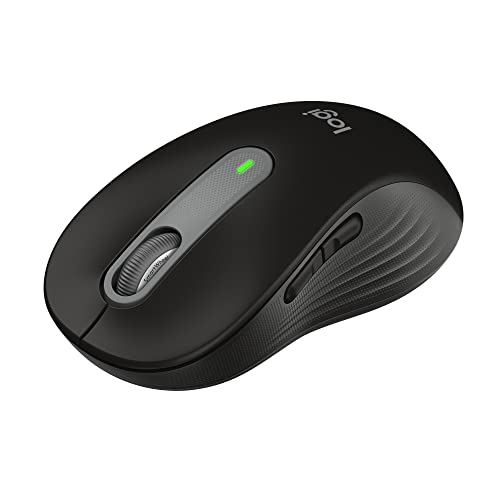
The Signature M650 L takes the standard Signature M650 design and stretches it into a full-size shell for larger hands. The contoured right-handed body has a soft thumb area and rubber side grip, and the SmartWheel changes behaviour with speed: a slow turn moves line by line, while a faster flick releases into rapid scrolling. It is a straightforward comfort mouse rather than a feature showcase.
Connection options are Bluetooth Low Energy or the included Logi Bolt USB receiver. The sensor is rated from 400 to 4,000 DPI, adjustable in the maker software, which is ample for office displays. Five buttons cover left and right click, back and forward side buttons, and the middle click, and the side buttons can be reassigned in the software.
Battery life is a strong point. A single AA battery is rated at up to 24 months through the Logi Bolt receiver and up to 20 months over Bluetooth, so battery changes are rare. SilentTouch switches keep clicks muted in shared spaces. Smaller-handed buyers should choose the standard M650 instead; this listing is the large version.
Specs
- Sensor: Logitech Advanced Optical Tracking, 400 to 4,000 DPI
- Connectivity: Bluetooth Low Energy and Logi Bolt USB receiver
- Buttons: 5
- Battery: 1 AA, up to 24 months via receiver and up to 20 months via Bluetooth
- Dimensions: 118.7 x 66.2 x 42 mm
- Weight: 115.4 g
- Hand orientation: Right-handed
- Model number: 910-006265
Who it’s for / who should skip
- Who it’s for: Users with larger hands wanting a comfortable, quiet, full-size mouse with very long battery life.
- Who should skip: Small-handed or left-handed users, and anyone wanting a rechargeable battery.
Logitech M720 Triathlon
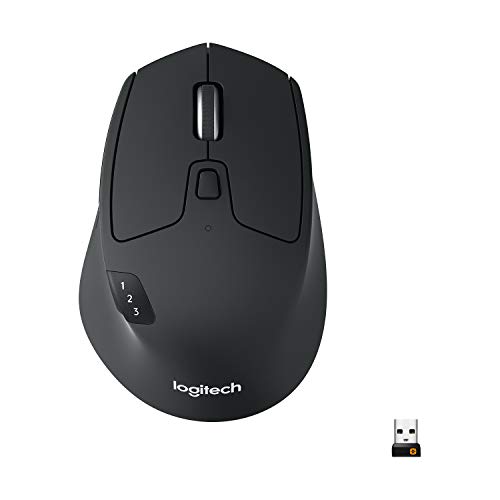
The M720 Triathlon is built around one idea: a single mouse that serves up to three computers. An Easy-Switch button on top moves the pointer between three paired devices, connected over Bluetooth or through the included Unifying USB receiver, so a desktop, a laptop and a tablet are easy to cover. That switching is the main reason to choose this model for setups split between work and personal machines.
The full-size right-handed shell is contoured with a rubberised grip, and the dual-mode scroll wheel tilts for side scrolling and switches between notched scrolling and a hyper-fast free spin. Eight buttons in total include back and forward side buttons and a thumb button that can be assigned in the maker software.
The optical sensor is rated at 1,000 DPI, modest on paper but well matched to office displays. Power comes from a single AA battery rated at up to 24 months, and the receiver stores inside the mouse. It lacks the quiet switches of newer models, so clicks are of the standard, audible kind.
Specs
- Sensor: Optical, 1,000 DPI nominal
- Connectivity: Bluetooth and Logitech Unifying USB receiver
- Buttons: 8 total, including side buttons and thumb button
- Battery: 1 AA, up to 24 months
- Dimensions: 115 x 74 x 45 mm
- Weight: 135 g with battery
- Hand orientation: Right-handed
- Model number: 910-006036
Who it’s for / who should skip
- Who it’s for: Anyone who regularly switches between two or three computers and wants fast scrolling plus long AA battery life.
- Who should skip: Buyers who want silent clicks, USB-C charging, or a compact travel-size body.
Logitech M330 Silent Plus

The M330 Silent Plus is the quiet, simple option for a single computer. Its contoured right-handed shape guides the hand into a natural position, with a textured rubber grip on the side, and the SilentTouch switches keep the normal click feel while greatly reducing click noise. In a shared office or a home workspace used late in the evening, that quietness is the whole point.
There is no Bluetooth here. The mouse connects over a 2.4 GHz link to a small USB nano receiver that works straight away, with a stated range of up to 10 metres. That suits desktops and older laptops where Bluetooth is unavailable or restricted. The receiver is USB-A, so a USB-C-only laptop would need an adapter.
The optical sensor is rated at 1,000 DPI and tracks on most desk surfaces. Three buttons cover the essentials: left click, right click and a clickable scroll wheel. A single AA battery is rated at up to 24 months with auto-sleep between uses. With no side buttons or software customisation, this is a mouse for straightforward pointing and scrolling rather than shortcut-heavy work.
Specs
- Sensor: Optical, 1,000 DPI
- Connectivity: 2.4 GHz wireless with USB nano receiver
- Buttons: 3
- Battery: 1 AA, up to 24 months, auto-sleep
- Dimensions: 105.4 x 67.9 x 38.4 mm
- Weight: 91 g
- Hand orientation: Right-handed
- Model number: 910-004905
Who it’s for / who should skip
- Who it’s for: Workers in quiet or shared spaces who want a comfortable, silent, plug-and-play mouse for one computer.
- Who should skip: Anyone who needs Bluetooth, side buttons, multi-device pairing, or a left-handed shape.
Logitech M240 Silent
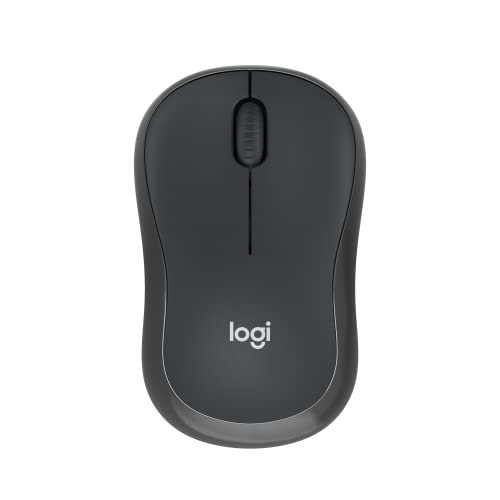
The M240 Silent is the compact, receiver-free member of this list. It pairs over Bluetooth only, so there is no dongle to lose and no USB port taken up, which suits modern laptops and tablets with few ports. Pairing is a one-time step through Bluetooth settings, after which the mouse reconnects automatically. A desktop without Bluetooth cannot use it without an adapter, and no receiver is included.
The symmetrical body is comfortable for left- or right-handed use and small enough to drop into a laptop sleeve. At 73.8 g it is the lightest mouse here. SilentTouch switches keep clicks very quiet for shared rooms and video calls. The scroll wheel is a standard notched wheel with a middle click, and there are no side buttons.
The optical sensor is rated at 1,000 DPI nominal, suitable for laptop screens and standard office monitors. Battery life is rated at up to 18 months from a single AA battery, helped by auto-sleep, and the stated range is up to 10 metres. For a hot desk or travel bag, this is the easiest pick to deploy and forget about.
Specs
- Sensor: Optical, 1,000 DPI nominal
- Connectivity: Bluetooth, no receiver included
- Buttons: 3
- Battery: 1 AA, up to 18 months, auto-sleep
- Dimensions: 99 x 60 x 39 mm
- Weight: 73.8 g
- Hand orientation: Ambidextrous
- Model number: 910-007113
Who it’s for / who should skip
- Who it’s for: Laptop and tablet users who want a small, quiet, ambidextrous mouse with no dongle and long battery life.
- Who should skip: Desktop users without Bluetooth, and anyone who wants side buttons or a full-size palm-filling shape.
Frequently Asked Questions
Is Bluetooth or a USB receiver better for an office mouse?
Bluetooth keeps ports free and suits laptops and tablets, while a USB receiver connects instantly and works with older computers. Mice that offer both, such as the MX Master 3S, M650 L and M720, cover both cases.
How long do wireless mouse batteries usually last?
AA-powered office mice in this guide are rated from 18 to 24 months per battery, helped by auto-sleep modes. The rechargeable MX Master 3S is rated at up to 70 days per charge. Real life varies with hours of use and connection type, so treat maker figures as best-case ratings.
Are quiet mice worse to click than standard mice?
Quiet switch designs aim to keep the same tactile click feel while reducing the sound produced. The M330 Silent Plus, M650 L, M240 Silent and MX Master 3S all use quiet click technology, so they suit shared offices and calls. The difference is in noise, not in how the button responds.
Which of these mice works for left-handed users?
Only the M240 Silent has a symmetrical ambidextrous body in this list. The MX Master 3S, M650 L, M720 and M330 are all right-handed shapes. Left-handed buyers wanting a larger mouse need dedicated left-hand models, outside this roundup.
Final Verdict
The MX Master 3S is the most complete productivity mouse here, with the best scrolling, tracking on glass and a rechargeable battery. The M650 L is the comfortable all-rounder for larger hands, with quiet clicks and battery life measured in years rather than weeks.
The M720 Triathlon is the pick when one mouse must serve several computers, while the M330 Silent Plus covers the classic single-desk setup with a receiver, a contoured grip and very quiet clicks. The M240 Silent rounds out the list as the compact Bluetooth option for laptops, hot desks and travel. Match shape to hand size first, then connection type, and any of these five will handle everyday office work reliably.
Product and ASIN Reference
| Product | ASIN |
|---|---|
| Logitech MX Master 3S Standard Edition Wireless Mouse – Graphite | B09HM94VDS |
| Logitech Signature M650 L Full Size Wireless Mouse – Black | B09KX9P829 |
| Logitech M720 Triathlon Wireless Mouse – Black | B087Z6LSHW |
| Logitech M330 Silent Plus Wireless Mouse – Black | B01JPOLKDW |
| Logitech M240 Silent Bluetooth Mouse – Graphite | B0BXNR9DB6 |