Our Short List of 3
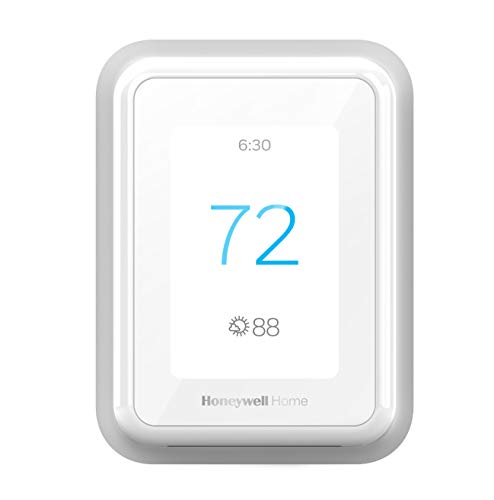
- ASIN: B07N83WK9T
- Model: RCHT9510WFW2001
- Connectivity: WiFi, works with Alexa and Google Assistant
- Display: touchscreen

- ASIN: B09XXS48P8
- Model: EB-STATE6-01
- Connectivity: dual-band WiFi, Bluetooth 5.0
- Display: 4-inch full-color LCD touchscreen, 540 x 540

- ASIN: B0BKH83KF9
- Model: ST76 (1F96U-42WF family)
- Connectivity: WiFi (2.4 GHz), Bluetooth for setup
- Display: 4.3-inch color touchscreen
All 3 Picks at a Glance
| Product | Specs | Action |
|---|---|---|
| 1. Honeywell Home T9 Smart Thermostat — Best Overall Lock |
| Check price on Amazon |
| 2. ecobee Smart Thermostat Premium — Best Per-Feature Access Control |
| Check price on Amazon |
| 3. Emerson Sensi Touch 2 (ST76) — Best App-Managed Keypad Lockout |
| Check price on Amazon |
Key takeaways
- Compare the best lockable WiFi thermostats with real PIN, access code and keypad lockout features from Honeywell Home, ecobee and Emerson Sensi.
As an Amazon Associate we earn from qualifying purchases.
A lockable WiFi thermostat solves a very specific problem: the wrong hands on the wall control. In a rental property, a short-term let, a small office, a classroom, or a home with enthusiastic children, an unlocked thermostat invites constant setpoint battles, disabled schedules, and heating or cooling bills that nobody remembers authorizing. The traditional fix was a clear plastic lock box screwed over the thermostat — ugly, awkward, and defeated by anyone with a screwdriver and patience. Modern smart thermostats build the lock into the software instead, and that is what this guide is about.
Not every WiFi thermostat is genuinely lockable, and the word “lock” means different things on different models. On the strong implementations, a four-digit PIN or access code stands between a passerby and every setting that matters, with a choice between a full lock, where nothing can be changed at the wall, and a partial lock, where the temperature can be nudged within limits but schedules, system mode, and configuration stay protected. Weaker implementations only lock the settings menu, or rely on setpoint limits alone. Every pick below has a documented, manufacturer-described lock feature of the strong kind: a PIN, an access code, or a total and partial keypad lockout. Specifications are taken from manufacturer documentation and product listings, and we explain exactly how each lock works so you can match it to a rental, a business, or a family home.
Quick Picks
- Best overall lockable WiFi thermostat: Honeywell Home T9 — touchscreen WiFi thermostat with partial and full screen lock modes protected by a PIN the thermostat itself generates.
- Best lock with per-feature control: ecobee Smart Thermostat Premium — Access Control security code that can protect everything or only the features you choose, such as schedules or system settings.
- Best app-managed lockout: Emerson Sensi Touch 2 — total and partial keypad lockout set from the Sensi app, so the wall unit can be locked down while the owner keeps full control from a phone.
Disclosure
Affiliate Disclosure: This article contains affiliate links. If you buy through a link on this page, we may earn a commission at no additional cost to you. Lock features and specifications are taken from manufacturer documentation and retailer listings; confirm current features and availability on the product page before ordering.
What “Lockable” Should Actually Mean
Full lock versus partial lock
A full lock freezes the wall unit: nobody can change the temperature, the mode, or any setting without the code. That is the right choice for a commercial space, a rental between tenants’ visits, or anywhere the thermostat is essentially set-and-forget for everyone except the owner. A partial lock is the more diplomatic option. Typically it allows a limited temperature adjustment at the wall — enough for a guest or employee to feel comfortable — while schedules, system configuration, fan settings, and WiFi setup remain locked away. For most homes and rentals, partial lock is the sweet spot: it ends the tampering without generating complaints or support calls.
Where the code lives matters
Locks are managed in three different places, and each suits a different owner. Some thermostats generate and store the PIN on the device itself, and you unlock at the screen. Some let you enable or change the code from the manufacturer’s web portal or app, which is far better for a landlord managing a property from another city. And some use a keypad lockout switched from the app, where the wall screen simply goes inert and all control moves to the phone. Before buying, decide who will hold the code, how often it will change — between tenants, for example — and whether you need to change it remotely.
A lock is not the same as a setpoint limit
Setpoint limits cap how high or low anyone can set the temperature. They are useful and all three picks below offer some form of range control, but a limit alone does not stop someone from switching the system from heat to cool, killing the schedule, changing the fan to run constantly, or factory-resetting your configuration. If your problem is energy bills, limits help. If your problem is tampering, you want a true PIN or lockout. The strongest setups combine both.
Do not forget the app side
A wall lock only guards the wall. Anyone with the thermostat’s app account on their phone has full control regardless of the PIN, so treat the account password as part of the lock: use a strong, unique password, keep the account in the owner’s name, and remove old users — former tenants, former employees, an ex’s phone — from the home in the app. For rentals, creating the account under a property-management email you control makes turnover much simpler.
The Picks
1. Honeywell Home T9 Smart Thermostat — Best Overall Lock
- ASIN: B07N83WK9T
- Model: RCHT9510WFW2001
- Connectivity: WiFi, works with Alexa and Google Assistant
- Display: touchscreen
The Honeywell Home T9 earns the top spot because its lock is exactly what most people picture when they search for a lockable thermostat. Honeywell’s own documentation for its touchscreen models describes two screen lock settings: a partial lock, under which only the temperature can be changed, and a full lock, under which no access is allowed without a PIN number. When you apply a lock setting, the thermostat displays a PIN on screen; you write it down, keep it somewhere safe, and that code becomes the key. A lock symbol at the bottom of the screen shows everyone who walks up that the unit is protected, which by itself discourages most casual fiddling.
Unlocking is equally deliberate: touch the lock symbol, enter the PIN digit by digit, and the thermostat returns to normal operation so you can make changes, after which you re-apply the lock setting. For a rental or an office, that workflow is ideal — staff or guests get either no control or temperature-only control, while the owner or manager with the PIN gets everything, on site, without needing a laptop or a support call.
Beyond the lock, the T9 is a full-featured WiFi thermostat: touchscreen control, voice assistant compatibility with Alexa and Google Assistant, and support for Honeywell’s smart room sensors, which let the thermostat prioritize the temperature in occupied rooms rather than wherever the hallway happens to be. It is a sensible platform for a property you intend to run for years, from a brand — Resideo’s Honeywell Home line — with a long track record in exactly the landlord and light-commercial settings where lockable thermostats matter most.
One operational tip from the way this lock is designed: because the thermostat generates the PIN and shows it once during setup, record it immediately in your property records, not on a sticky note near the thermostat. If the code is lost, recovery means following Resideo’s reset procedures, which is a chore you only want to do once.
2. ecobee Smart Thermostat Premium — Best Per-Feature Access Control
- ASIN: B09XXS48P8
- Model: EB-STATE6-01
- Connectivity: dual-band WiFi, Bluetooth 5.0
- Display: 4-inch full-color LCD touchscreen, 540 x 540
The ecobee approach to locking is the most granular of the three picks. In ecobee’s Settings menu, under Access Control, you enable a security code — a four-digit PIN you create at the thermostat — and then choose which features that code protects. The options cover the whole device or individual areas: temperature and quick changes, the schedule, vacation settings, and system and settings. That selectivity is genuinely useful. A landlord can lock the schedule and system configuration while leaving guests free to adjust the temperature. A parent can lock everything. A small business can protect the system settings that an HVAC contractor configured while letting staff make quick changes.
Two management details set ecobee apart. First, the access code can also be managed through ecobee’s web portal when you log into your account, which means a property manager can deal with a forgotten code or disable access control without driving to the property — the code itself is set at the thermostat or through the portal, not from the mobile app, a deliberate design that keeps the lock from being casually toggled by anyone holding a phone with the app. Second, the lock engages when the thermostat returns to standby, so the screen you leave behind is the locked screen.
The thermostat underneath the lock is ecobee’s flagship: a large, crisp color touchscreen, a SmartSensor in the box for the room that matters most, built-in occupancy sensing, an air quality monitor, and voice control through built-in Alexa or Siri, alongside Google Assistant, HomeKit, and SmartThings support. It is the premium-priced end of this category in spirit, and for a high-value rental or a smart home where the lock is one feature among many, it justifies itself. For a basic rental where the lock is the whole point, the Honeywell above is the more direct tool.
3. Emerson Sensi Touch 2 (ST76) — Best App-Managed Keypad Lockout
- ASIN: B0BKH83KF9
- Model: ST76 (1F96U-42WF family)
- Connectivity: WiFi (2.4 GHz), Bluetooth for setup
- Display: 4.3-inch color touchscreen
The Sensi Touch 2 takes the third approach: its lockout lives in the app. Emerson’s specification sheet for the ST76 lists both total keypad lockout and partial keypad lockout among its selectable performance features, alongside adjustable setpoint temperature limits. Emerson’s support documentation describes the behavior plainly: when keypad lockout is enabled through the Sensi app, the touchscreen is locked — a padlock icon appears at the top of the display — and changes can only be made through the app. For an absentee owner, that is arguably the cleanest model of all: the wall unit becomes a display, and every real control lives on the owner’s phone.
The partial lockout and setpoint limits round out the rental use case. You can cap how far heating and cooling setpoints can be pushed, which directly caps the worst-case energy bill a guest can create, while the lockout decides whether the screen accepts input at all. Sensi also makes a point of data privacy — the company states it does not sell personal information — which some landlords and homeowners weigh when choosing a platform to put in a tenant’s home.
Installation has one firm requirement: the Sensi Touch 2 needs a common wire. In an older rental with a two- or four-wire setup, budget for a C-wire adapter kit or an electrician visit, and check compatibility with the app’s guidance before ordering. Once installed, the 4.3-inch color display is one of the largest and clearest in the class, the thermostat is ENERGY STAR certified, and it plays well with Alexa, Google Assistant, SmartThings, and HomeKit. Choose the Sensi if your management style is phone-first and you want the lock, the limits, and the controls all in one app.
Lockable Thermostat Buying Guide
Match the lock to the setting. Short-term rentals usually want partial lock plus setpoint limits, so guests stay comfortable but cannot reprogram the house. Long-term rentals and commercial spaces usually want full lock or access control with everything protected. Family homes usually want the schedule and settings locked with temperature left open.
Decide how codes will be managed. If properties are local and you visit in person, an on-device PIN like the Honeywell’s is simple and robust. If you manage from a distance, ecobee’s web portal access or Sensi’s app-based lockout will save you trips. Write down your turnover procedure — new code or re-applied lock at every change of tenant — and follow it every time.
Check wiring before anything else. Most smart thermostats need a C-wire or a manufacturer-approved adapter. Confirm what is behind your current thermostat, check the manufacturer’s compatibility tool for your furnace, heat pump, or boiler, and remember that a lock feature is worthless on a thermostat that cannot power itself on your system.
Think about what happens when the lock goes wrong. A tenant locked out of temperature control entirely on the coldest night of the year will call you, not the thermostat company. Partial locks, reasonable setpoint ranges, and leaving clear instructions in the property — including who to contact — prevent most of those calls. Keep the PIN or code in your property management records, stored securely, for every unit.
Do not rely on a plastic guard instead. Physical thermostat guards still exist and still have a place on basic, non-smart thermostats. But on a WiFi thermostat they block touchscreens, trap heat that skews the temperature reading, and signal distrust. A software lock is cleaner in every way, which is why it is the feature this category is built around.
Verdict
For most buyers, the Honeywell Home T9 (ASIN: B07N83WK9T) is the best lockable WiFi thermostat: its partial and full screen lock modes with a thermostat-generated PIN are simple, proven, and exactly matched to rental and office use. If you want to choose precisely which features a code protects, and manage access through a web portal, the ecobee Smart Thermostat Premium (ASIN: B09XXS48P8) offers the most flexible Access Control in the category. And if you prefer the wall unit fully inert with all control in an app, the Emerson Sensi Touch 2 (ASIN: B0BKH83KF9) and its total and partial keypad lockout is the pick — just confirm you have a C-wire first. Any of the three ends setpoint tampering for good; the right choice is the one whose lock matches how you actually manage your property.