Key takeaways
- Learn how to pick a gaming CPU that fits your build: cores, cache, socket, cooling, and power. Compare five strong processors for fast, smooth play.
The processor sits at the center of every gaming PC, and it shapes how smooth a build feels in ways that are easy to miss on a specification sheet. A strong graphics card can carry high resolutions, yet the CPU decides how quickly frames get prepared, how fast a game world loads, and how well a system holds up when a browser, a voice chat app, and a game all run at once. Choosing well means matching the chip to the rest of the build instead of chasing the biggest number on the box.
A gaming CPU also locks in other buying decisions: the socket decides which motherboards fit, the memory standard decides which RAM kits work, and the power draw decides how much cooling the build needs. The five processors below cover the main ways to build a fast gaming PC in 2026.
As an Amazon Associate, we earn from qualifying purchases.
Quick Answer
For most gaming builds, the AMD Ryzen 7 9800X3D is the safest first pick because its large stacked cache keeps frame times steady in demanding games. The Ryzen 7 7800X3D offers similar gaming behavior for less, while the Ryzen 9 9950X suits builders who also run heavy creative work. The Intel Core i7-14700K and Core i9-14900K fit builders who already own an LGA 1700 board or want strong multi-threaded performance.
How to Choose a Gaming CPU for Fast PC Builds
Core and thread counts set the ceiling for multitasking. Eight cores with sixteen threads handle modern games comfortably, and extra cores help when streaming or recording runs alongside a game. Games rarely use every core, so fewer faster cores often beat many slower ones in pure gaming. On Intel chips, only the performance cores carry the heaviest game threads.
Cache matters more than many builders expect. A large L3 cache keeps more game data close at hand, which reduces trips to slower memory and smooths out frame pacing. AMD’s 3D V-Cache chips stack extra cache on top of the die, and that design shows its strength in simulation-heavy and open-world games where frame dips are common.
Clock speed still counts, but it is only one part of the picture. Boost clocks describe short bursts under ideal cooling, and a chip only holds those speeds when the cooler and the motherboard power delivery allow it. A lower-clocked chip with a large cache can feel smoother than a higher-clocked chip that throttles under a weak cooler.
Socket and platform decide the upgrade path. AMD’s AM5 socket covers the Ryzen 7000 and 9000 series, and a board bought for one generation can often take a later chip after a BIOS update. Intel’s LGA 1700 socket covers the 12th, 13th, and 14th generations, so a 600-series board may need a BIOS update before it accepts a 14th-generation chip.
Cooling deserves a real budget line. None of the five chips below ships with a cooler in the box, so a capable air or liquid cooler is a required purchase. High-end chips pull far more power under load than their base power figure suggests, and a weak cooler will let boost clocks sag during long sessions.
Memory and power complete the picture. AMD AM5 builds need DDR5 memory, while Intel LGA 1700 boards come in DDR4 and DDR5 versions, so the board and the RAM kit must match. A quality power supply with headroom above the combined draw of the CPU and graphics card keeps voltages stable during sudden load spikes.
AMD Ryzen 7 9800X3D
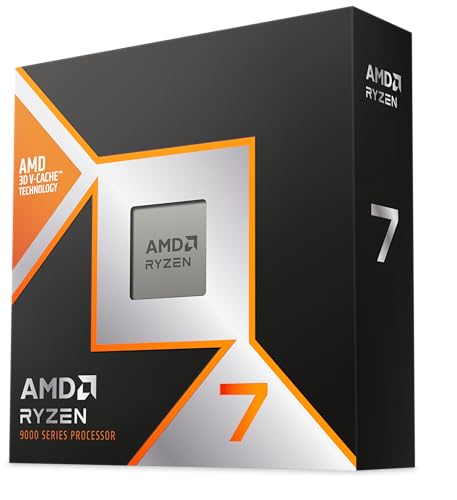
The Ryzen 7 9800X3D is the most direct answer to the question this guide asks. Its eight cores pair with a large stacked cache, and that combination keeps frame times steady in the games where other chips stutter. It runs on the AM5 platform with DDR5 memory, so it fits naturally into a new build or an upgrade from an earlier AM5 chip. Builders who play simulation-heavy, open-world, or competitive titles at high refresh rates will notice the difference most.
This chip draws a modest amount of power for its performance class, which makes cooling straightforward. A good dual-tower air cooler handles it without drama, and the chip leaves more thermal headroom for the graphics card.
Specs
- Cores and threads: 8 cores, 16 threads
- Base clock: 4.7 GHz; boost clock: up to 5.2 GHz
- L3 cache: 96 MB with 3D V-Cache
- Socket: AM5; memory: DDR5 up to 5600 MT/s
- TDP: 120 W; integrated Radeon graphics included
- Cooler: not included; model 100-100001084WOF
- ASIN: B0DKFMSMYK
AMD Ryzen 7 7800X3D

The Ryzen 7 7800X3D brings the same cache-first idea to a lower tier, and it remains one of the smartest gaming buys on the AM5 platform. It shares the eight-core layout and the large stacked cache of its newer sibling, with lower clocks that still clear the bar for smooth play in demanding titles. For a builder working with a fixed budget, the savings here can fund a better graphics card or a larger solid-state drive.
Its power draw stays modest, so cooling is simple and quiet. It fits the same AM5 boards and DDR5 memory as the 9800X3D, which makes it a clean drop-in choice for an existing AM5 system or a fresh mid-range build.
Specs
- Cores and threads: 8 cores, 16 threads
- Base clock: 4.2 GHz; boost clock: up to 5.0 GHz
- L3 cache: 96 MB with 3D V-Cache
- Socket: AM5; memory: DDR5
- TDP: 120 W; integrated Radeon graphics included
- Cooler: not included
- ASIN: B0BTZB7F88
AMD Ryzen 9 9950X
The Ryzen 9 9950X is the chip for builders who want one machine to do everything. Sixteen cores and thirty-two threads chew through rendering, compiling, and video work while still delivering strong gaming performance. It lacks the stacked cache of the X3D chips, so it does not match them frame for frame in cache-sensitive games, but its raw throughput wins whenever the workload spreads across many threads.
This is the most power-hungry AMD chip in this guide, so cooling and motherboard choice matter. A strong liquid cooler or a top-tier air cooler keeps it at full boost during long renders, and a board with solid power delivery avoids throttling.
Specs
- Cores and threads: 16 cores, 32 threads
- Base clock: 4.3 GHz; boost clock: up to 5.7 GHz
- L3 cache: 64 MB; L2 cache: 16 MB
- Socket: AM5; memory: DDR5 up to 5600 MT/s
- TDP: 170 W; integrated Radeon graphics included
- Cooler: not included
- ASIN: B0D6NNRBGP
Intel Core i7-14700K
The Intel Core i7-14700K is the balanced pick on the LGA 1700 platform, with twenty cores split between eight performance cores and twelve efficiency cores. That hybrid layout handles games on the fast cores while background tasks settle onto the efficient ones, and the twenty-eight threads give it real muscle for streaming and creative work. It suits builders who already own a 600- or 700-series board, since a BIOS update is often all it takes to drop this chip into an existing system.
Cooling needs attention. The chip can pull far more than its base power figure under sustained load, so a strong cooler is essential. Update the BIOS first, since Intel has released microcode updates for this generation.
Specs
- Cores and threads: 20 cores (8 P-cores + 12 E-cores), 28 threads
- Base clock: 3.4 GHz (P-core); boost clock: up to 5.6 GHz
- L3 cache: 33 MB; L2 cache: 28 MB
- Socket: LGA 1700; memory: DDR5-5600 or DDR4-3200
- Base power: 125 W; maximum turbo power: 253 W
- Integrated graphics: Intel UHD Graphics 770; cooler not included
- Boxed model: BX8071514700K
- ASIN:
Intel Core i9-14900K
The Intel Core i9-14900K sits at the top of the LGA 1700 lineup, with twenty-four cores and thirty-two threads and boost clocks that reach 6.0 GHz. It is the chip for builders who want maximum single-thread speed for high-refresh gaming and maximum multi-thread throughput for heavy work in the same machine.
The same advice about cooling and BIOS updates applies here, only more so. This chip draws the most power in this guide under full load, and it rewards a 360 mm liquid cooler or an equivalent high-end air cooler. Confirm the exact boxed listing before ordering: the model number is BX8071514900K, and the KF variant is a different chip without integrated graphics.
Specs
- Cores and threads: 24 cores (8 P-cores + 16 E-cores), 32 threads
- Base clock: 3.2 GHz (P-core); boost clock: up to 6.0 GHz
- L3 cache: 36 MB; L2 cache: 32 MB
- Socket: LGA 1700; memory: DDR5-5600 or DDR4-3200
- Base power: 125 W; maximum turbo power: 253 W
- Integrated graphics: Intel UHD Graphics 770; cooler not included
- Boxed model: BX8071514900K
- ASIN: B0CGJDKLB8
Who Should Skip a CPU Upgrade
A new processor is not always the right next purchase. Builders whose graphics card already limits frame rates will gain more from a GPU upgrade, because the CPU can only prepare frames as fast as the card can draw them. The same applies to systems still running on a slow storage drive or a single stick of memory: fixing those bottlenecks first usually delivers a bigger improvement.
Owners of a recent eight-core chip should also pause. Moving from one modern eight-core processor to another rarely changes the gaming experience enough to justify the cost, especially when the swap also demands a new motherboard and memory.
FAQ
Do I need a new motherboard to switch from Intel to AMD?
Yes. AMD chips use the AM5 socket and Intel chips use LGA 1700, so the two brands need different boards. A switch also means checking the memory standard, since AM5 boards need DDR5 while some LGA 1700 boards accept DDR4.
Does a gaming CPU need a separate cooler?
Yes, for all five chips in this guide. None of them ships with a cooler in the box, and the high-end models draw enough power under load to overwhelm a basic cooler. A dual-tower air cooler or a 240 mm liquid cooler is a sensible minimum.
Is more cache better than a higher clock speed for gaming?
It depends on the game. A large cache smooths frame pacing in simulation-heavy and open-world titles, which is why the X3D chips feel so steady. Clock speed matters more in lightly threaded games and in tasks outside gaming.
Will these CPUs work with my existing power supply?
It depends on the total draw of the build. The CPU is only one part of the load, and the graphics card usually draws more. Add the CPU and GPU draws together, leave headroom above that total, and check the power supply’s capacity and connectors.
Final Verdict
Choosing a gaming CPU comes down to matching the chip to the build and the workload. The Ryzen 7 9800X3D is the best all-round gaming pick for a new AM5 build, with the 7800X3D close behind for tighter budgets. The Ryzen 9 9950X is the right call when heavy creative work shares the machine with gaming. On the Intel side, the Core i7-14700K covers gaming and multitasking at a sensible level, while the Core i9-14900K is the flagship for builders who want the fastest LGA 1700 chip available.