Key takeaways
- Five PC soundbars for gaming and small desks, from compact USB bars to 2.1 systems with subwoofers, with the specs that matter for a clean setup.
Monitor speakers are thin, quiet, and pointed at your chest. A soundbar made for a PC desk fixes that without eating desk space: it slides under the monitor, takes one cable for power and audio, and fills a small room with game sound. This article covers five soundbars built for desktops, not living rooms, and every pick fits under a typical monitor without a receiver.
As an Amazon Associate, we earn from qualifying purchases.
Quick Answer
For most small desks, the Razer Leviathan V2 X is the simplest upgrade: one USB-C cable, a compact 400 mm bar, and Chroma RGB. If you want deeper bass, the Creative Stage V2 adds a subwoofer, while the Razer Leviathan V2 adds THX Spatial Audio. The Redragon GS560 suits tight budgets, and the Creative Stage Air V2 suits desks that need a battery-powered bar.
How to Choose a Soundbar for PC Gaming
Measure first. A bar that is wider than the gap between your monitor stand feet will not sit flat, and a bar taller than the clearance under your monitor will block the bottom of the screen. Most desk soundbars run 400 to 550 mm wide and under 80 mm tall, which suits 24-inch and 27-inch monitors. Check depth too: a deep bar can push your keyboard forward and crowd your wrist rest.
Connections decide how clean the setup feels. USB audio carries digital sound and power through one cable on many bars, which is the neatest option for a PC. A 3.5 mm jack works with almost anything but is analog and needs a separate power cable. Optical input suits PCs with a sound card or motherboard optical output. Bluetooth is handy for music from a phone, but wireless audio can lag behind the picture in fast games, so use a wired connection for gaming sessions.
Bass is the next fork in the road. A single bar with passive radiators handles dialogue, footsteps, and music well enough for most desks. A 2.1 system with a separate subwoofer adds low-end weight to explosions and engine rumble, but the subwoofer needs floor space and a cable run.
RGB lighting and surround modes often need the maker app to unlock fully. If you dislike background apps, pick a bar whose core controls sit on the bar itself. Finally, skip TV soundbars for a desk: they are usually too wide, too tall, and built around HDMI ARC rather than USB audio.
Razer Leviathan V2 X
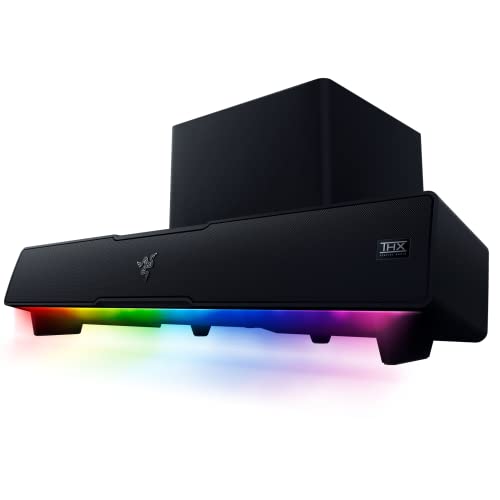

The Leviathan V2 X is the most desk-friendly bar in this lineup. At 400 mm wide it fits beneath almost any monitor, and a single USB-C cable carries both power and audio, so the desk stays clear of extra bricks and cables. Two full-range drivers and two passive radiators produce a wide soundstage, and Razer rates output at 90 dB at one metre, ample for a small room.
Chroma RGB runs across 14 lighting zones that sync with other Razer gear and can react to in-game events. Bluetooth 5.0 covers music from a phone, and the bar also works with laptops and a docked Nintendo Switch. The limits are clear: no subwoofer, no 3.5 mm jack, no optical input, and no HDMI, so this is a PC-first bar.
Specs
- Model: RZ05-04280100-R3U1
- ASIN: B0BCCCNHD8
- Width: 400 mm
- Drivers: 2 full-range drivers, 2 passive radiators
- Power and audio: USB-C single cable
- Wireless: Bluetooth 5.0
- Lighting: Chroma RGB, 14 zones
- Maximum output: 90 dB at 1 m
- Frequency response: 85 Hz to 20 kHz
- Subwoofer: none
Confirm the listing before ordering: a Renewed listing carries a different code, and the Leviathan V2 with a subwoofer is a separate product with its own code, covered below. Match the model number RZ05-04280100-R3U1 on the listing.
Creative Stage V2
The Stage V2 is the pick for desks that want real bass without a full speaker system. It pairs a slim bar with a 5.25-inch subwoofer, rated at 160W peak power, so explosions and soundtracks carry weight that single bars cannot match. Sound Blaster Clear Dialog and Surround modes lift voices out of busy scenes, and bass and treble adjust from the included remote.
Connectivity is the most flexible here: USB audio for a PC, optical input for a sound card or console, HDMI ARC for a TV, and Bluetooth 5.0 for a phone. The bar is wall mountable, and the subwoofer needs a floor spot beside the desk leg.
Specs
- Model: MF8375 (US listing)
- ASIN: B08H58GSXC
- System power: 160W peak, 80W RMS
- Subwoofer: 5.25-inch, wired
- Channels: 2.1
- Inputs: USB audio, optical, HDMI ARC
- Wireless: Bluetooth 5.0
- Audio modes: Clear Dialog and Surround by Sound Blaster
- Controls: remote, adjustable bass and treble
- Mounting: wall mountable
Regional listings carry different codes, so match the US model MF8375 on the listing you open. The newest crawl naming this code is about a year old, so confirm the listing is live and the offer is current before publishing or ordering.
Redragon GS560 Adiemus White
The GS560 is the budget RGB pick. At 16 inches wide it slides under most monitors, and a lighting bar across the front switches between four display modes from a touch pad on top. A volume knob sits beside the touch controls, so volume changes need no software. USB power and a 3.5 mm cable make setup simple.
Two drivers in a 2.0 channel layout suit dialogue, footsteps, and music at desk distance. Bass is modest, as expected with no subwoofer, and the bar is best for near-field listening rather than filling a large room.
Specs
- Model: GS560 Adiemus
- ASIN: B0CB9SRC2T (White)
- Width: 16 inches
- Channels: 2.0
- Drivers: dual drivers
- Output: 4W
- Lighting: RGB dynamic light bar, 4 display modes
- Controls: touch pad, volume knob
- Power: USB
- Audio input: 3.5 mm cable
Pick the White listing with this code. The Black listing showed as currently unavailable in a recent crawl, so do not substitute it without checking that its offer is live again.
Creative Stage Air V2
The Stage Air V2 is the portable pick. It is a compact under-monitor bar with a built-in 2200 mAh battery that runs for up to six hours, so it can move from the desk to a kitchen counter or a bedside table without a cable. At 41 cm wide it fits beneath smaller monitors and laptop stands, and the bar is only 7.5 cm tall.
Sound is 20W peak across two drivers, with Bluetooth 5.3, USB-C audio for a PC, and a 3.5 mm AUX input for anything else. The range runs 80 Hz to 20 kHz, which covers voices and most game effects cleanly, though low-end rumble is limited by the small size. Charging takes about six hours, so plan overnight charging if you use the battery daily.
Specs
- Model: 51MF8395AA000
- ASIN:
- Width: 41 cm, depth 9.4 cm, height 7.5 cm
- Output: 20W peak, 10W RMS
- Wireless: Bluetooth 5.3
- Inputs: USB-C audio, 3.5 mm AUX
- Battery: 2200 mAh, up to 6 hours playback
- Frequency response: 80 Hz to 20 kHz
- Charging time: about 6 hours
One caution: no amazon.com crawl in the research names this code in its text. Identity rests on the .ca listing naming the product, model, and code, plus the user manual keyed to the same code. Confirm the US listing and its stock before publishing.
Razer Leviathan V2
The Leviathan V2 is the full setup pick. It pairs the bar with a down-firing subwoofer and adds THX Spatial Audio, which widens the soundstage and places footsteps and direction cues more clearly in competitive games. Chroma RGB runs across 18 zones, and Bluetooth 5.2 pairs with up to eight devices, so switching between a PC and a phone takes no cable swaps.
The system is rated at 65W with a range of 45 Hz to 20 kHz, driven by an external power adapter, which is why this bar plays louder and deeper than USB-powered bars. The subwoofer needs floor space, and the THX mode needs the Razer app on a PC, so this pick suits a dedicated gaming desk.
Specs
- Model: RZ05-04160100-R3U1 (US listing)
- ASIN: B09VX86JR6
- Drivers: 2 full-range drivers, down-firing subwoofer
- Audio: THX Spatial Audio
- Lighting: Chroma RGB, 18 zones
- Wireless: Bluetooth 5.2
- Power: 65W, external adapter
- Frequency response: 45 Hz to 20 kHz
- UPC: 810056142872
Do not confuse this with the Leviathan V2 X above: the V2 X has no subwoofer and a different model number, RZ05-04280100-R3U1. Regional suffixes also differ, so match RZ05-04160100-R3U1 for the US listing.
Who Should Skip a PC Soundbar
Skip a soundbar if you already use a good headset for most sessions. Headsets still win for late-night play, voice chat clarity, and fine directional cues without disturbing anyone else. A soundbar is a shared-listening upgrade, not a headset replacement.
Skip it too if your desk has no free USB port and no optical output, since most PC bars need one or the other. Large rooms and TV viewing call for a TV soundbar or a proper speaker system instead: desk bars are tuned for near-field listening, and their output fades quickly across a living room. If you want cinema surround formats or HDMI eARC, a desk bar will not deliver them.
FAQ
Can a TV soundbar work on a PC desk?
Usually not well. TV bars are wider and taller than desk bars, they expect HDMI ARC rather than USB audio, and many lack a 3.5 mm or USB input entirely. A PC soundbar is sized for a monitor stand and connects through USB or 3.5 mm.
Does a soundbar need a subwoofer for gaming?
No. A single bar covers dialogue, footsteps, and music clearly at desk distance. A subwoofer adds low-end weight to explosions and engine sounds, which is welcome but optional. If floor space is tight or walls are shared, a single bar is the better choice.
Is USB audio better than 3.5 mm for a PC soundbar?
USB audio carries digital sound and power through one cable, which keeps the desk tidy and avoids analog noise from the headphone jack. A 3.5 mm connection is universal but needs a separate power cable. For gaming, use a wired connection either way, since Bluetooth can lag behind the picture.
Will a soundbar fit under my monitor?
Measure the width between the monitor stand feet, the clearance under the screen, and the depth of the desk. Most desk bars are 400 to 550 mm wide and under 80 mm tall, which fits 24-inch and 27-inch monitors. If the bar is too deep, it will push the keyboard forward.
Final Verdict
For most small desks, the Razer Leviathan V2 X is the pick: one USB-C cable, a 400 mm bar, and RGB that matches a gaming setup. If bass matters more than size, the Creative Stage V2 adds a subwoofer and the widest set of inputs here. The Razer Leviathan V2 is the step up for THX Spatial Audio and a deeper low end. On a tight budget, the Redragon GS560 White gives RGB style and simple plug-and-play sound, while the Creative Stage Air V2 is the only pick with a battery. Confirm each listing and its stock before ordering, especially the two Creative bars, whose freshest stock signals are thin.