Key takeaways
- Compare five flight simulator yokes for realistic flying, from Hall-effect yokes to Boeing replicas, and find the right cockpit controls for your desk.
A flight simulator yoke changes how a civil aviation sim feels. Instead of pushing a stick sideways, the pilot turns a wheel and pulls it toward the chest, exactly like the controls in a Cessna or a Boeing airliner. Landings get smoother, turns get more precise, and long cruise segments get far less tiring on the hands.
This guide compares five flight simulator yokes for realistic flying, from a budget classic to a full Boeing replica set. Every pick is a yoke, not a flight stick, and every pick works with the major PC flight simulators, while one pick also works on Xbox.
As an Amazon Associate, we earn from qualifying purchases.
Quick Answer
The Honeycomb Alpha is the best flight yoke, with 180 degree rotation, a steel shaft on ball bearings, and a switch panel. The Turtle Beach VelocityOne Flight is the best pick for Xbox pilots, and the Thrustmaster TCA Yoke Pack Boeing Edition is the best choice for airliner realism. The Logitech G Saitek Pro Flight Yoke is the best budget yoke, and the CH Products 200-615 is a legacy pick.
1. Honeycomb Alpha Flight Controls Yoke and Switch Panel

The Honeycomb Alpha is the reference yoke for serious PC flight simulation. The yoke turns through a full 180 degrees, and the steel shaft runs on dual linear ball bearings with 15 cm of travel, so pitch inputs feel smooth and free of the sticky center that cheaper yokes develop. A self-centering mechanism brings the yoke back to neutral after every input.
A switch panel sits on the base, with a five-position ignition switch, a landing gear lever, and LED-backlit toggles for lights, flaps, and avionics. The Alpha connects over USB-C and works on Windows PCs and Mac, and it pairs with the Honeycomb Bravo throttle quadrant. At about 4.9 kg, it needs a solid desk and a firm clamp. Confirm the listing and stock at the time of ordering.
Specs: 180 degree yoke rotation; steel shaft with dual linear ball bearings; 15 cm shaft travel; 5-position ignition switch; LED-backlit switch panel; self-centering mechanism; USB-C connection; Windows PC and Mac compatible; model AER-HONEY; ASIN B07SH2SFLW.
2. Turtle Beach VelocityOne Flight Universal Control System
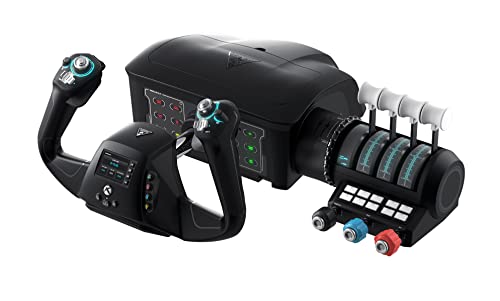
The Turtle Beach VelocityOne Flight is the only yoke in this guide built for Xbox as well as PC, and it is the natural pick for console pilots. The yoke handle turns through a true 180 degrees, and a non-contact Hall-effect sensor sits in the yoke shaft, so the main axis stays smooth and drift-free over years of use. A modular throttle quadrant with a dedicated trim wheel ships in the box, along with integrated rudder controls.
A full-color Flight Management Display on the base shows configuration options, trim position, and aircraft status. The system carries 12 axes and works with Microsoft Flight Simulator, X-Plane, DCS World, Elite Dangerous, and War Thunder on PC. On Xbox it works with Series X and Series S, but the Xbox One and Xbox Cloud Gaming versions of Microsoft Flight Simulator 2020 do not support the unit. At 19.01 by 19.5 by 7.2 inches, it is a complete system in one box. Confirm the listing and stock at the time of ordering.
Specs: 180 degree yoke rotation; Hall-effect sensor on main yoke axis; modular throttle quadrant with trim wheel; integrated rudder controls and brake buttons; full-color Flight Management Display; 12 axes; Xbox Series X, Xbox Series S, Xbox One, Windows 10 and 11 PCs; model TBS-0715-02; ASIN B09JM8SX8G.
3. Thrustmaster TCA Yoke Pack Boeing Edition

The Thrustmaster TCA Yoke Pack Boeing Edition is the most faithful airliner setup in this guide. It is an officially licensed 1:1 scale replica of the Boeing 787 Dreamliner controls, shipping as a pack with the TCA Yoke Boeing Edition and the TCA Quadrant Boeing Edition. The yoke uses a suspended PENDUL_R mechanism that copies the pendular feel of a floor-mounted Boeing yoke, with a long 8.3 inch range of travel that gives fine control on approach and flare.
H.E.A.R.T magnetic sensor technology provides 16-bit resolution on the main axes of the yoke and the throttle quadrant. The throttle quadrant carries the Boeing autopilot feature for altitude, airspeed, and heading, and the thrust levers reproduce the linear resistance feel of the real Dreamliner. The pack works on Xbox One and Xbox Series X and S, and it is also compatible with PC.
Note: a second listing code also surfaces for model 4460210, so confirm the listing shows model 4460210 and the full pack contents. The pack is large and heavy, so it needs a wide desk and a firm mount. Confirm the listing and stock at the time of ordering.
Specs: 1:1 scale Boeing 787 replica; suspended PENDUL_R mechanism; 8.3 inch yoke travel; H.E.A.R.T magnetic sensors, 16-bit resolution; throttle quadrant with Boeing autopilot feature; 16 programmable buttons; metal frame; Xbox One, Xbox Series X and S, PC compatible; model 4460210; ASIN B09GRLDWV2.
4. Logitech G Saitek Pro Flight Yoke System

The Logitech G Saitek Pro Flight Yoke System is the budget pick in this guide, and it has been the default first yoke for PC sim pilots for years. A stainless steel shaft carries the elevator and aileron axes, and the system offers five axes of control, with 25 programmable buttons and switch positions that rise to 75 functions through a three-position mode switch. A POV hat switch sits on the yoke grip, and the included throttle quadrant has configurable knobs for throttle, propeller pitch, and mixture.
The yoke works on Windows PCs over USB, and it pairs with the wider Logitech G flight sim ecosystem. The quadrant levers are the known weak point in community reports, with the lever arms prone to wear where they enter the quadrant housing, so gentle handling and a careful check of the quadrant on arrival are wise.
Buyers should confirm the part number: the current listing is model 945-000023, while part number 945-000004 belongs to an older listing, and renewed offers are separate refurbished units. Confirm the listing and stock at the time of ordering.
Specs: Stainless steel yoke shaft; 5 axes of control; 25 programmable buttons and switch positions, 75 functions with 3 modes; POV hat switch; throttle quadrant with configurable knobs; USB connection; Windows PC compatible; model 945-000023; ASIN B01M00OQBE.
5. CH Products Flight Sim Yoke 200-615

The CH Products Flight Sim Yoke 200-615 is the legacy pick in this guide, and it suits pilots who want a simple, no-driver yoke that just works. It offers five axes of control, covering aileron, elevator, throttle, propeller pitch, and fuel mixture, with 20 programmable buttons that deliver 144 customizable functions. The yoke connects over USB with plug-and-play setup on PC and Mac, and the design uses military-grade components.
The 200-615 is an older design. First, it uses potentiometer sensors rather than the Hall-effect sensors in the newer yokes in this guide, so the center can develop drift after years of heavy use. Second, availability is uneven: several listings show the unit out of stock, so buyers should confirm the listing is the new unit and that stock is available before ordering. For pilots who fly classic general aviation aircraft and want a straightforward yoke, the 200-615 still covers the essentials.
Specs: 5 axes of control; 20 programmable buttons, 144 customizable functions; plug-and-play USB; PC and Mac compatible; military-grade components; model 200-615; ASIN B000056SPM.
How to Choose a Flight Simulator Yoke
Rotation range is the first number to check. A yoke that turns through 180 degrees matches the real aircraft it copies, while a yoke with a narrower range feels cramped on crosswind landings. Shaft travel matters just as much: a long travel range gives fine pitch control on final approach.
Sensor type decides how long the yoke stays accurate. Hall-effect sensors use magnets and never touch, so they do not wear out or drift, while potentiometer sensors use a physical wiper that wears over time. Pilots who fly several hours a week should favor Hall-effect yokes, while occasional pilots can live with potentiometers.
Throttle setup is the next decision: some yokes ship with a quadrant in the box, while others sell it separately. Platform compatibility closes the list: most yokes are PC-only, so Xbox pilots need a yoke that explicitly lists Xbox support, and none of the yokes in this guide works on PlayStation consoles. Measure the desk before ordering.
Who Should Skip a Flight Simulator Yoke
A yoke is the wrong control for fighter jet and space combat sims. Those aircraft use a center stick, and a yoke feels slow and awkward in a dogfight, so a flight stick or a HOTAS set is the better pick for DCS World combat aircraft and space games. Pilots with very small desks should also skip a yoke, since even the smallest yoke in this guide needs a wide, solid surface and a firm clamp.
Casual pilots who fly a few times a year will get little value from a yoke; a keyboard and mouse, or a basic flight stick, covers occasional sightseeing flights. Pilots who want force feedback should know that none of the yokes in this guide offers it.
FAQ
Do I need rudder pedals with a flight simulator yoke?
A yoke controls pitch and roll, not yaw, so rudder pedals are the natural companion for realistic flying. The Turtle Beach VelocityOne Flight is the exception, since it carries integrated rudder controls on the yoke itself. For the other yokes, pedals are sold separately.
Do flight simulator yokes work on Xbox?
Most yokes in this guide are PC-only, but two work on Xbox. The Turtle Beach VelocityOne Flight works on Xbox Series X and Series S as well as PC, and the Thrustmaster TCA Yoke Pack Boeing Edition works on Xbox One and Xbox Series X and S as well as PC. The Xbox One and Xbox Cloud Gaming versions of Microsoft Flight Simulator 2020 do not support the VelocityOne Flight.
Yoke or flight stick: which is better for flight sims?
The answer depends on the aircraft. A yoke matches civil aviation aircraft, from Cessnas to Boeing airliners, and it gives smoother, more precise control on approach and landing. A flight stick matches fighter jets, helicopters, and space combat games, where quick, large inputs matter more.
Can I use a flight simulator yoke with X-Plane and Microsoft Flight Simulator?
Yes, all five yokes in this guide work with Microsoft Flight Simulator and X-Plane on PC. The Honeycomb Alpha, Logitech G Saitek Pro Flight Yoke, and CH Products 200-615 also work on Mac, while the Turtle Beach VelocityOne Flight and the Thrustmaster TCA Yoke Pack add Xbox support. Setup is plug-and-play on most systems.
Final Verdict
The Honeycomb Alpha is the best flight simulator yoke for most pilots, with a full 180 degree rotation, a steel shaft on ball bearings, and a built-in switch panel. Xbox pilots should choose the Turtle Beach VelocityOne Flight, which brings the same rotation and a Hall-effect sensor to console flying, along with a throttle quadrant and a Flight Management Display in one box. Airliner pilots who want the closest match to a real Boeing cockpit should choose the Thrustmaster TCA Yoke Pack Boeing Edition, with its pendular mechanism and autopilot quadrant. The Logitech G Saitek Pro Flight Yoke is the best budget yoke, and the CH Products 200-615 is a solid legacy pick. Whichever yoke fits the desk and the aircraft, confirm the exact model and listing before ordering.