Key takeaways
- Compare the best monitor calibrators from Calibrite and Datacolor, with picks for photo editing, HDR video, OLED screens, and multi-display desks.
Every monitor drifts. Backlights age, factory presets favor punchy showroom color over accuracy, and two screens sitting side by side on the same desk rarely match out of the box. If you edit photos, grade video, or design graphics for clients, that drift shows up as prints that come back too dark, skin tones that shift between your laptop and your external display, and brand colors that never quite look the same twice. A monitor calibrator solves the problem at the source: the colorimeter sits on your screen, measures how it actually renders color and brightness, and builds a corrected profile your operating system applies automatically.

The market is dominated by two names, Calibrite (the company that took over the X-Rite i1 line) and Datacolor (maker of the Spyder family), and the five tools in this guide cover the full range of needs. They differ mainly in how bright a display they can measure, which panel technologies they support, and how deep the included software goes. Below, we explain what actually matters when choosing one, then break down five verified picks for HDR video work, serious photo editing, multi-display studios, and simpler first-time calibration.
As an Amazon Associate, we earn from qualifying purchases.
How to Choose a Monitor Calibrator
Maximum luminance is the first spec to check. Standard dynamic range workflows live well under a few hundred nits, so almost any colorimeter can profile a basic office or photo display. HDR work is different: mini-LED and OLED panels push far brighter highlights, and a sensor that tops out too early cannot measure those highlights accurately. Match the tool to your brightest screen, not your average one.
Panel technology support matters just as much. Wide-gamut, OLED, mini-LED, and Apple XDR displays each respond differently to measurement. Current-generation tools from both brands explicitly support these panel types, while older models were designed around conventional LCD screens and can struggle with newer backlight technologies.
Software decides how much control you get. Entry-level tools use fixed targets and a short guided routine. Step up and you gain custom white point and gamma settings, profile validation, uniformity checks across the panel, ambient light monitoring, and tools for matching several displays to each other. Video editors should also look for broadcast-oriented tone curves and video calibration targets.
Plan on recalibrating regularly. A profile is a snapshot, and displays keep changing as they age. Most of these tools include reminder features, and the faster the calibration routine, the more likely it is to actually get done. Finally, check the connector: newer tools are USB-C, sometimes with a USB-A adapter in the box, while older models assume a USB-A port.
Calibrite Display Plus HL
The Display Plus HL is Calibrite’s flagship colorimeter, built around a high-luminance (HL) sensor that measures displays up to 10,000 nits. That headroom is aimed squarely at HDR production: it profiles LCD, mini-LED, OLED, and Apple XDR panels, plus compatible projectors, and it supports the BT 1886 tone curve used in broadcast video work. The included Calibrite PROFILER software offers Basic and Advanced modes with custom white point, luminance, contrast, and gamma controls, along with profile validation and uniformity check tools for confirming the result across the whole panel.
Specs
- Model: CCDIS3PLHL
- Maximum luminance: 10,000 nits
- Display support: LCD, mini-LED, OLED, Apple XDR, projectors
- Software: Calibrite PROFILER
- Connection: USB-C with USB-A adapter
- Operating systems: Windows and macOS
Who it’s for / who should skip
This is the pick for colorists, HDR video editors, and anyone running very bright mini-LED or reference-style displays who needs validation and uniformity tools. Skip it if you only edit stills on a standard SDR monitor, where its brightness range and advanced options go far beyond the job.
Calibrite Display Pro HL
The Display Pro HL uses the same HL sensor family as the flagship but measures up to 3,000 nits, which still covers the overwhelming majority of modern monitors, including mini-LED, OLED, and Apple XDR panels. It runs the same Calibrite PROFILER software with fully customizable white point and gamma, profile validation, and uniformity checks, and it can also profile compatible projectors. For most photographers and designers, it delivers the current-generation sensor and the full software feature set without paying for extreme HDR headroom they will never use.
Specs
- Model: CCDIS3HL
- Maximum luminance: 3,000 nits
- Display support: LCD, mini-LED, OLED, Apple XDR, projectors
- Software: Calibrite PROFILER
- Connection: USB-C with USB-A adapter
- Operating systems: Windows and macOS
Who it’s for / who should skip
Choose the Pro HL if you edit photos or design work on a modern wide-gamut or high-brightness display and want validation tools to prove your profile is accurate. Skip it if your work is true HDR mastering on the brightest reference panels, where the Plus HL’s extra range is the safer margin, or if you want the simplest possible guided routine.
Datacolor Spyder X2 Elite
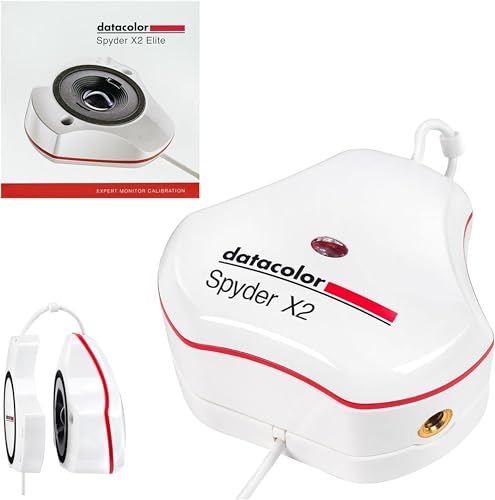
Datacolor’s Spyder X2 Elite pairs its lens-based color engine with re-engineered software that completes a calibration in under two minutes. It measures displays up to 750 nits, which suits standard photo and video monitors, and the Elite software tier adds the deeper controls: expert console mode, video calibration targets, soft proofing support, display analysis tools, and StudioMatch for tuning multiple displays to a shared target. Owners can also upgrade the software license to the X2 Ultra tier later, which raises the brightness ceiling for high-brightness HDR screens without replacing the hardware.
Specs
- Model: SXE200
- Maximum luminance: 750 nits
- Display support: standard and wide-gamut monitors, laptops, projectors
- Software: Datacolor Spyder X2 (Elite tier)
- Connection: USB-C with USB-A adapter included
- Weight: 5 oz
Who it’s for / who should skip
The X2 Elite fits photographers and videographers who run more than one display and want matching, analysis, and video targets in one package. Skip it if your main screen is a high-brightness HDR mini-LED panel, since its 750-nit ceiling is the tightest in this guide, or if you prefer the Calibrite software ecosystem.
Datacolor Spyder (2024)
The current Datacolor Spyder, model SP2024, is the streamlined mainstream option in the Spyder line. It is built for designers, photographers, and content creators who want accurate color without a long setup process, and it works on modern OLED monitors as well as LED screens. The software emphasizes a quick, guided calibration with an ambient light sensor that accounts for the lighting in your room, and it includes preview tools so you can compare how images will look across simulated devices and output conditions before you commit to an edit.
Specs
- Model: SP2024
- Maximum luminance: not stated
- Display support: OLED and LED monitors and laptops
- Software: Datacolor Spyder software
- Ambient light sensor: Yes
- Connection: not stated
Who it’s for / who should skip
Pick this Spyder if you want a current, easy-to-live-with calibrator for one or two modern displays and value a short learning curve. Skip it if you need projector calibration, published high-brightness HDR measurement limits, or the advanced validation and uniformity reporting found in the Elite and HL tiers.
Datacolor Spyder X Pro
The Spyder X Pro is the long-running workhorse of the Spyder family, and it remains a sensible choice for a first colorimeter. Its lens-based color engine calibrates a monitor in a minute or two, and the software offers both one-click calibration and a step-by-step assistant with 12 predefined calibration targets. Room light monitoring watches your ambient lighting and can prompt or adjust profile changes as conditions shift, and automatic profile changing keeps multi-monitor setups consistent without manual switching.
Specs
- Model: SXP100
- Maximum luminance: not stated
- Display support: desktop monitors and laptop displays
- Software: Datacolor SpyderX Pro software
- Room light monitoring: Yes
- Connection: USB-A
- Weight: 10.23 oz
Who it’s for / who should skip
The X Pro suits serious hobbyists and working photographers on conventional LCD and LED displays who want proven software and ambient light features. Skip it if you have moved to OLED or very bright mini-LED panels, or if your computer has only USB-C ports and you do not want to rely on an adapter.
Frequently Asked Questions
How often should I recalibrate my monitor?
A common working rhythm is once a month for color-critical work, and every few months for general use. Recalibrate sooner after moving the display to a room with different lighting, changing brightness settings significantly, or noticing that prints and screen images have started to disagree.
Can one calibrator profile multiple monitors?
Yes. Every tool in this guide can profile more than one display, and each screen gets its own profile. Higher-tier software from both brands adds matching features that tune several displays toward a shared white point and luminance so a multi-monitor desk looks consistent.
Do these calibrators work with OLED and mini-LED displays?
The current-generation models do. The Calibrite HL tools explicitly support OLED, mini-LED, and Apple XDR panels, and the 2024 Datacolor Spyder is built for OLED and LED screens. Older colorimeters designed for conventional LCD backlights may measure newer panel types less reliably, which is one reason to favor a current model.
What is the difference between a colorimeter and a spectrophotometer?
A colorimeter measures screen output through filtered sensors tuned to mimic human vision, which makes it fast and well suited to emissive displays. A spectrophotometer measures the full spectrum of light and can also profile printers and scanners. For monitor-only work, a colorimeter like the five here is the standard choice; spectrophotometers make sense when print profiling joins the workflow.
Final Verdict
For most buyers, the Calibrite Display Pro HL is the balanced pick: a current high-luminance sensor, full PROFILER software, and support for the panel types people are actually buying now. Move up to the Display Plus HL if HDR video and very bright reference displays are your day job. On the Datacolor side, the Spyder X2 Elite is the choice for multi-display matching and video targets, the 2024 Spyder is the easy mainstream option for OLED and LED screens, and the Spyder X Pro remains a dependable, lower-fuss tool for conventional displays. Whichever you choose, the important step is using it on a schedule, because an accurate profile you refresh regularly beats a perfect one you made a year ago.
Product and ASIN Reference
| Product | ASIN |
|---|---|
| Calibrite Display Plus HL | B0C82LKJHY |
| Calibrite Display Pro HL | B0C836NB5X |
| Datacolor Spyder X2 Elite | B0C1LKYPTT |
| Datacolor Spyder (2024) | B0DDYDLPJ4 |
| Datacolor Spyder X Pro | B07M6KPJ9K |