Key takeaways
- Find the best slide scanners for digitizing old photos and film, with fast standalone scanning, big preview screens, and honest resolution notes.
Boxes of slides and strips of negatives sit in closets for years, and every season makes the film a little more fragile. A slide scanner turns that archive into files you can share, back up, and look at again, without sending the originals away. The five scanners below all work without a computer during the scan: feed a slide or a strip, check it on a built-in screen, and save a JPEG to a memory card.
As an Amazon Associate, we earn from qualifying purchases.
Quick Answer
For most family archives, the KODAK Slide N SCAN RODFS50 is the easiest pick: a 5-inch screen, quick-feed trays for 135, 110, and 126 film, and simple on-screen editing. The Magnasonic FS71 adds Super 8 and built-in memory, the Wolverine Titan covers the most formats, the KODAK Max adds a tilting 7-inch screen, and the ClearClick QuickConvert 2.0 also scans printed 4×6 photos.
How to Choose a Slide Scanner
Read the resolution honestly. Every scanner here advertises 20, 22, or 24 megapixels, but that figure is interpolated: software enlarges the image after capture. The sensor underneath is smaller, typically 13, 14, or 16 megapixels. Interpolation adds pixels without adding detail.
Match the formats to your archive. Most family collections are 35mm slides and negatives, which every pick here accepts, along with 110 and 126 film. The differences show up at the edges: the Wolverine Titan also takes 127 and APS film, the Magnasonic FS71 also takes Super 8, and none of the five handles 120 medium-format film.
Weigh the screen. A 5-inch screen is enough to check framing, focus, and color before you save. The 7-inch tilting screen on the KODAK Max is easier on the eyes during a long session and doubles as a small photo frame for finished scans.
Do not forget storage. Four of the five picks need a memory card that is not included, and the KODAK models need an SD or SDHC card of up to 32 GB. The Magnasonic FS71 carries 128 MB of built-in memory, enough for roughly 50 images, plus a card slot for up to 128 GB. The ClearClick QuickConvert 2.0 is the exception in the other direction: a 32 GB card comes in the box.
Match the feeding style to the job. The KODAK models use quick-feed trays that let you push a strip through frame by frame, which suits long sessions with hundreds of slides. The Wolverine Titan uses similar fast-load adapters and scans a frame in about three seconds. The ClearClick scans from above, one item at a time, with no autofeeder, at about two to three seconds per item.
1. KODAK Slide N SCAN RODFS50 — The Easy All-Rounder
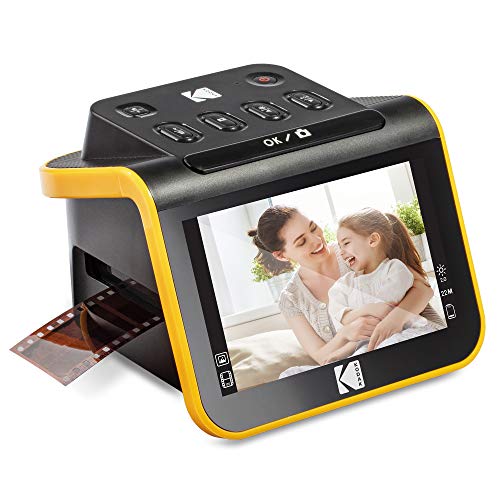
The RODFS50 is the straightforward pick for a family archive built on 35mm. Its 5-inch LCD is large enough to judge a frame before saving, and the quick-feed tray system keeps a long session moving: slide a strip or a mounted slide through, press the button, and move on. It handles 135, 110, and 126 film plus 50 mm mounted slides, which covers the formats most households actually own. On-screen controls adjust brightness and red, green, and blue levels, and a date function lets you stamp the capture date on the file.
The resolution story needs the honest version. The sensor is 13 megapixels, and the scanner saves files at 14 or 22 megapixels by interpolation. That is the same pattern across this whole category, and it is fine for sharing and ordinary prints, but it is not the same as a true 22-megapixel capture. Files save straight to an SD or SDHC card of up to 32 GB, and the card is not included, so order one with the scanner.
Specs
- 13MP sensor, saves 14MP or 22MP JPEG (interpolated); 5-inch LCD; formats 135, 110, 126 film and 50 mm slides; SD/SDHC up to 32 GB (card not included); USB-C, HDMI out; on-screen brightness and RGB editing, date function, gallery mode; 5.27 x 5.35 x 3.74 inches, about 1 pound; ASIN B084NVRHYQ
2. Magnasonic FS71 — The Format-Flexible Workhorse

The FS71 earns its place on breadth. It covers 35mm, 126, 110, and Super 8 film, plus 135, 126, and 110 slides, which is the widest format range among the standalone picks that also include a large screen. The sensor is 16 megapixels and the scanner saves 24-megapixel JPEG files by interpolation, so the same honest-reading rule applies as with the KODAK models: the headline number is enlarged after capture, and the native sensor is what sets the real detail level.
Storage is where the FS71 stands apart. It carries 128 MB of built-in memory, enough for roughly 50 images before you need a card at all, and the card slot accepts SD cards up to 128 GB. One flag to carry into the purchase: the two most recent Amazon crawls for this listing both showed no featured offers available, so confirm availability before ordering, even though current 2026 roundups still list the FS71 as a live pick.
Specs
- 16MP sensor, saves 24MP JPEG (interpolated); 5-inch TFT LCD; formats 35mm, 126, 110, Super 8 film and 135, 126, 110 slides; 128 MB built-in memory (about 50 images), SD up to 128 GB (card not included); HDMI out, USB; 3 to 5 seconds per scan; on-device brightness, RGB, flip, and mirror controls; 4.9 x 5.4 x 4.4 inches, 13.4 ounces; ASIN B086DX4253
3. Wolverine Titan F2DTITAN — The Widest Format Coverage
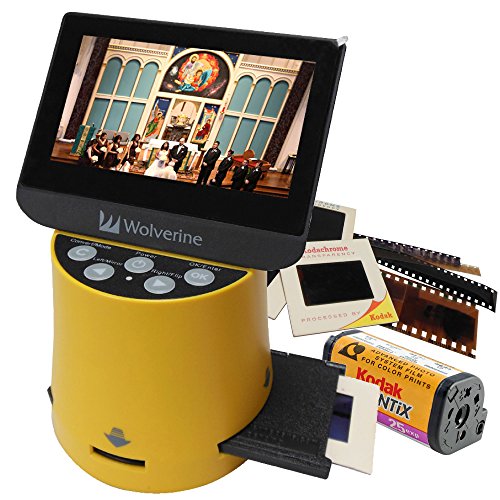
The Titan is the pick for archives that wander beyond 35mm. It is an 8-in-1 converter covering 35mm, 127, 126, 110, and APS slides and negatives, which is the broadest format list in this guide. That matters if your collection includes APS cartridges from the late 1990s or 127 film from older cameras, because most standalone scanners simply do not accept those formats. Scans take about three seconds per frame, and the fast-load adapters push slides and strips through with little handling.
Output is 20-megapixel JPEG, saved to internal memory for roughly 35 to 40 images or to an SD or SDHC card up to 32 GB. One limit to know before buying: the Titan cannot digitize printed photos.
Specs
- 20MP output; 4.3-inch color LCD; formats 35mm, 127, 126, 110, APS slides and negatives; internal memory about 35 to 40 images, SD/SDHC up to 32 GB (card not included); HDMI and USB; about 3 seconds per scan; fast-load slide and negative adapters; 5.5 x 3.5 x 4 inches, about 1 pound; ASIN B01MRCNSJT
4. KODAK Slide N SCAN Max RODFS70 — The Big-Screen Upgrade

The Max is the RODFS50 grown up. It shares the same sensor and the same format list, 135, 110, and 126 film plus 50 mm slides, and the same quick-feed tray system, but the screen grows to a tilting 7-inch LCD. The sensor is 13 megapixels and files save at 13 or 22 megapixels by interpolation, so the resolution story is identical to the RODFS50.
Storage and connections follow the same pattern as the smaller KODAK: an SD or SDHC card up to 32 GB, not included, USB-C to a computer, and an HDMI output for a TV, though the HDMI cable is not in the box. A tracker check shortly before writing showed third-party new offers tracked within the previous 12 hours, with the Amazon-sold column empty, so expect third-party sellers at the moment and confirm the listing before ordering.
Specs
- 13MP sensor, saves 13MP or 22MP JPEG (interpolated); 7-inch tilting LCD; formats 135, 110, 126 film and 50 mm slides; SD/SDHC up to 32 GB (card not included); USB-C, HDMI out (cable not included); gallery and photo-frame mode; 6.69 x 5.35 x 4.45 inches, 1.06 pounds; ASIN B0B3F6KJJ2
5. ClearClick QuickConvert 2.0 — The One That Also Scans Prints
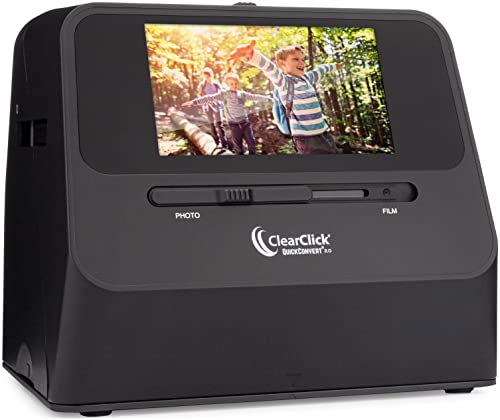
The QuickConvert 2.0 is the odd one out, and that is its strength. It scans from above, so you can lay a 4×6 photo on the bed without removing it from an album, and it also handles 35mm slides and 110 and 126 negatives. That makes it the only pick in this guide for a mixed archive of prints and film. It works entirely without a computer, with a built-in rechargeable battery, a 5-inch LCD, and a 32 GB memory card included in the box.
The trade-offs are real. There is no autofeeder, so every item is scanned one at a time, at two to three seconds each, which is slow for a large slide collection. The native resolution is 14 megapixels, saved as 22-megapixel files by interpolation, so the same honest-reading rule applies. Photos larger than 4×6 are not supported, so 5×7 prints need a different machine.
Specs
- 14MP native, saves 22MP JPEG (interpolated); 5-inch LCD; scans 4×6 photos and 35mm, 110, 126 slides and negatives; 32 GB memory card included; rechargeable battery; PhotoPad Pro software included; 2 to 3 seconds per item, one at a time, no autofeeder; 8 x 7 x 6 inches, 2.38 pounds; ASIN B073V879J5
Who Should Skip These Scanners
Skip this whole group if your archive is only printed photos and you own no film at all. Four of the five picks cannot scan a print, and buying a film scanner for prints alone wastes the machine. The ClearClick is the exception, but even it caps prints at 4×6, so a collection of larger prints still needs a flatbed. Skip them too if you need archival-grade files: these machines save JPEG only, with interpolated headline numbers, and none of them produces the uncompressed files or the true optical resolution that a dedicated film scanner delivers. A buyer chasing that level of detail should look at a dedicated desktop film scanner such as the Plustek OpticFilm 8300i Ai, which trades the standalone screen and quick-feed trays for a computer-tethered workflow and finer control.
Frequently Asked Questions
What resolution do I actually get from a slide scanner?
You get the native sensor resolution, and the headline number is interpolated. The KODAK models use a 13-megapixel sensor and save 14- or 22-megapixel files, the Magnasonic FS71 uses a 16-megapixel sensor and saves 24-megapixel files, the Wolverine Titan saves 20-megapixel files, and the ClearClick uses a 14-megapixel sensor and saves 22-megapixel files. Judge by the sensor figure, not the headline.
Do I need a computer to use a slide scanner?
No, not during the scan. All five picks scan standalone: you feed the film, check the frame on the built-in screen, and save a JPEG to a memory card. A computer enters the picture afterward, when you copy the files from the card, organize them, and back them up. None of the five needs drivers or software installed to scan.
Can these scanners handle printed photos too?
Only one of the five can. The ClearClick QuickConvert 2.0 scans from above, so it handles 4×6 printed photos as well as slides and negatives, and it is the pick for a mixed archive. The KODAK models, the Magnasonic FS71, and the Wolverine Titan are film-only machines: they accept slides and negative strips, not prints.
What film formats can these scanners handle?
All five handle 35mm slides and negatives, plus 110 and 126 film. The Wolverine Titan adds 127 and APS, and the Magnasonic FS71 adds Super 8, which makes those two the picks for varied archives. None of the five handles 120 medium-format film, so a collection of medium-format negatives needs a different machine.
Final Verdict
A slide scanner is a weekend-project machine, and the right one depends on what sits in your boxes. The KODAK RODFS50 is the default for a 35mm family archive: simple, quick to feed, and easy to check on its 5-inch screen. The Magnasonic FS71 is the pick when Super 8 or built-in memory matters. The Wolverine Titan is the pick for the widest format range, including 127 and APS. The KODAK Max RODFS70 is the pick when a large tilting screen makes long sessions comfortable. The ClearClick QuickConvert 2.0 is the pick for a mixed archive of prints and film, with a card in the box and a battery for cord-free use.
Product and ASIN Reference
| Product | ASIN |
|---|---|
| KODAK Slide N SCAN Film and Slide Scanner RODFS50 | B084NVRHYQ |
| Magnasonic All-in-One 24MP Film Scanner FS71 | B086DX4253 |
| Wolverine Titan 8-in-1 Film to Digital Converter F2DTITAN | B01MRCNSJT |
| KODAK Slide N SCAN Max Digital Film Slide Scanner RODFS70 | B0B3F6KJJ2 |
| ClearClick QuickConvert 2.0 Photo, Slide, and Negative Scanner | B073V879J5 |