Key takeaways
- Compare the best green screens for streaming and video calls, from pull-up panels to pop-up backdrops, with sizes, weights, and setup styles explained.
A green screen is the simplest way to make a home setup look like a studio. Instead of relying on software blur or a virtual background that eats your hair and shoulders, a physical chroma key backdrop gives your camera one flat, evenly colored surface to remove, so the cutout around you stays clean in OBS, Zoom, Teams, and similar apps. The catch is that green screens come in very different forms, and the wrong one can mean wrinkles, shadows, and a backdrop that is either too small for your frame or too bulky for your room.
This guide compares five well-regarded green screens for streaming and video calls: three pull-up panels that rise out of a floor case, one tripod-mounted screen built for standing and full-body shots, and one lightweight pop-up backdrop that folds into a disc. Each pick below lists its verified size, weight, and mounting style, who it suits, and who should skip it, so you can match the screen to your space instead of guessing.
As an Amazon Associate, we earn from qualifying purchases.
How to Choose a Green Screen
Start with coverage. The screen needs to fill your camera frame edge to edge, with margin for arm movement. For a seated desk setup with a typical webcam, a panel around five feet wide is usually enough. If you stand, gesture widely, record two people, or use a wide-angle lens, look at the wider panels and tripod screens below, and remember that a 16:9 frame uses width faster than height.
Next, pick a form factor. Pull-up screens live in an aluminum floor case and rise on a locking frame, so setup takes seconds and the fabric stays tensioned and smooth. Pop-up backdrops are spring-frame discs that twist open and fold away into a carry bag; they are the lightest option but need a wall, door, or stand to lean or hang on. Tripod and wall-mount screens sit somewhere in between, trading a few minutes of assembly for height adjustment and, in one case below, portrait orientation for vertical video.
Fabric matters more than marketing. A wrinkle-resistant polyester that pulls taut will key far better than a loose cloth sheet, because folds create shadows and shadows create ragged edges. Whatever you buy, plan your lighting around it: light the screen as evenly as you can, keep some distance between yourself and the fabric to avoid green spill on your skin and clothes, and avoid wearing green. Finally, check the packed size and weight if the screen has to move between rooms, because the sturdiest pull-up cases are also the heaviest things in this guide.
Positioning deserves a thought before you order, too. A pull-up or tripod screen needs a strip of clear floor directly behind your chair, while a pop-up panel can lean on the wall you already have. Measure that space, and check the ceiling height against the taller panels if your room is small. In your software, turn off automatic exposure and white balance if your camera allows it, since a hunting camera makes the green shift brightness and breaks an otherwise good key.
Valera Explorer 90

The Valera Explorer 90 is the outlier here in a good way: instead of a floor case, its screen stretches over a frame that mounts on the included tripod stand or on a wall. That design makes it the only pick that rotates between landscape and portrait, which is handy if you record vertical video for phones as well as widescreen streams. The 90-inch diagonal gives an 80 by 46 inch usable area in a 16:9 shape, the widest coverage in this guide relative to its weight.
Specs
- Screen size: 90 in diagonal, about 80 x 46 in usable (16:9)
- Orientation: Landscape or portrait
- Mounting: Tripod stand included, wall mount option
- Fabric: ChromaBoost wrinkle-resistant polyester
- Weight: 8.5 lb including tripod
- Extras: Carry bag, bundled digital background library
Who it’s for: Streamers and presenters who stand, move around, or shoot full-body video, and anyone who wants a big screen that still packs into a 46-inch bag for travel or storage.
Who should skip: Desk-bound callers in tight rooms. The tripod footprint and two-minute assembly are overkill if you only need a seated head-and-shoulders backdrop, and a pull-up panel is faster for daily use.
EMART Collapsible Green Screen with Stand, 79 x 71 in

EMART’s large collapsible panel pairs a pull-up chroma key screen with an adjustable tripod, giving you a 79 by 71 inch surface that can be raised to the height your shot needs. The auto-locking frame holds the wrinkle-resistant fabric flat, and the fast-fold design means the panel packs down without a separate backdrop stand kit to assemble and store.
Specs
- Screen size: 79 x 71 in
- Frame: Auto-locking, fast-fold collapsible design
- Stand: Adjustable tripod included
- Fabric: Wrinkle-resistant chroma key fabric
- Weight: 9.12 kg (about 20.1 lb)
- Model: EM-PSG2018
Who it’s for: Creators who want the largest flat panel in this guide and the freedom to set its height, for example for standing presentations, product videos with a person in frame, or two-person recordings.
Who should skip: Anyone short on floor space or who moves rooms often. At about twenty pounds with a tripod footprint, it is a set-it-up-and-leave-it screen rather than a grab-and-go one.
KHOMO GEAR Extra Large Collapsible Chroma Key Panel, 77 x 62 in

KHOMO GEAR’s panel follows the classic pull-up formula: an aluminum floor case, a pneumatic X-frame that locks as you lift the handle, and a wide 77 by 62 inch sheet of wrinkle-resistant polyester. The height adjusts as it rises, so you can stop lower for seated calls or extend it fully for standing shots, and when you are done it retracts back into the case and the feet rotate away for storage.
Specs
- Screen size: 77 x 62 in
- Frame: Pneumatic X-frame, auto-locking, adjustable height
- Case: Aluminum floor case with carry handle
- Fabric: Wrinkle-resistant polyester
- Weight: 19 lb
Who it’s for: Streamers who want a wide, tensioned panel that sets up in seconds and disappears into its case afterward, without a separate stand to store.
Who should skip: Buyers who need portrait orientation or a tripod mount, and anyone who will carry the screen between locations often, since the case is a two-hand lift.
Neewer Pull-Up Green Screen
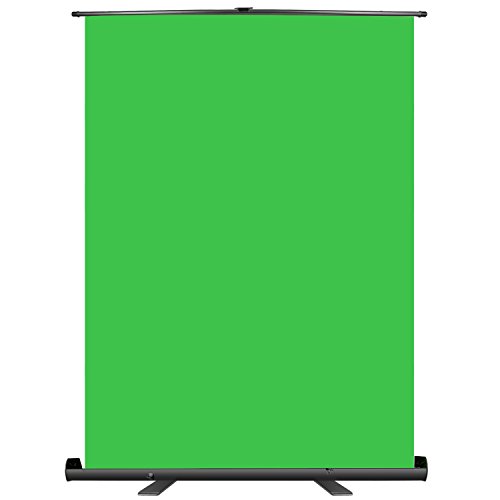
Neewer’s pull-up screen is the straightforward desk-streaming option: a solid aluminum base, an auto-locking frame, and a wrinkle-resistant panel that pulls up to a full five by six feet and locks at its set height. It covers a seated or standing single-person shot, and the base doubles as the storage case, so the whole thing slides under a bed or behind a door between sessions.
Specs
- Screen size: 5 x 6 ft (1.5 x 1.9 m)
- Frame: Auto-locking pull-up frame
- Base: Solid aluminum, doubles as carry case
- Fabric: Wrinkle-resistant chroma key fabric
- Weight: About 19.5 lb
- Model: 10097668
Who it’s for: Home office workers and streamers who want a proven pull-up design for daily calls and streams, with no stand assembly and no fabric to steam.
Who should skip: Two-person setups and wide-angle standing shots, where the five-foot width can run out at the edges, and frequent travelers, for whom the pop-up pick below is far lighter.
Neewer Chromakey Backdrop, Double-Sided Green and Blue
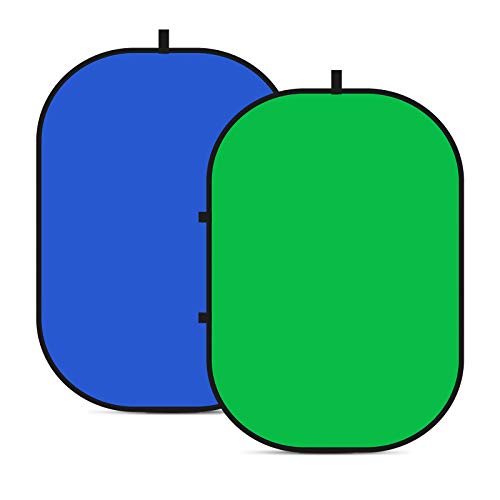
This Neewer backdrop is a spring-frame pop-up panel with chroma green on one side and chroma blue on the other, which is useful if a guest wears green or your lighting keys one color better than the other. At five by six and a half feet it is a full-size backdrop, yet it weighs barely over a pound and twists down into a disc of about 25 inches that fits in the included carry bag.
Specs
- Screen size: 5 x 6.6 ft (1.5 x 2 m)
- Design: Double-sided, green on one side, blue on the other
- Frame: Steel spring frame, pop-up
- Packed size: About 24.8 in disc, carry bag included
- Weight: About 1.1 lb
- Model: 10039506
Who it’s for: Budget-conscious and mobile creators, and anyone whose green screen has to live in a closet or car between shoots. It is also the easiest pick to take to a client’s office or a classroom.
Who should skip: Buyers who want a self-standing screen. The panel has no stand, so it must lean against a wall or hang from a hook or backdrop stand, and the spring frame takes a little practice to fold down the first few times.
Frequently Asked Questions
How big should a green screen be for a desk setup?
For a seated shot from a typical webcam, a panel around five feet wide and six feet tall fills the frame with room to spare. Go wider, around six and a half feet or more, if you use a wide-angle lens, sit far from the camera, or move around a lot on camera.
Do green screens work with Zoom and Teams, or only with streaming software?
They work with both. Zoom and Teams can replace a real background more reliably when there is a solid color behind you, and streaming tools such as OBS and Streamlabs have dedicated chroma key filters that are designed for a physical green screen.
How should a green screen be lit for a clean key?
Light the screen evenly and separately from yourself, avoid hot spots and shadows, and sit a few feet in front of it. Distance reduces green light bouncing back onto your hair and shoulders, which is the main cause of fringes and spill in the final image.
What is the difference between pull-up, pop-up, and tripod green screens?
Pull-up screens rise out of a floor case on a locking frame and stay tensioned, pop-up screens are spring-frame discs that fold into a bag but need support, and tripod screens mount on a stand for height adjustment and sometimes portrait orientation. The trade-off is speed and smoothness against weight and price.
Final Verdict
For most streamers and remote workers, a pull-up panel is the sweet spot, and the Neewer Pull-Up and KHOMO GEAR screens are the two to choose between: the Neewer for a standard single-person frame, the KHOMO GEAR when you want extra width. Pick the Valera Explorer 90 if you stand, shoot full-body, or need portrait orientation, and the EMART if you want the largest panel with tripod height adjustment. If weight and storage matter more than a perfectly tensioned surface, the double-sided Neewer pop-up backdrop does the job at about a pound and folds away into its own bag.
Product and ASIN Reference
| Product | ASIN |
|---|---|
| Valera Explorer 90 | B07KYQRZC7 |
| EMART Collapsible Green Screen with Stand, 79 x 71 in | B087223LMZ |
| KHOMO GEAR Extra Large Collapsible Chroma Key Panel, 77 x 62 in | B07P7RVNRF |
| Neewer Pull-Up Green Screen | B07K1SX1KR |
| Neewer Chromakey Backdrop, Double-Sided Green and Blue | B00E89Q5OY |