Our Short List of 3

- Best for: Large homes where every floor needs coverage.
- Quad-band WiFi 7 mesh router
- 3-pack
- Coverage up to 12,000 sq ft
- Two 10G ports on each unit

- Best for: Flats and smaller houses that may grow later.
- Dual-band WiFi 6 extendable router
- Subscription-free network security
- Parental control
- Built-in VPN
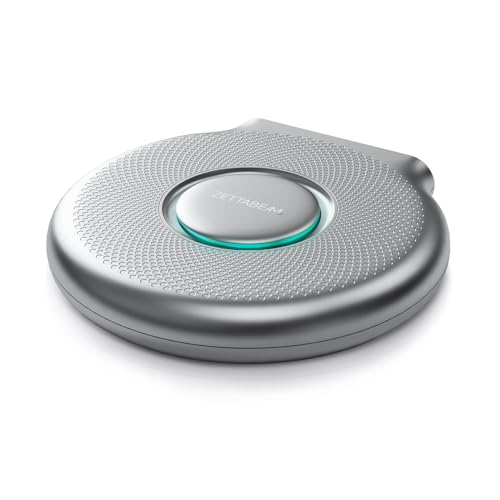
- Best for: Renters and portable setups.
- AX3000 WiFi 6 router
- 2,404 Mbps dual band
- Easy Mesh
- OFDMA and MU-MIMO
All 4 Picks at a Glance
| Product | Specs | Action |
|---|---|---|
| ASUS ZenWiFi BQ16 Pro (3-Pack) |
| Check price on Amazon |
| ASUS RT-AX1800S |
| Check price on Amazon |
| Tongyu AX3000 ZETTABEAM |
| Check price on Amazon |
 ASUS ZenWiFi BQ16 Pro (1-Pack) |
| Check price on Amazon |
Key takeaways
- Compare five residential wireless routers for home networks, from mesh 3-packs to single extendable routers, with coverage, bands, and security compared.
A residential wireless router has one job: carry a household’s internet to every room without dead zones, dropped calls, or a console that lags when someone else starts a stream. The five routers below come from listings whose own wording states the router form, the brand, and a home basis, so each pick is a router built for home use rather than a modem or a hotspot. Three picks share the ASUS brand as distinct models, and two are two configurations of one model, both facts stated openly below.
Mesh packs appear with their pack sizes stated, because a 3-pack and a 1-pack are different purchases even when the model name matches. Every ASIN line carries a warning marker, meaning the code was corroborated through listing mirrors and roundup links rather than a live Amazon page, so re-check each code before buying.
Quick Picks
As an Amazon Associate we earn from qualifying purchases.
| Product | Best for | Key spec |
|---|---|---|
| ASUS ZenWiFi BQ16 Pro (3-Pack) | Large homes needing every floor covered | Quad-band WiFi 7, up to 12,000 sq ft |
| Tenda Nova MW12 (3-Pack) | Houses with dead zones | Tri-band AC2100, up to 6,000 sq ft |
| ASUS RT-AX1800S | Flats and smaller houses | Dual-band WiFi 6, extendable with AiMesh |
| Tongyu AX3000 ZETTABEAM | Renters and portable use | AX3000 WiFi 6, 100 devices |
| ASUS ZenWiFi BQ16 Pro (1-Pack) | Smaller homes wanting WiFi 7 hardware | Quad-band WiFi 7, up to 4,000 sq ft |
How to Choose
Match the coverage to the floor plan
Start with the size of the home, not the speed on the box. A single router suits a flat or a small house where one central spot reaches every room, while a mesh pack suits larger homes, thick walls, and more than one floor, because extra units fill dead zones. Check the coverage figure in the listing and compare it with the home’s floor area, then add a margin for walls and furniture that block signal. A router that covers 4,000 square feet on paper may still struggle across two concrete floors, so buyers in solid-walled homes should favour a pack over a single unit.
Count devices before counting bands
A home router serves phones, laptops, televisions, consoles, and smart plugs at the same time, so the device count matters more than the headline speed. Dual-band hardware suits lighter households, while tri-band and quad-band hardware spread traffic across more bands and keep video calls smooth when many devices connect at once. Read the listing for the device figure and the band count, and match both to the household: a family of four with smart-home gear needs more capacity than a single occupant with a laptop. Mesh features such as AiMesh and Easy Mesh help only when the hardware underneath can carry the load.
Read the ports and the security wording
Wired ports decide how many stationary devices skip WiFi entirely: a television, a desktop, and a console each run better on a cable, so count the Gigabit and 10G ports before buying. Security wording matters just as much: subscription-free security, parental controls, and VPN support should appear in the listing itself, not in a review or a forum post. Multi-SSID support separates smart-home devices from family devices, which limits what a compromised plug can reach. If the listing is silent on security, treat that silence as a gap rather than assuming the feature exists.
Treat mesh packs as systems, not single boxes
A mesh pack is a system: the pack size decides how many rooms get a unit, and the listing should state that size plainly. A 3-pack covers a large home with one unit per floor or zone, while a 1-pack is a single router that can grow through AiMesh or Easy Mesh later. Check whether the listing calls the unit a router, because a mesh system that replaces a router is not the same purchase as a mesh router itself. Compare pack sizes only within the same model, since a 3-pack of one model and a 1-pack of another differ in hardware as well as count.
The 5 Best Options
ASUS ZenWiFi BQ16 Pro (3-Pack)
- Best for: Large homes where every floor needs coverage.
- Quad-band WiFi 7 mesh router
- 3-pack
- Coverage up to 12,000 sq ft
- Two 10G ports on each unit
Large homes where every floor needs coverage.
A 3-pack needs three spots in the home, so it is more hardware than a small flat requires.
The ASUS ZenWiFi BQ16 Pro in its 3-pack configuration is the mesh-router pick for large homes, and its listing states the residential basis openly: it is a Smart Home Master mesh router with coverage up to 12,000 square feet. Quad-band WiFi 7 spreads traffic across four bands, and each unit carries two 10G ports for wired backhaul or fast wired devices. Multi-SSID support separates smart-home gear from family devices, while VPN and parental controls run without a subscription. This is a mesh pack, sold as three units, so it suits households that need every floor covered rather than a single room served well.
Watch out for: A 3-pack needs three spots in the home, so it is more hardware than a small flat requires.
Tenda Nova MW12 (3-Pack)
The Tenda Nova MW12 states its home basis in its wording: a Whole Home WiFi Mesh System built around a Gigabit Mesh Router, sold as a 3-pack. Tri-band AC2100 hardware covers up to 6,000 square feet and serves 100 or more devices, which fits family homes where phones, televisions, and smart plugs compete at once. Three Gigabit ports per unit give wired options for a television or a desktop, and the dual-band mesh network links the units together. As a mesh pack it needs several spots in the home, so it fits houses with dead zones better than small flats where one router reaches everywhere.
Specs
- Tri-band AC2100 mesh system
- Gigabit Mesh Router
- Whole Home WiFi Mesh System
- Coverage up to 6,000 sq ft
- Serves 100 or more devices
- Three Gigabit ports
- Dual-band mesh network
- 3-pack
Best for: Houses with dead zones that need several units.
Watch out for: Tri-band AC2100 hardware sits below WiFi 7 models for the busiest households.
ASIN: ⚠ B08HYJQRNZ
ASUS RT-AX1800S
- Best for: Flats and smaller houses that may grow later.
- Dual-band WiFi 6 extendable router
- Subscription-free network security
- Parental control
- Built-in VPN
Flats and smaller houses that may grow later.
Single-unit coverage may fall short in large or thick-walled homes.
The ASUS RT-AX1800S is the single-router pick for homes that do not need mesh hardware, and its listing states Smart Home among its uses, which is the residential basis stated here. Dual-band WiFi 6 covers a flat or a smaller house, and the extendable design accepts AiMesh nodes later if coverage falls short. Subscription-free network security, parental control, and a built-in VPN come with the router rather than behind a recurring plan. Gaming and streaming get support, so evenings with a console and a television stay smooth. The same model also appears in another site’s home-routers roundup, so this pick carries a cross-site overlap flag for the record.
Watch out for: Single-unit coverage may fall short in large or thick-walled homes.
Tongyu AX3000 ZETTABEAM
- Best for: Renters and portable setups.
- AX3000 WiFi 6 router
- 2,404 Mbps dual band
- Easy Mesh
- OFDMA and MU-MIMO
Renters and portable setups.
The home basis rests on a use list, so confirm the listing wording before buying.
The Tongyu AX3000 ZETTABEAM is the travel-friendly pick, and its listing names home use in a use list that also covers modem, gaming, and computer use, which is the home basis stated here. AX3000 WiFi 6 hardware runs at 2,404 Mbps on the dual band, with Easy Mesh, OFDMA, and MU-MIMO handling 100 devices. Four FEM units and four antennas push the signal, and VPN support suits households that route traffic through a tunnel. It is a compact router that moves between rooms or trips, so it fits renters and small homes better than buyers who want one unit serving a large house.
Watch out for: The home basis rests on a use list, so confirm the listing wording before buying.
ASUS ZenWiFi BQ16 Pro (1-Pack)
- Best for: Smaller homes that want WiFi 7 hardware in one unit.
- Quad-band WiFi 7 mesh router
- 1-pack
- Coverage up to 4,000 sq ft
- Two 10G ports on each unit
Smaller homes that want WiFi 7 hardware in one unit.
One unit covers less area than the 3-pack of the same model.
The ASUS ZenWiFi BQ16 Pro in its 1-pack configuration is the second configuration of the same model in this roundup, a fact stated here: one unit rather than three, with coverage up to 4,000 square feet. It keeps the quad-band WiFi 7 hardware, two 10G ports, Smart Home Master features, Multi-SSID support, VPN, parental controls, subscription-free security, and AiMesh of its sibling. A single unit suits a flat or a smaller house, and AiMesh lets the owner add units if the household grows. Buyers who want the BQ16 Pro without three units start here, with the mesh-pack flag noting the pack size.
Watch out for: One unit covers less area than the 3-pack of the same model.
Which One Fits Your Situation
A large house with dead zones
Choose a 3-pack mesh router. The BQ16 Pro 3-pack and the Tenda MW12 3-pack both put a unit on each floor or zone, and both state their home basis in the listing. Place units halfway between the main router and the weak rooms, not inside the dead zones themselves, for the best result.
A flat or a small house
Choose a single router with room to grow. The RT-AX1800S covers a smaller home on its own and accepts AiMesh nodes later, while the BQ16 Pro 1-pack gives quad-band WiFi 7 hardware in one unit. Start with one unit and add nodes only if a room stays weak after setup.
A household full of smart-home gear
Choose a router that names Smart Home support and separates device traffic. The BQ16 Pro packs carry Smart Home Master features with Multi-SSID support, and the RT-AX1800S names Smart Home among its uses. Keep smart plugs and cameras on their own network name where the router allows it, for extra safety.
A renter who moves often
Choose a compact router that travels well. The Tongyu AX3000 names home use alongside travel-router wording, and its small form moves between rooms or addresses without a fresh install each time. A single portable unit beats a fixed mesh system when the next home is unknown and the lease is short.
Common Mistakes
- Buying a modem-only unit and expecting it to route a home network: check that the listing states the router form.
- Choosing a mesh system that replaces a router instead of a mesh router: the two purchases differ.
- Comparing pack sizes across different models as if only the unit count differed.
- Trusting a coverage figure without allowing for walls, floors, and furniture that block signal.
- Assuming security features exist when the listing never states them.
Frequently Asked Questions
Do I need a mesh system for a small flat?
Usually not. A single router placed centrally covers a flat or a small house, and an extendable model accepts extra nodes later if one room stays weak. A mesh pack suits larger homes, thick walls, and more than one floor. Buy the single unit first, then add nodes only where the signal proves weak, rather than paying for three units from the start.
What does quad-band WiFi 7 add over dual-band WiFi 6?
Extra bands spread traffic across more lanes, so video calls, streams, and downloads interfere less when many devices connect at once. Dual-band WiFi 6 suits lighter households, while quad-band WiFi 7 suits busy homes with consoles, televisions, and smart-home gear running together. The gain shows in crowded evenings, not in a single speed test.
Can I add mesh units to a single router later?
Only if the router supports a mesh standard such as AiMesh or Easy Mesh. The RT-AX1800S and the BQ16 Pro both name AiMesh support in their listings, so extra units can join later. Check the listing wording before buying: a router without mesh support stays a single unit, however good its coverage figure looks.
Why does every ASIN line carry a warning marker?
The marker means the code was corroborated through listing mirrors and roundup links rather than a live Amazon page, because direct Amazon access is blocked. The code should still match the named product, but re-check it on Amazon before buying, and confirm the pack size matches the listing, since 1-pack and 3-pack versions carry different codes.