Key takeaways
- Compare the best laser engravers for wood, acrylic and leather, from a 5W starter machine to a 20W cutter built for small-business production.
A desktop laser engraver turns a plain piece of plywood, leather or acrylic into a personalized gift, a product label or a sellable craft item in minutes. The current generation of diode machines has moved well beyond the weak novelty engravers of a few years ago: even mid-range models now cut several millimeters of wood in a single pass, engrave fine photographic detail, and connect to proper design software instead of a limited phone app. For hobbyists and small shops, that makes a laser one of the most versatile tools that can sit next to a computer.

The five machines in this guide cover the realistic buying range, from a compact 5W starter unit for marking and light cutting to a 20W model with the power for small-batch production. Every pick is an open-frame diode laser sold on Amazon, compared on the things that actually decide a purchase: optical output power, work area, engraving speed, air assist, software support and safety features.
As an Amazon Associate, we earn from qualifying purchases.
How to Choose a Laser Engraver
Optical output power is the single most important specification, and it is also the most misrepresented. Manufacturers often headline the machine’s electrical input power, which can be four to eight times higher than the light energy that reaches the material. Compare the optical output figure instead: around 5W engraves well and cuts only thin stock slowly, 10W is the hobby sweet spot for cutting plywood and acrylic in reasonable passes, and 20W machines cut noticeably thicker material and run production jobs faster.
Work area decides what you can make in one piece. Most desktop diode lasers offer roughly 400 x 400 mm, which suits signs, cutting boards, coasters and tumblers with a rotary add-on. Expandable frames, like the Sculpfun below, stretch that area for long boards or large panels. Also check the laser spot size: a smaller compressed spot produces finer lines and cleaner photo engraving than a larger one.
Air assist matters more than most first-time buyers expect. A pump that blows air at the cut point clears smoke and debris, giving cleaner edges, less charring and deeper cuts per pass. Software-controlled air assist is easier to live with than a separate pump switched on by hand. Software is the other daily-use factor: LightBurn is the common standard across these brands, and LaserGRBL is a free Windows alternative.
Finally, treat safety as part of the purchase. All five machines here are Class 4 lasers, whose beam and reflections can injure eyes. Plan on proper laser safety glasses, never leave a running job unattended, and think about ventilation before the machine arrives, because engraving produces smoke and fumes that need somewhere to go.
Ortur Laser Master 3 20W Laser Engraver
The Laser Master 3 in its LU3-20A configuration is the power pick of this group. Its 20W optical output comes from four diode beams combined through spatial compression, which keeps the focal spot small at 0.08 x 0.08 mm while delivering cutting force that smaller machines cannot match. Ortur rates the machine for one-pass cuts in pine board and plywood that would take a 10W laser several passes, and for color engraving on stainless steel. A top engraving speed of 20,000 mm per minute keeps large fills and batch jobs moving.
An air pump is included and the air tube is built in, so cuts come out cleaner without a separate accessory purchase. Control options are broad: Wi-Fi and app control, USB and TF card for offline work, plus LightBurn and LaserGRBL support. The safety list is longer than most, with a safety lock, emergency stop, tilt detection and exposure time limits.
Specs
- Laser type: Diode, LU3-20A module
- Optical output: 20W
- Laser spot: 0.08 x 0.08 mm
- Work area: 400 x 380 mm
- Max engraving speed: 20,000 mm/min
- Air assist: Included, built-in air tube with 50L pump
- Connectivity: Wi-Fi, app, USB, TF card
- Software: Inspiraesth app, LightBurn, LaserGRBL
- Laser class: Class 4
Who it’s for: Small businesses and serious hobbyists cutting thicker wood and acrylic, running batch jobs, or engraving stainless steel gifts and signage.
Who should skip: Beginners who only want to mark phone cases and coasters, since the extra power, speed and safety systems are more machine than a light marking workload needs.
xTool D1 Pro 10W Laser Engraver
The D1 Pro 10W is the polished all-rounder of the group. Its 10W diode uses a compressed spot of 0.08 x 0.06 mm, which is well suited to detailed engraving on wood, leather, coated metal and glass, and the rigid all-metal frame and dual-motor drive are built to hold accuracy at its 400 mm per second top working speed. The work area of 432 x 406 mm is slightly larger than the standard 400 mm square offered by most rivals.
xTool’s own Creative Space software is the easiest starting point of any program mentioned here, with a large project library and straightforward controls, and the machine also works with LightBurn for users who outgrow it. Connection options cover USB, Wi-Fi and TF card. Flame detection and tilt or movement detection add automatic protection, and the large accessory ecosystem gives the machine room to grow with its owner.
Specs
- Laser type: Diode
- Optical output: 10W
- Laser spot: 0.08 x 0.06 mm
- Work area: 432 x 406 mm
- Max working speed: 400 mm/s
- Connectivity: USB, Wi-Fi, TF card
- Software: xTool Creative Space, LightBurn
- Safety: Flame detection, tilt and movement auto-stop
- Laser class: Class 4
Who it’s for: Hobbyists and craft sellers who want a refined software experience, a slightly larger bed, and a deep accessory catalog for future upgrades.
Who should skip: Buyers who mainly cut thick stock, because a 10W diode still needs multiple passes on thicker plywood where the 20W Ortur finishes in one.
SCULPFUN S30 Pro 10W Laser Engraver
The S30 Pro is the value pick for buyers who want automatic air assist without moving up to a 20W machine. Its 10W module focuses to 0.06 x 0.08 mm, and the 32-bit mainboard controls the included 30L/min air pump directly through LightBurn, switching the airflow with the job instead of relying on a manual valve. An industrial-grade linear rail on the X axis and limit switches on both axes support the engraving accuracy the design is known for.
The standout feature is expansion. The standard 410 x 400 mm engraving area can grow to 935 x 400 mm with a Y-axis kit or 935 x 905 mm with a full XY kit, which no other machine in this guide offers. The laser also uses a replaceable protective lens, a small detail that extends module life.
Specs
- Laser type: Diode
- Optical output: 10W
- Laser spot: 0.06 x 0.08 mm
- Wavelength: 455 nm
- Work area: 410 x 400 mm, expandable to 935 x 905 mm
- Air assist: Automatic, mainboard-controlled, 30L/min
- Machine power: about 84W
- Software: LightBurn, LaserGRBL
- Item weight: 15.05 lb
- Laser class: Class IV
Who it’s for: Makers planning oversized signs or long boards later, and anyone who wants software-controlled air assist and clean cuts at a 10W level.
Who should skip: Buyers who want the machine fully self-contained out of the box, since offline control and Bluetooth require an upgrade kit rather than being built in.
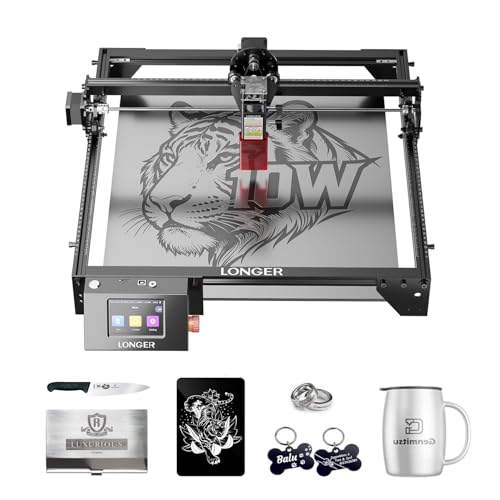
LONGER Ray5 10W Laser Engraver
The Ray5 10W separates itself with its control panel. A 3.5-inch color touch screen runs jobs directly from a TF card, shows progress, and allows offline work without a computer tethered nearby, while Wi-Fi and app control are also available. The ESP32-based controller is a modern platform for this level of machine.
Its dual-beam 10W module focuses to an ultra-fine 0.06 x 0.06 mm spot, the joint finest in this guide, which suits detailed graphics and small text. The 400 x 400 mm work area matches the class standard, and the listing rates the machine at 10,000 mm per minute. Safety coverage includes an emergency stop, motion protection and thermal detection, and the frame arrives as a straightforward kit build with the tools included.
Specs
- Laser type: Diode, dual-beam module
- Optical output: 10W
- Laser spot: 0.06 x 0.06 mm
- Work area: 400 x 400 mm
- Max engraving speed: 10,000 mm/min
- Display: 3.5-inch color touch screen
- Connectivity: USB, TF card, Wi-Fi, app
- Software: LaserGRBL, LightBurn
- Laser class: Class 4
Who it’s for: Users who want to run repeat jobs from the machine itself in a workshop, garage or market stall without keeping a laptop connected.
Who should skip: Buyers who want air assist included, because the base Ray5 10W leaves it as a separate accessory and cuts will show more charring without it.
ATOMSTACK A5 Pro Laser Engraver
The A5 Pro is the starter machine of this guide, and it earns its place by keeping the useful parts of a bigger laser: a full 410 x 400 mm work area, an all-metal frame, and a compressed spot design. Its 5W to 5.5W output focuses to 0.08 x 0.08 mm, which produces crisp engraving on wood, bamboo, leather, slate and coated metals, and it can cut thin wood and acrylic with patience and multiple passes.
Fixed-focus design removes one setup step for beginners, since there is no focal adjustment to get wrong, and the panoramic filter window shields the work area from most ultraviolet light while a job runs. Assembly is a short kit build, and the machine works with the free LaserGRBL software as well as LightBurn, so software cost can stay at zero while skills develop.
Specs
- Laser type: Diode
- Optical output: 5W to 5.5W
- Machine power: 40W
- Laser spot: 0.08 x 0.08 mm compressed spot
- Work area: 410 x 400 mm
- Engraving accuracy: 0.01 mm
- Focus: Fixed focus
- Frame: All-metal anodized aluminum
- Software: LaserGRBL, LightBurn
- Laser class: Class 4
Who it’s for: First-time buyers engraving gifts, tags, slate and leather goods who want a full-size bed and simple fixed-focus setup.
Who should skip: Anyone planning to cut thick plywood or acrylic as the main job, because 5.5W output makes cutting slow work compared with the 10W and 20W picks above.
Frequently Asked Questions
Can a diode laser engraver cut metal?
No. Diode lasers in this power range engrave coated, painted or anodized metal and can mark stainless steel, including color marks on the 20W Ortur, but they do not cut metal sheet. Cutting metal requires a fiber laser or a much larger CO2 system, which are different machine classes entirely.
What is the difference between machine power and laser output power?
Machine power is the electrical power the whole unit draws, while optical output is the light energy that actually reaches the material. A machine advertised at 40W or 130W electrical input may deliver only 5W or 20W of optical power, so the optical figure is the one to compare when judging cutting ability.
Do I need an enclosure and ventilation for a desktop laser?
An enclosure is not required for these open-frame machines to function, but ventilation is essential in practice. Engraving and cutting produce smoke and fumes, so work near an open window with a fan, or add an enclosure with extraction if the machine will run indoors often.
Which software should a beginner start with?
LaserGRBL is free and works with every machine in this guide on Windows, which makes it the zero-cost starting point. LightBurn is the common upgrade, with better design tools and direct air assist control on supported machines, while the xTool D1 Pro also offers the beginner-friendly Creative Space program in the box.
Final Verdict
For most buyers, the xTool D1 Pro 10W is the balanced choice: a fine compressed spot, the largest standard work area here, friendly software and a deep accessory range. If cutting power and throughput are the priority, the Ortur Laser Master 3 20W is the clear step up, with double the optical output, included air assist and the strongest safety package. The SCULPFUN S30 Pro is the smart buy for clean cuts and future expansion, the LONGER Ray5 suits anyone who values its offline touch screen, and the ATOMSTACK A5 Pro is the sensible first laser for engraving-focused work.
Product and ASIN Reference
| Product | ASIN |
|---|---|
| Ortur Laser Master 3 20W Laser Engraver (LU3-20A) | B0C5MKWXXC |
| xTool D1 Pro 10W Laser Engraver | B0B2RF1FVC |
| SCULPFUN S30 Pro 10W Laser Engraver | B0BG8PTJBM |
| LONGER Ray5 10W Laser Engraver | B0B7LK9C3M |
| ATOMSTACK A5 Pro Laser Engraver | B0FZRQM849 |