Our Short List of 3
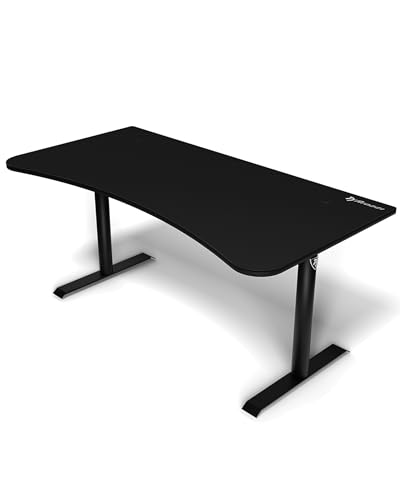
- Best for: Triple-monitor players who want maximum width and a full-length mouse surface.
- Top size: 63 in wide x 32 in deep (160 cm x 82 cm)
- Monitor capacity: width stated to allow three large monitors
- Surface: full-surface washable mousepad
- Cable management: three top cutouts plus under-top storage net; cutouts double as grommet monitor-stand mounting points

- Best for: Corner-based triple-screen setups that also need standing height.
- Top shape: 120-degree curved corner design
- Monitor capacity: positioned in the listing title for triple monitors
- Height: electric sit-stand with 4 height settings
- Capacity: 200 lb as stated in the listing title

- Best for: Dual or triple setups that want an L-shaped return and a glass finish.
- Layout: 60-inch L-shaped, reversible
- Recorded size variant: 60L x 40D inch, right side
- Top material: black glass
- Lighting: RGB LED lights built in
All 4 Picks at a Glance
| Product | Specs | Action |
|---|---|---|
| Arozzi Arena Large Gamer Desk, Pure Black |
| Check price on Amazon |
| Vari Command Center Electric Standing Desk (ComfortEdge), Light Wood/Slate |
| Check price on Amazon |
| EUREKA ERGONOMIC GTG L60 RGB Glass Gaming Desk |
| Check price on Amazon |
 ErGear L Shaped Electric Standing Desk, 63 Inch, Vintage Brown |
| Check price on Amazon |
Key takeaways
- Four gaming desks whose own listings state room for two or three monitors, compared on width, load limits, cable routing and sit-stand options.
Adding a second or third monitor is where an ordinary gaming desk quietly fails. The screens themselves are easy to choose; the harder decision is whether the desktop is wide and deep enough to hold them at a sane viewing distance, whether the frame can carry the combined weight of several displays plus a PC, and whether the cable runs for three video leads and three power bricks have anywhere to go. A desk that fits two monitors on paper can still leave your keyboard hanging off the front edge.
This roundup is for players building dual-screen battlestations, streamers running a game display beside a chat display, and anyone planning a triple-monitor racing or flight setup. Every desk below was picked because its own Amazon listing states multi-monitor capacity in so many words, and each one is judged on verifiable listing facts: top dimensions, stated load limits, height adjustment and cable routing.
Quick Picks
As an Amazon Associate we earn from qualifying purchases.
| Product | Best for | Key spec from title |
|---|---|---|
| Arozzi Arena Large Gamer Desk | Triple-monitor rigs on a fixed-height desk | 63-inch top with stated triple-monitor support |
| Vari Command Center Electric Standing Desk | Corner setups that need sit-stand adjustment | 120-degree curved top for triple monitors |
| EUREKA ERGONOMIC GTG L60 RGB Glass Gaming Desk | Dual or triple screens with a glass finish | 60-inch L-shape stated for 2 to 3 monitors |
| ErGear L Shaped Electric Standing Desk | Triple screens plus a printer and storage | 63 x 57 inch top, electric height adjustment |
How to Choose
Start with width and depth, not the headline monitor count
A listing that promises room for three monitors only helps if the top is genuinely wide enough for your screens side by side. Three 27-inch displays in a row need roughly 180 cm of run once bezels and slight angling are counted, which is why the widest tops here start at 160 cm. Depth matters just as much: a shallow top pushes screens closer to your face and steals keyboard space, so check the stated depth figure and picture where your hands will rest before you commit to a layout.
Match the load limit to the whole setup
Monitors are only part of the weight a desk carries. Add a tower PC, speakers, a monitor arm or two and a stack of peripherals, and a three-screen station can pass 100 lb without trying. Every listing in this guide states a capacity, from 176 lb on the Arozzi to 220 lb on the ErGear, and that figure should cover everything you plan to put on the surface, spread evenly. If your build is already heavy, choose the desk whose stated limit leaves the most headroom rather than the one that merely fits today.
Decide how the screens will mount
Some desks expect monitors to stand on their own feet, which eats depth; others are built around clamp mounting. The Arozzi Arena routes cables through three cutouts that double as grommet mounting points, and the ErGear adds an extended rear edge sized for C-clamp mounts. If you plan to float your screens on arms, confirm the desk offers a mounting edge or grommets in its listing. If you prefer factory stands, a raised monitor shelf or a deeper top becomes the priority instead.
Fixed height, manual adjustment or electric lift
Height adjustment decides how well a desk suits more than one user, or one user who likes to stand. Electric models such as the Vari and the ErGear move at the press of a button and remember the positions you use, while the Arozzi adjusts manually within a set range and the Eureka GTG L60 sits at a fixed height. Standing also changes cable behaviour: leads need enough slack to reach the floor at full extension, so plan your cable lengths around the desk’s tallest setting, not its lowest.
The 4 Best Options
Arozzi Arena Large Gamer Desk, Pure Black
- Best for: Triple-monitor players who want maximum width and a full-length mouse surface.
- Top size: 63 in wide x 32 in deep (160 cm x 82 cm)
- Monitor capacity: width stated to allow three large monitors
- Surface: full-surface washable mousepad
- Cable management: three top cutouts plus under-top storage net; cutouts double as grommet monitor-stand mounting points
Triple-monitor players who want maximum width and a full-length mouse surface.
Availability signals on this listing conflict — an older crawl showed no featured offers while retailer mirrors of the listing show it in stock — so confirm a live offer on the Amazon page before ordering.
Built around a single wide slab, the Arena is the straightforward answer for a triple-screen rig that will not move once it is assembled. Its listing states that the 160 cm width allows for three large monitors, and the entire surface is a washable mousepad, so mice track anywhere without a separate mat. Three cutouts in the top route cables down to a storage net underneath, and those same cutouts double as grommet mounting points if you would rather clamp your screens on arms than park them on stands.
Vari Command Center Electric Standing Desk (ComfortEdge), Light Wood/Slate
- Best for: Corner-based triple-screen setups that also need standing height.
- Top shape: 120-degree curved corner design
- Monitor capacity: positioned in the listing title for triple monitors
- Height: electric sit-stand with 4 height settings
- Capacity: 200 lb as stated in the listing title
Corner-based triple-screen setups that also need standing height.
The captured listing content behind this block is an older crawl, so re-check the current dimensions and settings on the live Amazon listing before you buy.
Where most multi-monitor desks run in a straight line, the Command Center bends. Its 120-degree curved corner top wraps the screens around you, which suits flight and racing rigs that spread gauges across three displays, and the sloped front edge softens the point where your forearms meet the desk during long sessions. Electric lift with four height settings lets the whole array rise for standing play without disturbing the layout, and the listing rates the frame at 200 lb, enough for three monitors plus a tower kept off the floor.
EUREKA ERGONOMIC GTG L60 RGB Glass Gaming Desk
- Best for: Dual or triple setups that want an L-shaped return and a glass finish.
- Layout: 60-inch L-shaped, reversible
- Recorded size variant: 60L x 40D inch, right side
- Top material: black glass
- Lighting: RGB LED lights built in
Dual or triple setups that want an L-shaped return and a glass finish.
Dimensions differ between size variants of this model, so confirm the exact variant and orientation on the listing before ordering.
The GTG L60 takes the L-shape route: a 60-inch main run for your screens and a return that swallows a tower, console or paperwork. Its listing copy states the top is large enough for two to three monitors and suitable for a curved monitor, which makes it a natural home for an ultrawide flanked by a vertical side screen. The black glass surface and built-in RGB lighting give it a showroom look the wood-effect desks here do not chase, and the reversible layout lets you put the return on whichever side your room demands.
ErGear L Shaped Electric Standing Desk, 63 Inch, Vintage Brown
- Best for: Combined gaming and office stations that need drawers and standing height.
- Desktop size: 63 x 57 in, L-shaped, reversible long side
- Monitor capacity: listing states space for dual or triple monitors, laptops and printers
- Height adjustment: electric, 27.5 to 46.4 in
- Frame: steel, supports up to 220 lb
Combined gaming and office stations that need drawers and standing height.
The footprint is genuinely large, so measure your corner carefully; this block’s tie rests on a mirror record of the listing, making a live-page check worthwhile.
ErGear’s corner desk is the storage-heavy option. The 63 x 57 inch top is stated to hold dual or triple monitors alongside laptops and printers, so a work-and-play station fits on one surface, and two drawers, a fabric side pocket and an open shelf keep controllers and paperwork off the playing area. Electric adjustment runs from 27.5 to 46.4 inches, the steel frame is rated to 220 lb, and an extended rear edge gives C-clamp monitor arms a proper bite. The long side of the L can be fitted on either end during assembly.
Which One Fits Your Situation
You run three screens in a straight line
Pick the Arozzi Arena. It is the only fixed desk here whose listing spells out a three-monitor width, the full-surface mousepad removes any worry about mouse room at the edges, and the cutouts give three sets of cables a tidy path down. Choose it when your rig is built once and left alone, and when manual height adjustment is enough for a single regular user.
Your battlestation lives in a corner and you like to stand
The Vari Command Center was shaped for exactly this. The curved top pulls side screens into your peripheral vision, the sloped edge is kinder to forearms over long sessions, and the electric lift means the whole triple array rises with you. It is the natural choice for simulation rigs and for players who split the day between sitting and standing in the same corner.
You mix gaming with a second machine or console
Look at the GTG L60 or the ErGear. The Eureka’s return gives a console or second PC its own wing under glass and light, while the ErGear adds drawers and a shelf for the clutter a shared station collects. Both listings state room for at least two monitors, so a main screen plus a side display fits either way; decide by whether storage or looks matter more in your room.
Your setup will grow over the next year
Buy for the rig you are planning, not the one on the desk today. The ErGear’s 220 lb frame rating and printer-friendly top leave the most headroom for a third screen and extra hardware, while the Arena’s width suits a move to three displays on stands. Either way, leave spare capacity in the load limit and spare length in your cables, because a desk is the one part of a battlestation nobody enjoys replacing.
Common Mistakes
- Counting monitors instead of measuring them: three small screens and three large screens need very different widths, so compare your actual displays against the stated top size.
- Forgetting the tower: a PC parked on the desktop consumes both surface and load budget that buyers often reserve entirely for monitors.
- Ignoring depth: a wide but shallow top forces screens too close and pushes the keyboard to the edge.
- Skipping the cable plan: three monitors mean at least six leads, and desks without grommets, cutouts or trays turn that into a visible tangle.
- Buying a fixed-height desk for a shared room: if two people of different heights will use the station, manual or electric adjustment stops being a luxury.
Frequently Asked Questions
How wide should a desk be for three monitors?
Work from your screens, not a rule of thumb. Measure the combined width of your displays as they will actually sit, including any angle on the outer pair, then compare it with the stated top width. In this guide the Arozzi’s 160 cm top is the one its listing explicitly ties to three large monitors, while the L-shaped models spread the third screen onto a return instead.
Can an L-shaped desk really hold a triple-monitor setup?
Yes, provided the listing says so and the layout suits your room. The ErGear’s listing states space for dual or triple monitors across its 63 x 57 inch top, and the Eureka GTG L60 states room for two to three monitors. The trade-off is viewing geometry: screens split across a corner sit at a sharper angle than screens on one straight run, which some players love and others find tiring.
Is a standing desk worth it for a multi-monitor rig?
It is worth it if you actually stand, because the whole array has to move together. Electric models here, the Vari and the ErGear, lift every screen at once and return to saved heights, which keeps alignment intact. Remember to budget cable slack for the tallest position and to check the frame’s stated load limit against everything riding on the top, monitors and tower included.
Should I use monitor arms or the stands my screens came with?
Arms free up depth and let you pull screens to the same height, but they need something to clamp to. The Arozzi’s cutouts double as grommet mounting points and the ErGear provides an extended rear edge for C-clamps. If your chosen desk offers neither, stands are the simpler route, and a deeper top or a monitor shelf becomes more important than raw width.