Our Short List of 3
- Board: Raspberry Pi 5, 8GB RAM
- Processor: Broadcom BCM2712, 2.4GHz quad-core Arm Cortex-A76
- RAM: 8GB LPDDR4X
- Storage: 128GB EVO+ microSD, preloaded with 64-bit Raspberry Pi OS

- Board: Raspberry Pi 5, 8GB RAM
- Processor: Broadcom BCM2712, 2.4GHz quad-core Arm Cortex-A76
- RAM: 8GB LPDDR4X-4267
- Storage: 128GB microSD, preloaded with 64-bit Raspberry Pi OS

- Board: Raspberry Pi 4 Model B, 4GB RAM
- Processor: Broadcom BCM2711, 1.5GHz quad-core Arm Cortex-A72
- RAM: 4GB LPDDR4
- Storage: 32GB EVO+ microSD, preloaded with Raspberry Pi OS
All 4 Picks at a Glance
| Product | Specs | Action |
|---|---|---|
| 1. CanaKit Raspberry Pi 5 Starter Kit PRO — Turbine Black |
| Check price on Amazon |
| 2. Vilros Raspberry Pi 5 Starter Kit MAX — Turbo Cooled Aluminum |
| Check price on Amazon |
| 3. CanaKit Raspberry Pi 4 4GB Starter PRO Kit |
| Check price on Amazon |
 4. Seeed Studio Raspberry Pi 5 Starter Kit |
| Check price on Amazon |
Key takeaways
- Find the best Raspberry Pi kits for beginners and makers, from Pi 5 starter bundles to budget Pi 4 packs, with board, RAM, storage, and cooling guidance.
A Raspberry Pi kit is the simplest way to meet this little computer. You get the board, a case, cooling, a power supply, and a memory card with the operating system already loaded, so the first boot takes minutes. A bare board alone leaves a beginner guessing about supply, card, and case fit, and that guessing is where most first builds stall.
The five kits below cover the two boards that matter in 2026: the Raspberry Pi 5 for a desktop, a home server, or a maker bench, and the Raspberry Pi 4 for learning and single-purpose projects.
As an Amazon Associate, we earn from qualifying purchases.
Quick Answer
For most beginners and makers, the CanaKit Raspberry Pi 5 Starter Kit PRO with 8GB of RAM and a 128GB card is the best first kit, pairing the current Pi 5 board with proper cooling and a strong power supply. The Vilros MAX kit suits buyers who want a metal case, while the CanaKit Pi 4 PRO kit is the value choice for learning and single-purpose projects.
The Five Kits at a Glance
| Kit | Board | RAM | Storage | Cooling |
|---|---|---|---|---|
| CanaKit Pi 5 PRO | Raspberry Pi 5 | 8GB | 128GB card | Fan, heat sink |
| Vilros Pi 5 MAX | Raspberry Pi 5 | 8GB | 128GB card | Alloy case, fan |
| CanaKit Pi 4 PRO | Raspberry Pi 4 | 4GB | 32GB card | Fan, heat sinks |
| Seeed Pi 5 | Raspberry Pi 5 | 8GB | 128GB card | Fan, heat sink |
| RasTech Pi 4 | Raspberry Pi 4 | 4GB | 32GB card | Fan, heat sinks |
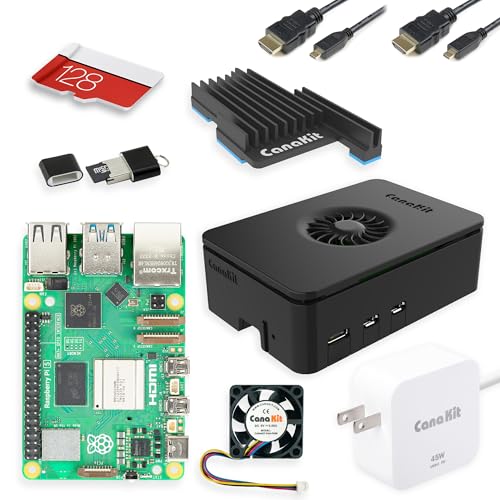
1. CanaKit Raspberry Pi 5 Starter Kit PRO — Turbine Black
- Board: Raspberry Pi 5, 8GB RAM
- Processor: Broadcom BCM2712, 2.4GHz quad-core Arm Cortex-A76
- RAM: 8GB LPDDR4X
- Storage: 128GB EVO+ microSD, preloaded with 64-bit Raspberry Pi OS
This is the default first kit. The Raspberry Pi 5 inside runs on the Broadcom BCM2712, a 2.4GHz quad-core Arm Cortex-A76 chip with 8GB of LPDDR4X memory — the board to buy for a desktop, a Docker host, or a Home Assistant server. The Turbine Black case pairs a low-noise PWM fan with a large MEGA heat sink.
One caution: the Amazon listing wrongly labels the processor as a MediaTek MT8125 in one field. The board is a genuine Raspberry Pi 5 with the BCM2712, so trust that chip and ignore the stray field.
2. Vilros Raspberry Pi 5 Starter Kit MAX — Turbo Cooled Aluminum
- Board: Raspberry Pi 5, 8GB RAM
- Processor: Broadcom BCM2712, 2.4GHz quad-core Arm Cortex-A76
- RAM: 8GB LPDDR4X-4267
- Storage: 128GB microSD, preloaded with 64-bit Raspberry Pi OS
Vilros takes the same 8GB Raspberry Pi 5 and wraps it in the most polished bundle of the five. The case is a CNC-machined aluminum alloy shell that works as a passive heat sink, with a built-in PWM fan for active cooling. The 11-piece set adds a 27W USB-C power supply, a 128GB preloaded microSD card, two micro-HDMI cables, a card reader, a camera adapter cable, and an RTC battery connector.
The board is the same BCM2712 at 2.4GHz with 8GB of LPDDR4X, so the difference from the CanaKit kit is the case and the extra small parts, not raw computing muscle. An aluminum case also survives knocks better than a plastic one.
3. CanaKit Raspberry Pi 4 4GB Starter PRO Kit
- Board: Raspberry Pi 4 Model B, 4GB RAM
- Processor: Broadcom BCM2711, 1.5GHz quad-core Arm Cortex-A72
- RAM: 4GB LPDDR4
- Storage: 32GB EVO+ microSD, preloaded with Raspberry Pi OS
The Pi 4 is the older board, and this kit is why it still belongs in a buying guide. The Raspberry Pi 4 Model B inside runs on the Broadcom BCM2711, a 1.5GHz quad-core Cortex-A72 chip with 4GB of RAM, ample for learning Python, running Pi-hole, building a retro gaming box, or serving a single home-automation job. The kit includes a premium three-piece ABS case, a low-noise fan, a PiSwitch, a 3.5A USB-C supply, heat sinks, a micro-HDMI cable, and a GPIO reference card.
Two facts keep this kit honest. The board dates from 2019, so it cannot match a Pi 5 on a desktop or a multi-container server, and its 32GB card fills faster than the 128GB cards in the Pi 5 kits. The Amazon listing also wrongly labels the CPU as a Tegra in one field; the board is a genuine Pi 4 with the BCM2711.
4. Seeed Studio Raspberry Pi 5 Starter Kit
- Board: Raspberry Pi 5, 8GB RAM
- Processor: Broadcom BCM2712, 2.4GHz quad-core Arm Cortex-A76
- RAM: 8GB LPDDR4X-4267
- Storage: 128GB microSD, preloaded with 64-bit Raspberry Pi OS
Seeed Studio is a long-standing maker brand, and its Pi 5 starter kit is the official essential bundle for buyers who also want Seeed sensors, HATs, and Grove modules for the GPIO header. The box holds a genuine Raspberry Pi 5 with 8GB of RAM, a 27W USB-C PD power supply, and a Seeed 128GB microSD card preloaded with 64-bit Raspberry Pi OS, rated U1. The board runs the same BCM2712 at 2.4GHz as the other Pi 5 kits, with dual 4Kp60 micro-HDMI output and a PCIe lane for NVMe HATs.
One conflict needs a clear note. The title and series name say 8GB, and Seeed’s own page lists 8GB LPDDR4X-4267, but one field inside the Amazon spec body says 16GB. Buy this kit as an 8GB kit, because the title, the series name, and the maker page all agree.
5. RasTech Raspberry Pi 4 4GB Starter Kit
RasTech is the budget route into the Pi 4. The kit includes a Raspberry Pi 4 Model B with 4GB of RAM and the BCM2711 chip at 1.5GHz, a 32GB card, four copper heat sinks, a case with a cooling fan, a 5V 3A power supply with an on-off switch, two HD out cables, a card reader, and a screwdriver. The listing is sold by RasTech US with a 12-month warranty, and its crawl is the freshest of the five kits here.
The trade-off is polish. The case and accessories feel simpler than the CanaKit kit, and the 32GB card is the smaller of the two sizes here, so a desktop or media library will want a larger card later. For a first build on a tight budget, or for a second Pi running one headless job, those compromises are easy to accept.
Specs
- Board: Raspberry Pi 4 Model B, 4GB RAM
- Processor: Broadcom BCM2711, 1.5GHz quad-core Arm Cortex-A72
- RAM: 4GB LPDDR4X
- Storage: 32GB card
- Cooling: Case with cooling fan, four copper heat sinks
- Power supply: 5V 3A with on-off switch
- Warranty: 12 months
How to Choose a Raspberry Pi Kit
Pi 5 or Pi 4: Picking a Board
Choose the Pi 5 for a desktop, a Docker host, a Home Assistant server, or a media center. Its BCM2712 runs roughly two to three times faster than the Pi 4 chip, it has a PCIe lane for NVMe storage HATs, and it handles several services at once. Choose the Pi 4 when the job is one thing: a Pi-hole ad blocker, a retro gaming box, a sensor logger, or a classroom board for learning Python. The Pi 4 draws less power, runs cooler, and costs less.
RAM and Storage
Four gigabytes covers learning, a single server job, retro gaming, and most sensor projects. Eight gigabytes is the right call for a desktop, for Docker with several containers, or for Home Assistant. On storage, a 32GB card boots the system and holds a few projects, while a 128GB card gives room to grow and is the better default for a Pi 5 desktop or server. Look for Class 10 or U1 at minimum, and prefer an A1 or A2 application class.
Power and Cooling
The Pi 5 needs a 27W USB-C PD supply delivering 5V at 5A, and the Pi 4 needs a 3A USB-C supply. An old phone charger cannot deliver that current, and the board answers with undervoltage warnings, throttled speed, and corrupted cards. On cooling, the Pi 5 runs warmer, so a fan earns its place under sustained load, while the Pi 4 is usually content with heat sinks and a ventilated case. A fan adds a little noise; a passive case stays silent.
Who Should Skip a Raspberry Pi Kit
Skip a Pi kit when you want a computer that works like a Windows or Mac machine the moment you open the box. The Pi runs Linux, and some Windows-only software has no ARM build. Skip it too when the only job is streaming video to a television, because a dedicated streaming stick is simpler for that one task. If you already own a Pi 5 board with a case, supply, and card, buy accessories instead of a full kit.
Getting Going in an Afternoon
The preloaded card in each kit means the first boot is quick. Connect a monitor with a micro-HDMI cable, plug in a keyboard and mouse, insert the card, and connect power last. The system boots into Raspberry Pi OS, where you set the language, the Wi-Fi network, and a password, then run the software updater. For a headless setup, the Raspberry Pi Imager tool can enable SSH before the first boot, so you can log in from another computer without a monitor.
A good first afternoon has one small project with a visible result. Blink an LED from the GPIO header with a few lines of Python, or point a browser at a Pi-hole dashboard. Add a second project only after the first one runs, because a stack of half-finished builds is the most common way a new Pi ends up in a drawer.
FAQ
Do I need a keyboard, mouse, and monitor?
Not always. For a desktop setup you need all three, and none of the five kits includes them. For a headless server, set up the board with SSH or VNC from another computer.
Can a Raspberry Pi 5 replace a desktop computer?
For web browsing, documents, light coding, and media playback, an 8GB Pi 5 works well as a second desktop. It cannot replace a desktop for heavy x86 software, demanding games, or video editing.
Which kit is best for learning Python and GPIO?
Any of the five kits works, because the 40-pin GPIO header is the same layout on the Pi 4 and the Pi 5. The CanaKit Pi 4 PRO kit has a small edge for learners, since it includes a GPIO reference card in the box.
Is the Raspberry Pi 4 still worth buying in 2026?
Yes, for single-purpose projects and learning. A Pi 4 with 4GB runs Pi-hole, retro gaming, sensor logging, and Python lessons well, and it costs less than any Pi 5 kit. No, when the board must serve as a desktop, a Docker host, or a media server — then the Pi 5 with 8GB is the better buy.
Final Verdict
The CanaKit Raspberry Pi 5 Starter Kit PRO is the kit to buy first. It pairs the current Pi 5 board with 8GB of RAM, a 128GB preloaded card, a strong 45W supply, and cooling that holds speed under load. The Vilros MAX kit is the pick for buyers who want a machined aluminum case, while the CanaKit Pi 4 PRO kit is the value pick for learning and single-purpose builds. The Seeed kit suits makers adding Seeed sensors, and the RasTech kit is the tightest-budget route into a genuine Pi 4.
One caution applies to all five: the listing data behind this guide was crawled between 192 and 340 days ago, so confirm the listing is live before ordering.
Product and ASIN Reference
| Product | ASIN |
|---|---|
| CanaKit Raspberry Pi 5 Starter Kit PRO — Turbine Black, 8GB, 128GB | B0CRSNCJ6Y |
| Vilros Raspberry Pi 5 Starter Kit MAX — Turbo Cooled Aluminum, 8GB, 128GB | B0D232HN74 |
| CanaKit Raspberry Pi 4 4GB Starter PRO Kit | B07V5JTMV9 |
| Seeed Studio Raspberry Pi 5 Starter Kit — 8GB, 128GB | B0DK4L9W6B |
| RasTech Raspberry Pi 4 4GB Starter Kit | B0C8LV6VNZ |