Our Short List of 3
All 3 Picks at a Glance
| Product | Specs | Action |
|---|---|---|
 Sovol SV08 CoreXY 3D Printer | Check price on Amazon | |
 Creality K2 Plus Combo | Check price on Amazon | |
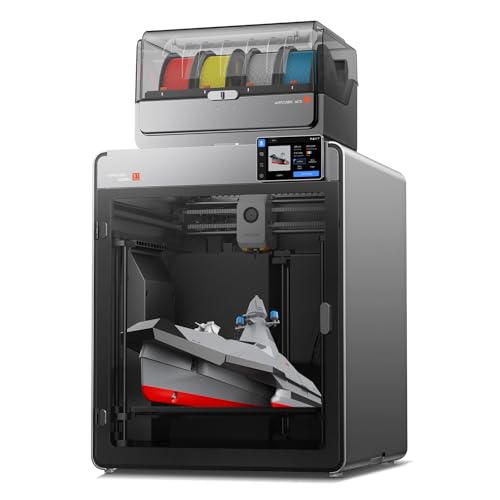 Anycubic Kobra S1 Max Combo | Check price on Amazon |
Key takeaways
- Three verified 350mm-class 3D printers compared by build volume, print speed, enclosure and multi-colour printing: Sovol SV08, Creality K2 Plus Combo and Anycubic Kobra S1 Max Combo.
Disclosure: As an Amazon Associate, we earn from qualifying purchases.
Our top pick: Sovol SV08 CoreXY 3D Printer. Runner-up: Creality K2 Plus Combo.
A 350mm build volume sits a clear step above the common desktop class. Where a typical 220mm to 256mm machine forces large parts to be split, printed in sections and glued back together, a printer with roughly 350mm on each axis can produce a full-size helmet, a large enclosure, a wide prototype housing or a whole batch of smaller parts in a single run. That is the class this guide covers, and only that class: every printer below was checked against a real Amazon US listing, and each one sits in the 350mm class on the figures its maker publishes.
The naming in this corner of the market needs care. Similar model names hide very different build volumes, and some round-ups label printers as 350mm machines when their makers list them at 300mm. This guide leaves those models out and sticks to three printers whose 350mm-class volumes could be traced to listings or manufacturer figures. One of the three, the Anycubic Kobra S1 Max Combo, rests on thinner verification than the other two, and its section says so plainly rather than presenting it with the same confidence.
Quick Picks
- Sovol SV08 CoreXY 3D Printer — Best overall: a true 350 x 350 x 345 mm build volume, CoreXY speed up to 700 mm/s, and an open Klipper-based platform built on the Voron 2.4 design.
- Creality K2 Plus Combo — Best enclosed multi-colour pick: a full 350 x 350 x 350 mm cube, an enclosed chamber with active heating, the CFS multi-colour system and dual AI cameras.
- Anycubic Kobra S1 Max Combo — Enclosed 350mm-cube alternative: manufacturer figures put it at 350 x 350 x 350 mm and 600 mm/s, but its listing evidence is the thinnest in this guide, so check its product page carefully.
Sovol SV08 CoreXY 3D Printer
OUR TOP PICK
The Sovol SV08 is the strongest verified printer in this guide, and the one to start with in the 350mm class. As stated on the Amazon listing, its print size is 13.8 x 13.8 x 13.6 inches, which works out to a build volume of 350 x 350 x 345 mm. It is sold by Sovol on Amazon US, and its listing is the one to use: a second listing for the same model showed no buying options available when checked, so confirm the listing linked here is the live one before ordering.
The SV08 is a CoreXY machine based on the open-source Voron 2.4 design, running Klipper firmware. That heritage matters for a large-format printer, because big parts mean long print times, and an open, widely understood platform makes the machine easier to tune, maintain and modify over its life. Sovol states a maximum speed of up to 700 mm/s, the highest figure in this guide, and the hotend is a clog-free design rated to 300 °C, which opens the door to higher-temperature filaments beyond basic PLA and PETG.
Levelling on a bed this size is handled by four independent Z motors, which drive the auto-levelling system and keep the large gantry aligned across the full width of the plate. That matters more at 350mm than on a small printer: the wider the bed, the more a slight tilt or a low corner shows up in the first layer, and the first layer decides whether a print that runs for many hours stays attached. A built-in camera lets the print be monitored remotely, which is a practical feature on the long jobs a 350mm machine is bought for.
The Voron and Klipper background also shapes who this printer suits. Buyers who like to tune a machine, adjust its configuration and draw on a large pool of shared knowledge around the Voron 2.4 design will find the SV08 familiar territory. Buyers who want the opposite, a sealed machine that asks as little as possible of them, are better matched by the enclosed Combo models below. At 39 lb, it is a substantial desktop unit, and its open frame is the main trade-off: there is no enclosure, so large parts in warping-prone materials such as ABS or ASA will need a separate enclosure solution or a warm, draught-free room.
Specs
– Model: Sovol SV08 CoreXY 3D Printer
– Build volume: 350 x 350 x 345 mm (13.8 x 13.8 x 13.6 in), as stated on the listing
– Motion system: CoreXY, based on the open-source Voron 2.4 design
– Firmware: Klipper
– Maximum speed: up to 700 mm/s, as stated by Sovol
– Hotend: clog-free design, up to 300 °C
– Levelling: auto-levelling with 4 independent Z motors
– Monitoring: built-in camera
– Weight: 39 lb
Pros
– Highest maximum speed in this guide, at up to 700 mm/s
– Open-source Voron 2.4-based design running Klipper, so tuning and parts knowledge is widely shared
– Four independent Z motors for auto-levelling across the large bed
– 300 °C hotend covers a wide range of filament types
Cons
– Open frame with no enclosure, so large ABS or ASA parts may warp without an added enclosure
– Build height is 345 mm rather than a full 350 mm cube
– A second listing for this model showed no buying options when checked, so confirm the linked listing is live
Creality K2 Plus Combo
The Creality K2 Plus Combo is the runner-up, and the pick for buyers who want the full cube and an enclosed machine. Its build volume is 350 x 350 x 350 mm, the complete 350mm cube that the SV08 falls just short of on height. The printer is enclosed, with active chamber heating, which is the combination that large parts in ABS, ASA and other temperature-sensitive materials need: the chamber holds warmth evenly, so wide flat parts are far less likely to lift at the corners or split between layers partway through a long print.
The Combo name refers to the CFS multi-colour system included with this configuration, which feeds different filaments to the printer for multi-colour or multi-material jobs. On a build plate this size, that means large multi-colour signs, labelled housings and colour-coded prototypes in a single run, rather than a single-colour part that has to be painted or assembled from pieces. Creality states a maximum speed of 600 mm/s, and the machine carries dual AI cameras for monitoring, alongside full-auto levelling, so the first layer on a big bed is handled by the printer rather than by manual adjustment.
The buyer this machine suits is the one printing large functional or display parts in a single material family that benefits from a warm chamber, or large multi-colour work where the CFS system earns its place on every job. If most of your printing is single-colour PLA prototypes, the enclosure and filament system are capabilities you would rarely use, and the simpler open machine above may serve you just as well. If your parts are wide, flat and made from temperature-sensitive materials, the chamber is not a luxury at this size; it is what keeps a long print intact from the first layer to the last.
One caution applies before ordering. The K2 Plus exists in several variant listings, and they are not interchangeable: the base, non-Combo K2 Plus listing showed as unavailable when checked, and a conflicting ASIN for the Combo circulates in third-party comparisons. The link below is the Combo listing whose ASIN was verified against Amazon listing copy for this guide. Check that the page it opens shows the K2 Plus Combo with the CFS system included, and re-check it before publishing or purchasing, because variant listings in this range change.
Specs
– Model: Creality K2 Plus Combo
– Build volume: 350 x 350 x 350 mm
– Maximum speed: 600 mm/s, as stated by Creality
– Enclosure: enclosed, with active chamber heating
– Filament system: CFS multi-colour system included in the Combo configuration
– Cameras: dual AI cameras
– Levelling: full-auto levelling
Pros
– Full 350 x 350 x 350 mm build volume, the complete cube
– Enclosed chamber with active heating for large parts in temperature-sensitive materials
– CFS multi-colour system included, for multi-colour printing at full size
– Dual AI cameras and full-auto levelling for long, unattended jobs
Cons
– Several variant listings exist under similar names, including an unavailable base version, so the exact listing must be checked
– A conflicting ASIN for this model appears in third-party comparisons; use only the listing linked here and re-check it live
Anycubic Kobra S1 Max Combo
The Anycubic Kobra S1 Max Combo is the third printer in this guide, and it is included with an explicit caveat. Manufacturer figures place it in exactly the right class: a build volume of 350 x 350 x 350 mm, an enclosed design, and a maximum speed of 600 mm/s, in a Combo configuration. On paper, that makes it a direct alternative to the K2 Plus Combo above, and for buyers who prefer the Anycubic range it is the 350mm-cube model to look at.
The caveat is verification. Unlike the two printers above, this model’s ASIN was traced through a comparison table on a third-party site rather than through Amazon listing copy, and no Amazon US listing text was retrieved for it during research. That means the figures in this section are manufacturer figures carried by that comparison, not specifications confirmed from the product page itself. Treat this entry as a lead to verify, not as a confirmed listing: open the product page, confirm the model name, the build volume on each axis, the enclosure and what the Combo configuration includes, and only then weigh it against the other two.
If the live page confirms the manufacturer figures, the Kobra S1 Max Combo stands as a genuine third option in the class, with the enclosure that large engineering-material parts need. If the page shows a different volume or a different configuration, it does not belong in this class and the two printers above are the verified choices.
Specs
– Model: Anycubic Kobra S1 Max Combo
– Build volume: 350 x 350 x 350 mm, per manufacturer figures in comparison copy
– Maximum speed: 600 mm/s, per manufacturer figures
– Enclosure: enclosed design, per manufacturer figures
– Verification status: ASIN traced via a third-party comparison table only; not confirmed against Amazon listing copy
Pros
– Full 350 x 350 x 350 mm build volume on manufacturer figures
– Enclosed design, suited to large parts in temperature-sensitive materials
– Combo configuration, aimed at multi-colour printing
Cons
– Weakest verification in this guide: the ASIN comes from a comparison table, not from Amazon listing copy
– Specifications are manufacturer figures that must be confirmed on the live product page before ordering
How to Choose
Start by checking the build volume axis by axis, not by the headline number. A printer described as a 350mm machine should show roughly 350mm on the axes that matter for your parts. In this guide, the K2 Plus Combo and the Kobra S1 Max Combo are full 350 x 350 x 350 mm cubes on their makers’ figures, while the SV08 gives 350 x 350 x 345 mm. Watch the naming traps around this class: the Sovol SV08 MAX is a 500 x 500 x 500 mm machine, the Creality K2 Pro is listed by its maker at 300 x 300 x 300 mm despite some round-ups calling it a 350mm printer, and the base Creality K2 is a 260mm machine. None of those belongs in a 350mm comparison.
Next, decide between open and enclosed by the materials you print. For PLA and PETG, an open CoreXY such as the SV08 is straightforward and fast. For large parts in ABS, ASA or nylon blends, size works against you: a wide part cools unevenly, corners lift and layers can split. An enclosed printer, ideally with active chamber heating like the K2 Plus Combo, holds the temperature around the part steady and makes large engineering-material prints far more reliable.
Then weigh speed and multi-colour honestly. The maximum speed figures quoted by makers, 700 mm/s for the SV08 and 600 mm/s for the other two here, are headline figures reached under favourable conditions; real throughput on large parts also depends on acceleration, flow rate and the shape of the model. Speed still matters at this size, because a full-plate print can run for many hours, but it should not be the only figure compared. Multi-colour is a separate question: a Combo configuration with a filament-switching system such as the CFS suits signage, prototypes and colour-coded parts, while single-colour functional printing gains nothing from it.
Consider also what a full plate does to print planning. A 350mm bed invites batch printing, laying out a whole set of parts in one job, which cuts the handling between prints but ties the machine up for longer stretches and makes a single failure more costly. Features that look minor on a small printer, reliable auto-levelling, a camera for remote checks, and a hotend that resists clogging over many hours, carry more weight here, because the jobs themselves are longer and the material in each one is greater.
Finally, plan for the physical size and the long print times. A 350mm-class printer is a large, heavy desktop machine: measure the bench or stand, the doorway it has to pass through, and the clearance for the enclosure door or lid. Levelling systems such as the SV08’s four independent Z motors or the full-auto levelling on the K2 Plus Combo, and monitoring cameras, earn their place on jobs that run overnight. And before ordering any model in this class, open the exact listing and confirm the variant: in ranges with Combo and base versions, the difference between listings is the difference between the printer described here and a different machine.
FAQs
Is a 350mm build volume noticeably bigger than a standard desktop printer?
Yes. A common desktop machine in the 250mm class gives a build area of about 250 x 250 mm, while a 350mm printer gives 350 x 350 mm, close to twice the area on the plate. In practice, that is the difference between printing a helmet, a large enclosure or a wide housing in one piece and splitting the same part into sections that must be aligned and glued.
Do I need an enclosed printer for large prints?
It depends on the material. Large PLA and PETG parts print well on an open machine such as the Sovol SV08. Large parts in ABS, ASA or similar materials cool unevenly across a wide plate, and the corners tend to lift; an enclosed printer, especially one with active chamber heating such as the Creality K2 Plus Combo, keeps the temperature around the part even and greatly reduces that risk.
Why are similarly named printers, such as the SV08 MAX and the K2 Pro, not in this guide?
Because their build volumes fall outside the 350mm class. The Sovol SV08 MAX is a 500mm-class machine, the Creality K2 Pro is listed by its maker at 300 x 300 x 300 mm, and the base Creality K2 is a 260mm machine. They may suit other needs, but they are not 350mm printers, and including them here would mix size classes. Always check the volume on each axis rather than relying on the model name or on round-up labels.
Conclusion
For most buyers in the 350mm class, the Sovol SV08 is the top pick: a verified Amazon US listing, a 350 x 350 x 345 mm build volume, the highest maximum speed in this guide, and an open Voron 2.4-based Klipper platform with four-motor auto-levelling. The Creality K2 Plus Combo is the runner-up and the better choice when an enclosed, actively heated chamber and multi-colour printing matter, with the full 350mm cube. The Anycubic Kobra S1 Max Combo matches that cube on manufacturer figures, but its verification is thin, so confirm its live product page carefully before treating it as an equal option. Whichever model you choose, measure the space it will occupy and confirm the exact listing variant before ordering.