Our Short List of 3

- Best for: Bluey fans ages 3 and up who want games tied to the show.
- Model 80-530900, ages 3 years and up
- 10 show-themed games with a character selector slider
- 2 AA batteries required, included
- Dimensions 11.3 x 9.33 x 3 inches; weight 1.2 pounds
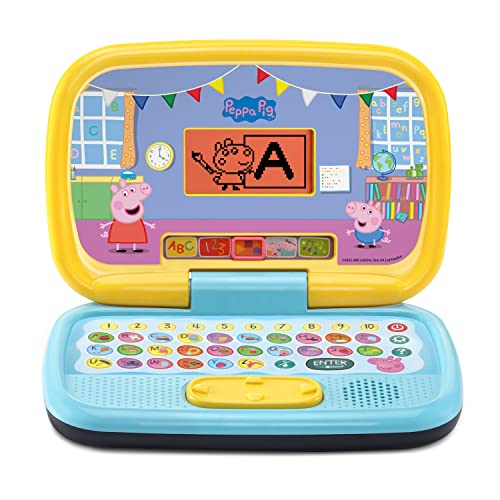
- Best for: Peppa Pig fans ages 2 and up who want a first role-play laptop.
- Model 80-553500, ages 2 years and up
- 15 games and activities across five categories
- ABC keyboard, animated LCD screen, 10 number buttons, direction keys
- 90-day warranty against manufacturer defects

- Best for: Preschoolers ages 3 to 6 who want a realistic grown-up laptop.
- Model 80-196340, ages 3 to 6 years
- 30 activities across five learning categories, with Spanish words
- 26-letter keyboard with 10 number keys
- Dimensions 9.33 x 6.22 x 2.19 inches; weight 1.17 pounds; 2 AA batteries included
All 5 Picks at a Glance
| Product | Specs | Action |
|---|---|---|
| VTech Bluey Game Time Laptop |
| Check price on Amazon |
| VTech Peppa Pig Play Smart Laptop |
| Check price on Amazon |
| VTech Play Smart Preschool Laptop |
| Check price on Amazon |
 VTech Brilliant Baby Laptop |
| Check price on Amazon |
 VTech Genio Bilingual JuniorBook Learning Laptop |
| Check price on Amazon |
Key takeaways
- Compare 5 toy laptops for kids and early learning, from alphabet games to math quizzes, with sturdy keys, bright screens, and skills that stick.
A toy laptop gives a young child a way to tap, type, and play while picking up letters, numbers, and simple words along the way. The best models feel like a small computer in small hands, with chunky keys, a bright screen, and games that teach without turning play into a lesson. Parents often buy one for a birthday, a holiday, or a long car ride, and the right choice depends on the child’s age and what the laptop actually does.
This guide compares five toy laptops from VTech, a brand that dominates this corner of the toy aisle. The five picks cover every age from six months to eight years, from a baby laptop with big shape buttons to a bilingual junior laptop with a full keyboard. Each one below was checked against its Amazon listing, so the specs come from the product page itself.
Quick Picks
As an Amazon Associate we earn from qualifying purchases
| Product | Best for | Key spec from title |
|---|---|---|
| VTech Bluey Game Time Laptop | Bluey fans ages 3 and up | 10 show-themed games |
| VTech Peppa Pig Play Smart Laptop | Peppa Pig fans ages 2 and up | 15 games and activities |
| VTech Play Smart Preschool Laptop | Preschoolers ages 3 to 6 | 30 leveled activities |
| VTech Brilliant Baby Laptop | Babies 6 months to 3 years | 9 shape buttons and movable mouse |
| VTech Genio Bilingual JuniorBook Learning Laptop | Older kids ages 5 and up | 80+ offline apps, bilingual |
How to Choose
Match the Age Range
Toy laptops are built for narrow age bands, and the age on the box is the most useful filter in this guide. A laptop made for a baby uses oversized buttons, simple cause-and-effect play, and songs, while a model for a five-year-old adds a full keyboard, spelling games, and two languages. Buying a laptop meant for an older child leaves a toddler pressing buttons that do nothing they understand, while buying a baby laptop for a school-age child bores them in a day. Check the age range on the listing before anything else, then look at the number of activities to see whether the laptop will hold attention for months rather than an afternoon.
Look at the Keyboard and Screen
The keyboard is where a toy laptop either feels like a computer or feels like a noise toy. A full QWERTY layout with a direction pad teaches finger placement and lets older children type real words, while a small ABC keyboard with big letter keys suits toddlers who are still learning the alphabet. The screen matters too: an animated LCD screen with a light-up display holds attention better than a static picture panel, and a movable mouse adds a second way to interact. Look for keys that press cleanly and a screen bright enough to see in a car or a sunny room, since a laptop that is hard to read gets set aside quickly.
Count the Activities, Not the Buttons
Button counts look impressive on a listing, but the number of activities tells you more about how long a laptop stays fun. A model with nine shape buttons and three play modes can still keep a baby busy for months, while a laptop with dozens of keys and only a handful of games runs out of surprises fast. Look for leveled learning that grows with the child, such as categories that move from letters to words, or from counting to simple sums. Games that mix music, spelling, logic, and puzzles hold attention longer than a single mode repeated across every key. If the listing names the activity count, compare that number across models before choosing.
Think About Batteries and Durability
Every laptop in this guide runs on disposable batteries, so the battery count shapes how often you reach for a fresh pack. Two AA batteries keep a baby laptop light and easy to carry, while a full keyboard model that needs four AA batteries trades weight for a bigger screen and more apps. Durability matters just as much: a laptop that survives drops onto a hard floor and wipes clean after sticky hands will outlast a fragile one by months. Look for a sturdy shell, keys that stay attached, and a size your child can carry without help, since a laptop that lives in a bag gets played with more than one left on a shelf.
The 5 Best Options
VTech Bluey Game Time Laptop
- Best for: Bluey fans ages 3 and up who want games tied to the show.
- Model 80-530900, ages 3 years and up
- 10 show-themed games with a character selector slider
- 2 AA batteries required, included
- Dimensions 11.3 x 9.33 x 3 inches; weight 1.2 pounds
Bluey fans ages 3 and up who want games tied to the show.
The games lean on show knowledge, so children who do not watch Bluey may enjoy it less.
The Bluey Game Time Laptop turns a favorite cartoon into ten games built around episodes children already know, from Grannies to Musical Statues. A character slider lets a child pick Bluey, Bingo, Bandit, or another familiar face before each game, and the official voice of Bluey speaks familiar phrases when the dedicated button is pressed. The clamshell body runs on two AA batteries and travels well, with a size that fits a small backpack. It suits families who want a laptop tied to a show their child already loves, since the games land better when the characters are familiar.
VTech Peppa Pig Play Smart Laptop
- Best for: Peppa Pig fans ages 2 and up who want a first role-play laptop.
- Model 80-553500, ages 2 years and up
- 15 games and activities across five categories
- ABC keyboard, animated LCD screen, 10 number buttons, direction keys
- 90-day warranty against manufacturer defects
Peppa Pig fans ages 2 and up who want a first role-play laptop.
The small size suits toddlers, so older children may outgrow it quickly.
The Peppa Pig Play Smart Laptop packs 15 games across five categories into a role-play computer that speaks with Peppa Pig’s voice. An ABC keyboard, ten number buttons, and direction keys help children move through letters, words, numbers, shapes, and puzzles, while the animated LCD screen keeps each game bright and easy to follow. It suits ages two and up, which makes it one of the youngest laptops in this guide, and the role-play angle means children treat it like a real computer. The compact body fits small hands and small bags alike.
VTech Play Smart Preschool Laptop
- Best for: Preschoolers ages 3 to 6 who want a realistic grown-up laptop.
- Model 80-196340, ages 3 to 6 years
- 30 activities across five learning categories, with Spanish words
- 26-letter keyboard with 10 number keys
- Dimensions 9.33 x 6.22 x 2.19 inches; weight 1.17 pounds; 2 AA batteries included
Preschoolers ages 3 to 6 who want a realistic grown-up laptop.
The spelling and logic games suit children closer to school age than toddlers.
The Play Smart Preschool Laptop looks like a grown-up computer, with a sleek black shell, a 26-letter keyboard, and ten number keys. Five categories of leveled learning offer 30 activities, from letters and words to numbers, shapes, animals, foods, and music, plus a section that teaches Spanish words alongside English ones. A friendly animated penguin guides children through each challenge with spoken feedback. It suits ages three to six and works well for children who want to copy a parent typing, since the realistic styling makes practice feel like the real thing.
VTech Brilliant Baby Laptop
- Best for: Babies 6 months to 3 years who need a first cause-and-effect laptop.
- Model 80-191200, ages 6 months to 3 years
- 9 shape buttons and a movable mouse with a light-up screen
- 3 play modes with more than 115 songs, tunes, and sounds
- Dimensions 2.2 x 11.1 x 12.48 inches; weight 1.5 pounds; 2 AA batteries included
Babies 6 months to 3 years who need a first cause-and-effect laptop.
The simple games suit babies and toddlers, so preschoolers may tire of it fast.
The Brilliant Baby Laptop is the youngest pick in this guide, built for babies from six months to three years. Nine brightly colored shape buttons and a movable mouse interact with a light-up screen, while three play modes cover music, shapes, and animals. More than 115 songs, tunes, and sounds keep the laptop fresh across many play sessions, and the travel-ready body fits easily in a bag. It suits parents who want a first electronic toy that teaches cause and effect, since every press gives an immediate light or sound in reply.
VTech Genio Bilingual JuniorBook Learning Laptop
- Best for: Children ages 5 and up who want typing practice in English and Spanish.
- Model 80-581230, ages 5 years and up
- Full-sized QWERTY keyboard with an ambidextrous cursor controller
- More than 80 pre-loaded offline apps, bilingual in English and Spanish
- 4 AA batteries required; dimensions 11.26 x 7.5 x 7.48 inches; weight 1.9 pounds
Children ages 5 and up who want typing practice in English and Spanish.
The four-battery load and full keyboard suit older children, not toddlers.
The Genio Bilingual JuniorBook is the most advanced laptop in this guide, built for children aged five and up. A full-sized QWERTY keyboard and an ambidextrous cursor controller work for right- or left-handed children, while more than 80 pre-loaded offline apps cover typing, spelling, math, and logic in English and Spanish. The bilingual curriculum makes it a strong pick for families raising children in two languages. It needs four AA batteries, which is more than any other laptop here, so keep spares on hand for long trips.
Which One Fits Your Situation
A First Laptop for a Baby or Toddler
The Brilliant Baby Laptop fits babies from six months, with big shape buttons, a movable mouse, and songs that reward every press. The Peppa Pig laptop suits ages two and up, adding letters and numbers once a toddler can follow simple games. Both models stay simple enough for small hands, and both travel well in a bag. Pick the Brilliant Baby for a first electronic toy, and the Peppa Pig laptop for a toddler ready for letters.
A Travel Companion for Car Rides
A laptop earns its place on a road trip when it runs quietly on batteries and keeps a child busy without a screen that needs charging. The Bluey laptop and the Preschool laptop both fit that job, with compact bodies that slide into a backpack and games that run offline. The Bluey model suits children who love the show, while the Preschool laptop suits children who want to type like a grown-up. Bring spare batteries for a long drive.
A Preschooler Who Wants a Grown-Up Computer
The Preschool laptop is the pick for a child who watches a parent type and wants a computer of their own. Its black shell, full letter keyboard, and number keys look like the real thing, and the 30 activities give real practice in letters, numbers, and Spanish words. The animated penguin keeps feedback friendly when a child gets an answer wrong. It suits ages three to six and grows with a child through the preschool years.
An Older Child Ready for Typing and Two Languages
The Genio JuniorBook suits a child aged five or older who has outgrown simple letter games and wants to type real words. Its full QWERTY keyboard, cursor controller, and 80-plus offline apps teach typing, spelling, and math in English and Spanish, which suits bilingual families and school-age learners. The four-battery load is the trade-off for the bigger screen and deeper curriculum. Pick this one when a toy laptop needs to teach, not just entertain.
Common Mistakes
- Buying a laptop built for an older age band and expecting a toddler to follow its games.
- Choosing by button count alone instead of checking how many activities the laptop actually includes.
- Picking a character laptop for a child who does not watch the show behind it.
- Forgetting spare batteries, since every laptop here runs on disposable AA cells.
- Mixing up color variants of the same model, which can mean buying a duplicate of a laptop a child already owns.
Frequently Asked Questions
What age is right for a first toy laptop?
A baby can enjoy a toy laptop from six months, when big shape buttons and a light-up screen teach cause and effect. Toddlers from 18 months handle ABC keyboards and simple music games, while preschoolers from three years get more from leveled activities and spelling games. The age on the listing is the best guide, since each model targets a narrow band.
Do toy laptops need Wi-Fi or a phone to work?
No. Every laptop in this guide runs offline, with games and songs stored on the device itself. Children press keys, move a mouse, and play without any connection, which makes them useful in a car or on a plane. The Genio JuniorBook carries more than 80 offline apps, so even the most advanced model here works without a network. Batteries are the only thing a child needs to keep playing.
How many batteries do these laptops need?
Most laptops in this guide need two AA batteries, which keeps them light. The Genio JuniorBook needs four AA batteries, since its full keyboard and bigger screen draw more power. The Preschool, Peppa Pig, Bluey, and Brilliant Baby laptops all run on two AA batteries, and the baby, preschool, and Bluey models include a set for a first play session. Keep spare batteries in the bag for trips.
Can a toy laptop really teach letters and numbers?
Yes, when the games match the child’s age. The Preschool laptop teaches letters, words, numbers, and Spanish words through 30 leveled activities, while the Peppa Pig laptop covers letters, numbers, and shapes in 15 games. The Genio JuniorBook adds typing and math in two languages for older children. A toy laptop works best as a playful supplement to books and conversation.